2. Procedure of removing the clutch
from the engine:
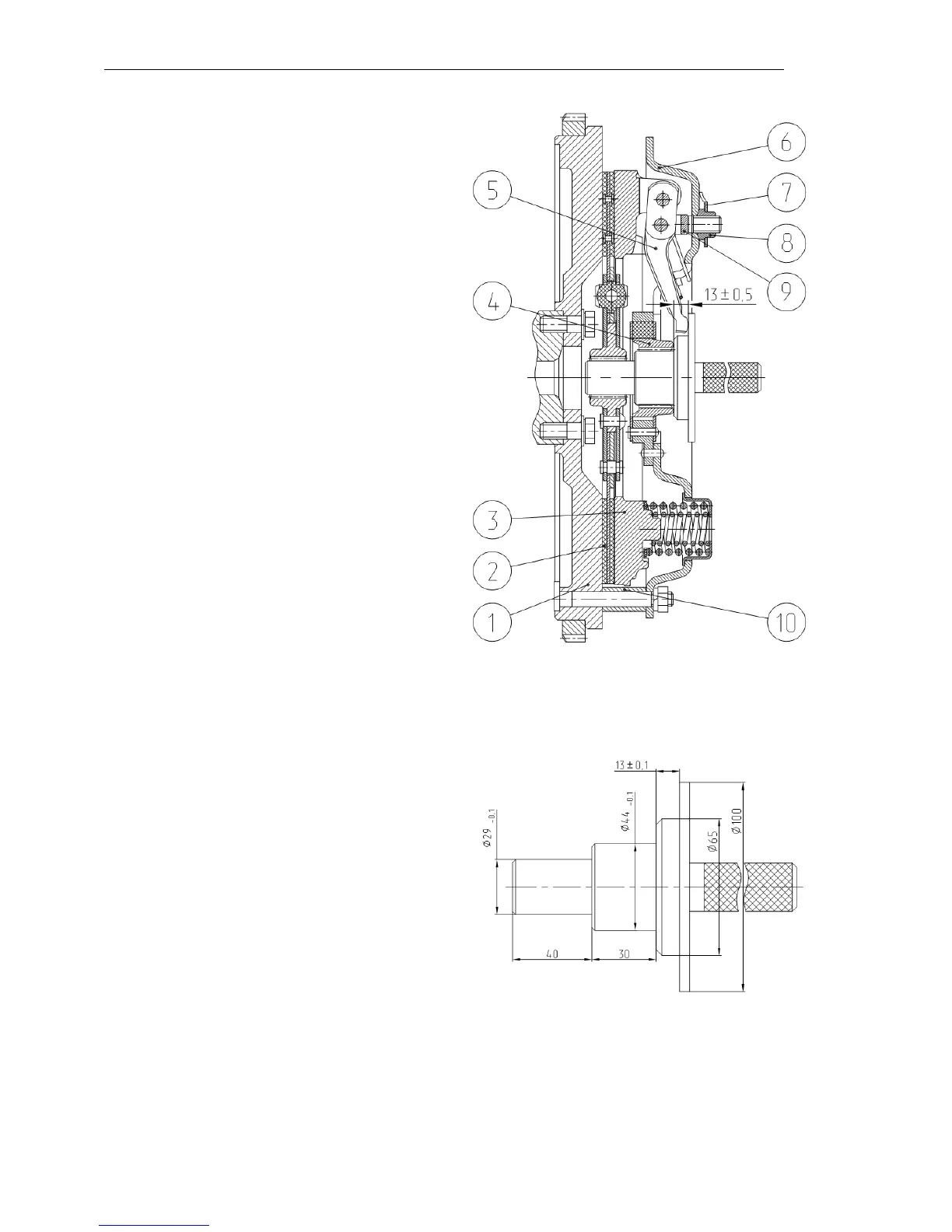
1. Turn three auxiliary bolts (М12х40)
into the pressure plate (3) through the
auxiliary holes of the backing plate (6).
2. Turn out the nuts fastening the
backing plate to the flywheel and re-
move the clutch plate assemblies (back-
ing plate (6) with the pressure one (3)).
3. Remove the driven plate (2).
3. Procedure of replacing the clutch
to the engine:
1. Place the driven plate (2) with the
long end of the hub directed towards the
flywheel (1).
2. Set the clutch plate assemblies
(backing plate (6) with the pressure one
(3)) onto the flywheel pins with the
bushings (10) and fix them by means of
the nuts (with the torque of 70…90
N∙m).
3. Set the auxiliary mandrel and turn
out the auxiliary bolts.
4. Adjust the position of the clutch
levers (5).
4. Adjusting the position of the
clutch levers
1. Adjust the position of the clutch
levers to the dimension of 13±0.5 from
the bearing areas of the levers (5) to the
end face of the hub (4) of the backing
plate (6) by turning the adjusting nuts
(8) on or off. The difference of the di-
mensions for individual levers shall not
exceed 0.3 mm.
2. After adjusting the levers, set the
lock plates (7) and fix them with bolts.
3. Remove the mandrel.



 To Next Page