Starting the tractor motion
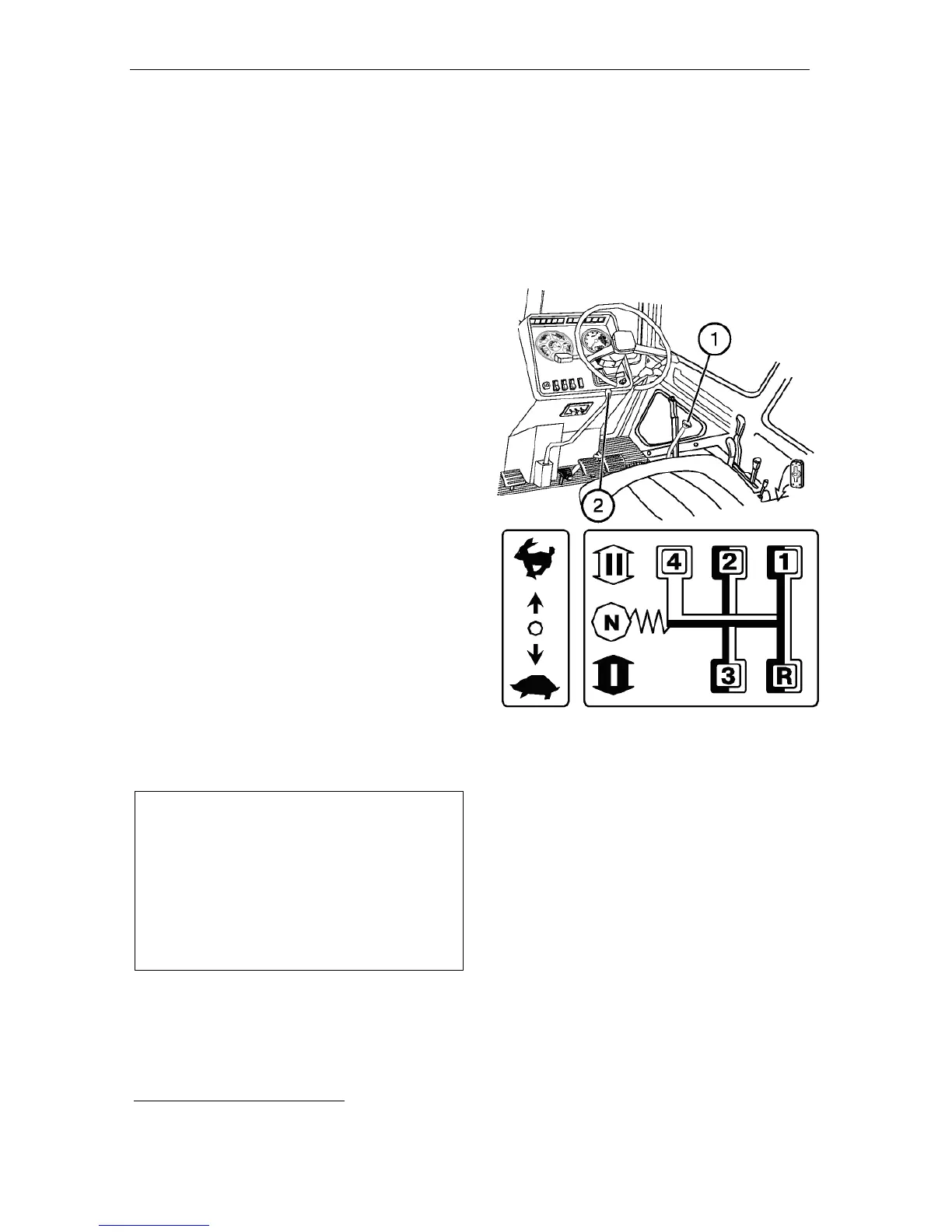
ATTENTION! When selecting the re-
quired gear, use the gearbox switching
diagram.
To start the movement, proceed as fol-
lows:
• step on the clutch pedal fully;
• select the required gearbox range;
• shift the lever (1) to the leftmost po-
sition and set the range II or I, re-
spectively, by moving the lever for-
ward or backward;
• return the lever to the neutral position
and then to the right, select the re-
quired gear and set the required speed
by moving the lever (1) forward or
backward;
• set the lever 2 to the required ex-
treme position (forward or back-
ward)
*
.
Release the parking brake and re-
lease smoothly the clutch pedal while
increasing slightly the fuel feed. On
starting the motion, increase the fuel
feed.
Avoid starting the motion with high trac-
tion load (e.g. a plough deepened into
the soil).
ATTENTION! Always step on the
clutch pedal prior to engaging the
range (step) and putting in the gear.
Do not hold the foot on the clutch pedal
during operation on the tractor, since
this can lead to clutch slipping, its over-
heating and failure.
*
Forward – direct gear, back – reducing the speed
for tractors with reducing gear and increasing the
speed for tractors with multiplier.



 To Next Page