SETTING UP AND CONFIGURING THE DEVICE
18 Conduit
®
Cat 4 for EU/UK MTCDT-L4E1 Hardware Guide
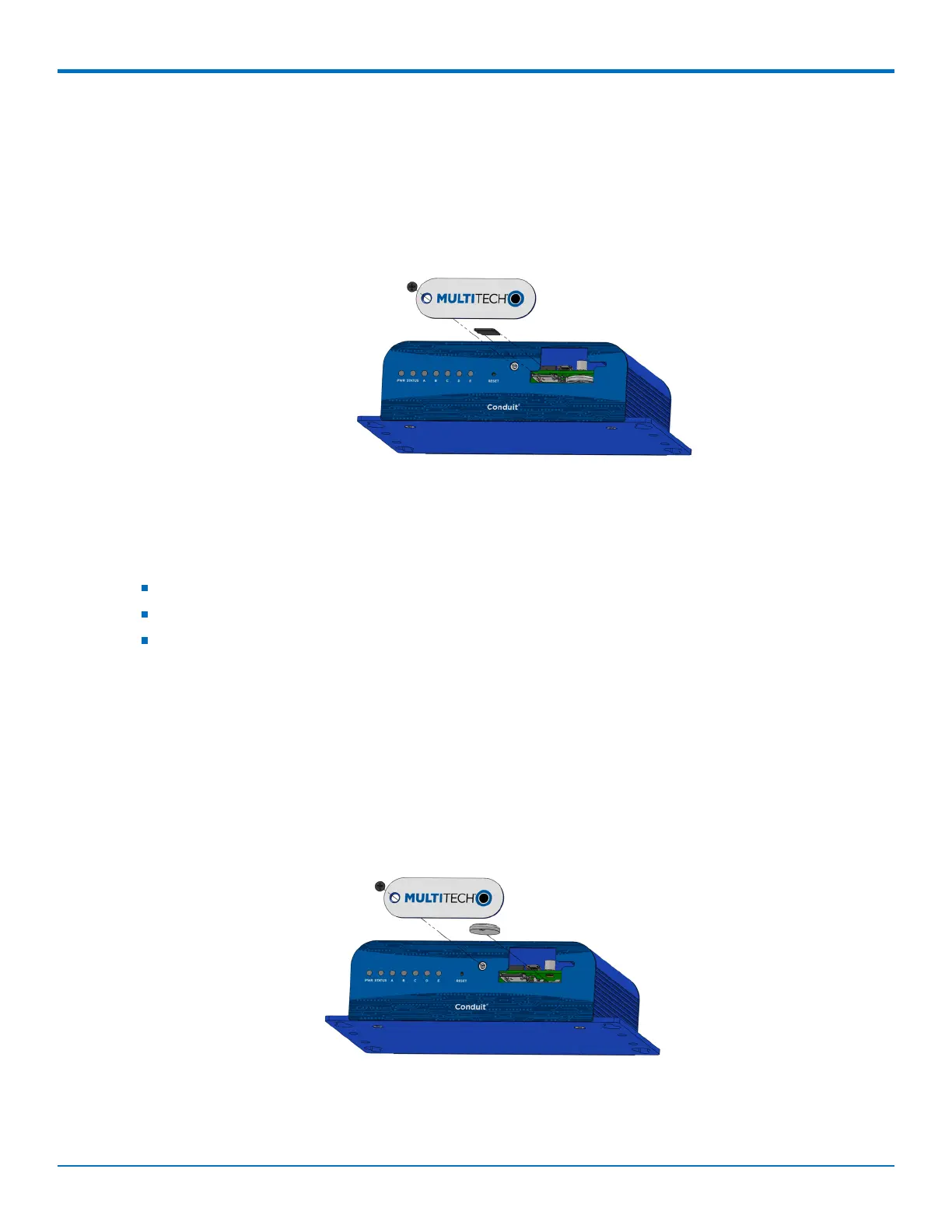
4. If an SD card is already installed, gently push on the card to release it from its setting and remove it from
the housing with your fingers.
5. With the new SD card contacts facing up and toward the interior of the device, gently push the card into
the slot to secure it.
6. Reattach the MultiTech nameplate to the housing using the screw removed in step 2.
Installing a Battery
The battery is located in the Conduit housing.
You need:
Phillips screwdriver
If replacing a battery, non-metal tweezers or similar object
CR1632 standard coin lithium battery
To install or replace the battery:
1. If connected, disconnect power to the Conduit.
2. At the front of the Conduit housing, remove the screw that secures the MultiTech nameplate to the
housing.
3. The battery holder is located at the right side of the opening on the underside of the PC board. To
remove an existing battery, use non-metal tweezers as necessary.
4. Orient the new battery so that the positive (+) pole is facing down. Use your fingers or non-metal
tweezers to insert the battery into the holder.
5. Reattach the MultiTech nameplate to the housing using the screw removed in Step 2.
CAUTION: Risk of explosion if this battery is replaced by an incorrect type. Dispose of batteries according to
instructions.
Note:



 To Next Page