MultiTech Conduit Edge SDK Installation and Setup Guide
Using a utility such as WinSCP, or a simple
scp command, copy the files to the
MultiConnect device under a directory
such as /opt/thingworx/.
Note that you may have to create the
thingworx directory or another suitable
location for the files.
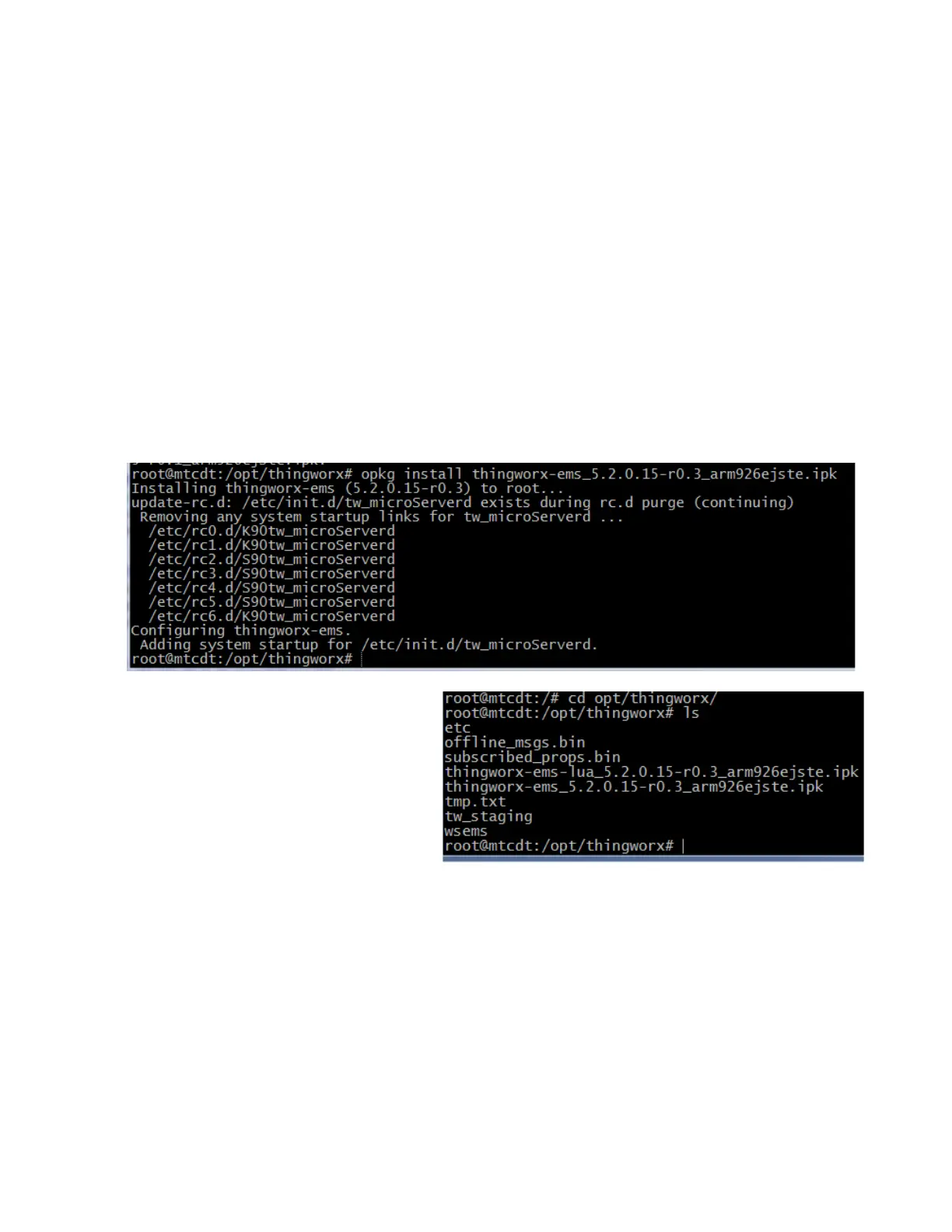
Once these files are copied, run the following commands using the Open PacKaGe utility:
opkg install thingworx-ems_5.2.0.15-r0.3_arm926ejste.ipk
opkg install thingworx-ems-lua_5.2.0.15-r0.1_arm926ejste.ipk
Note:
If your device does not have the Open PacKaGe utility, contact the manufacturer for instructions on
installing it.
If your installation completes successfully, you should see a result similar to the following for each install:
Locate the “wsems” executable file. It may
b
e
in
stalled
under
the
/
u
s
r
/
bin
direc
to
r
y.
If it is, copy it to the same top-level
directory as your EMS install. In our case,
this was the same directory as the location
of our two .ipk files:


 To Next Page