MultiTech Conduit Edge SDK Installation and Setup Guide
Troubleshooting
I cannot connect to the MultiConnect device
from my local computer.
1. Ensure that your Ethernet Adapter is active in Windows, and that the IP
address is configured manually. Choose an IP address on the same
range as that of the MultiConnect Device.
2. Reset the MultiConnect Device by holding the RESET button on the
front for 5 seconds, while it is powered on, and then try again.
3. See the Quick Start Guide for more assistance.
The included EMS and lua packages will not
install with Open PacKaGe utility.
1. Verify that your Open PacKaGe utility is installed on the device.
2. Ensure that you are running the command from the same directory as
the location of the two .ipk files.
3. Try installing the files on a different directory on the device.
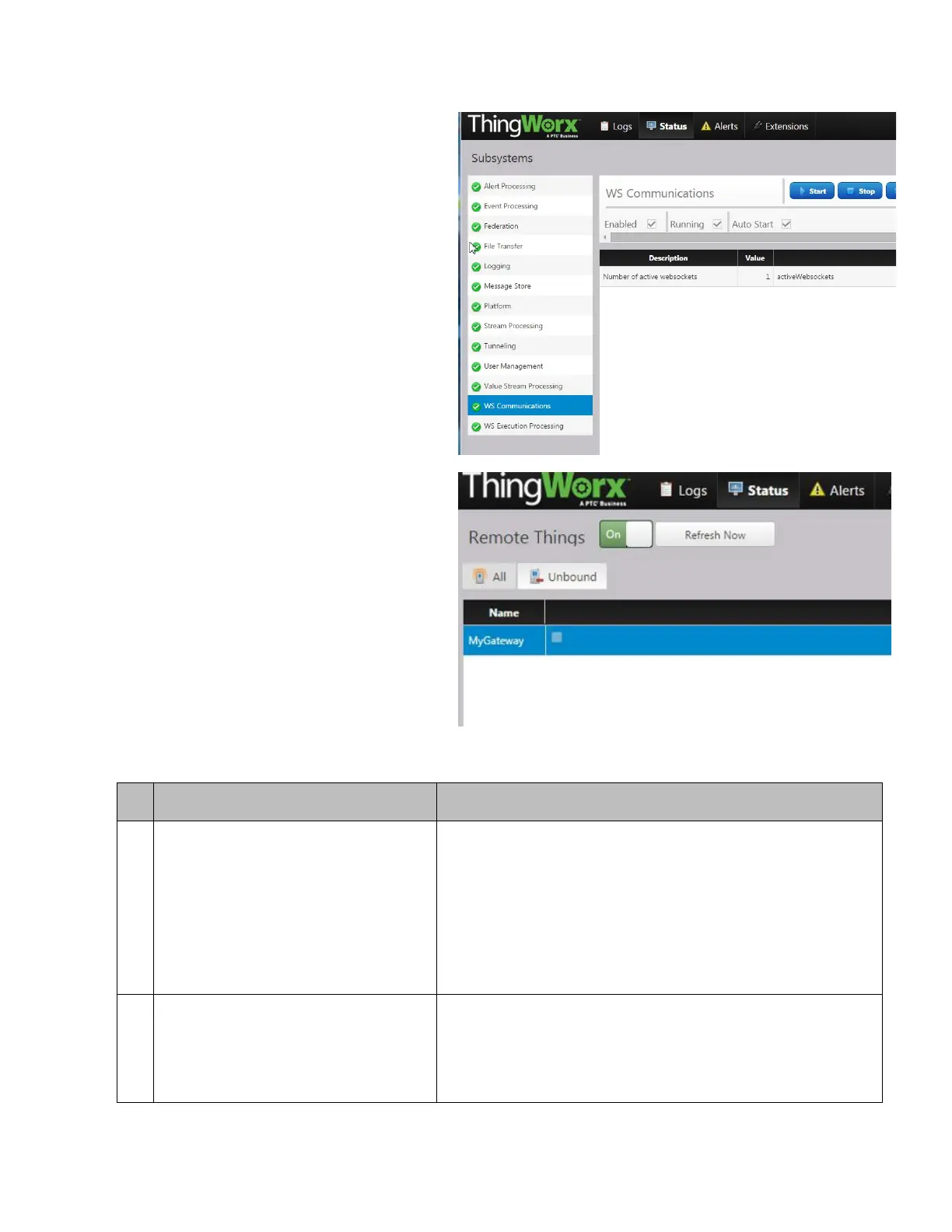
You can verify that the connected websocket
is the one configured from the MultiTech
device by checking the “Remote Things” and
then the “Unbound” tab at the top right. You
should see a device listed with the same
identifier as that listed in your config.json file.
At this point, your MultiConnect device is
connected to the ThingWorx Platform.


 To Next Page