1.0. Machine Overview 2.0. Unpack and Installation
2.1. What's in the Box?
2.2. Installation
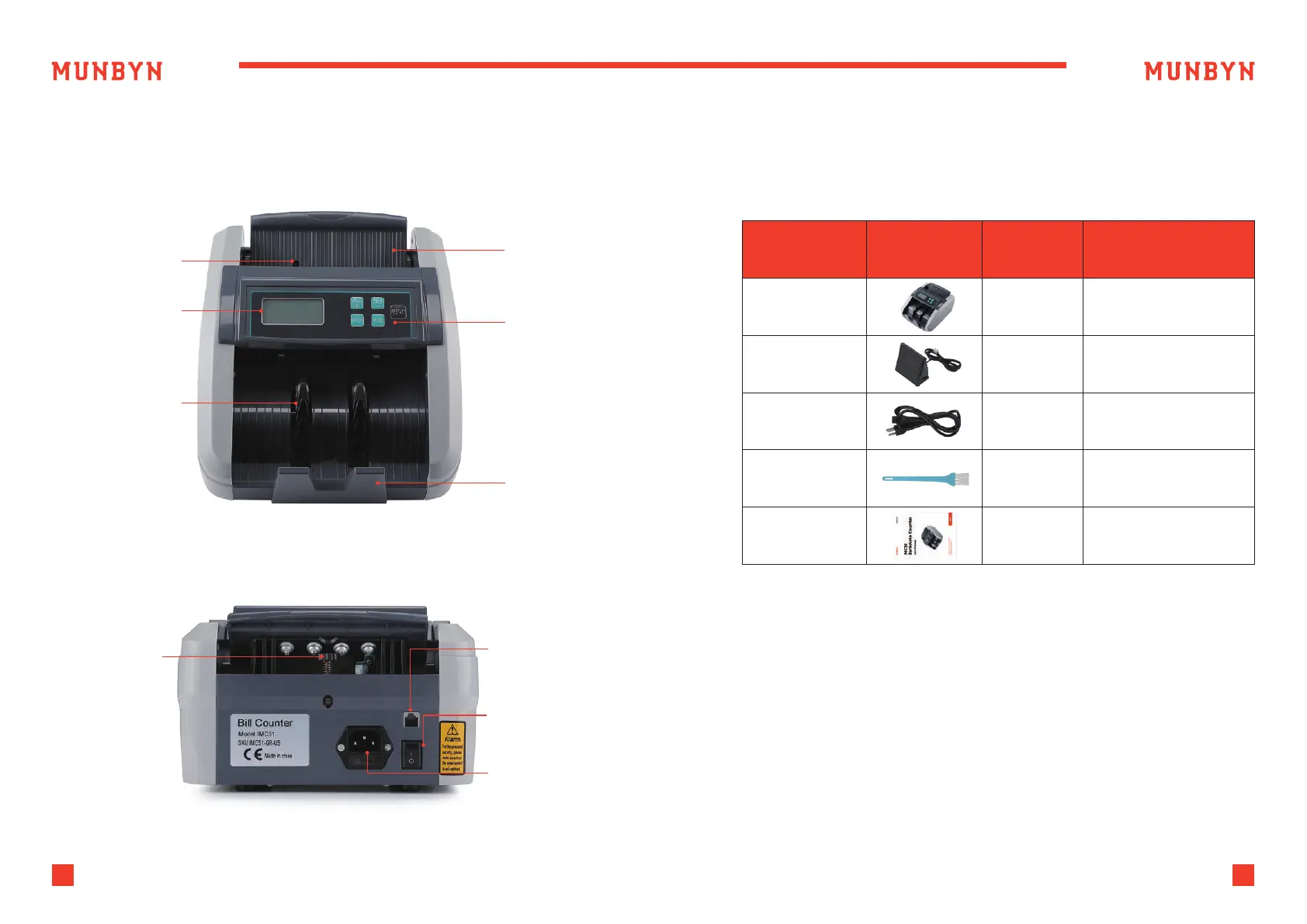
Start counting
sensor
Hopper
Keypad
Stacker
External
Display Port
Power Switch
Power Cord Jack
Segment LCD
Display
Impeller
Feeding Gap
Adjustment
Screw
Figure 1-1 IMC51 Front Diagram
Figure 1-2 IMC51 Back Diagram
1
Support: +1 650 206 2250
2
Support: +1 650 206 2250
When you receive the package, open and check the packing list in the
package.
Table 2-1 What's in the Box?
Item Name
Banknote Counter Banknote Counter
External LED display
screen with RJ11 cable
Power supply cable o
American standard
Clean the machine
1
1
1
1
1
External Display
Power Cable
Nylon Brush
User Manual
Picture Quantity (pcs) Description
2.2.1. 1) This machine is specially designed for indoor use. Please do not install
or use it outdoors.
2) Please do not install it in place that cannot bear the weight of this
product or in places that are inclined or uneven.
3) Do not use or please combustible materials, inflammables and volatile
items such as thinners around/inside this product.



 To Next Page