2.2.2. Power Supply Connection
3
Support: +1 650 206 2250
4
Support: +1 650 206 2250
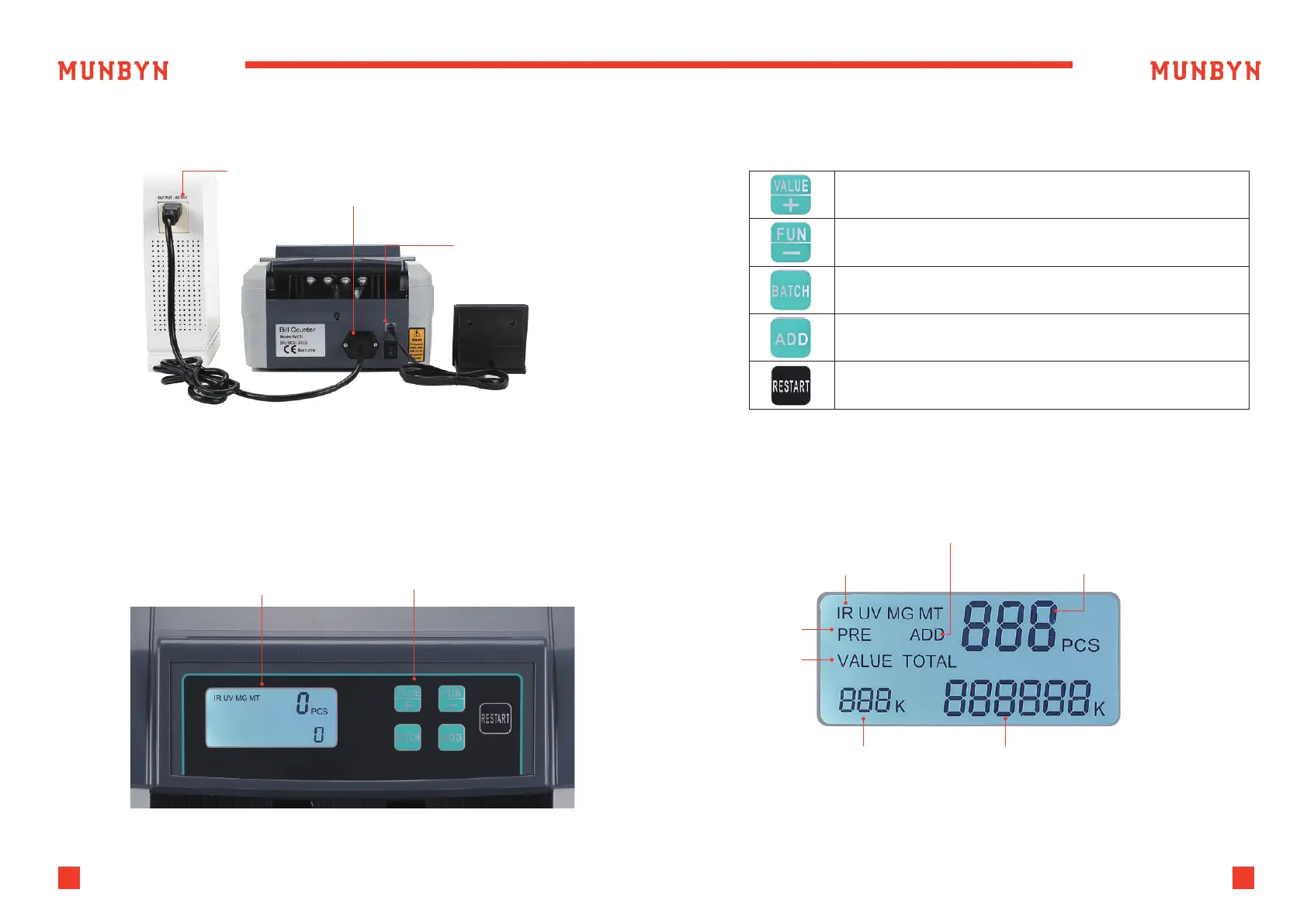
Figure 2-1 Power and External Display Connection
Figure 3-1 Display Appearance
Table 3-1 Function Keys
Figure 3-2 Display Interface
“VAL” button, press this button to enter total value
calculation mode.
“FUNC” button, press to turn on/off IR UV, MG MT
detection methods.
“BAT” button, press to turn on/off the BATCH function.
“ADD” button, press to turn on/off the ADD function.
“RESTART” button, press to start or restart counting
bills, long press to switch Auto/Manual counting mode.
Power Supply
Power Cord Connector
External
Display Connector
3.0. Display and Operational Interface
3.1. Display Appearance
3.2. Operational Instructions for Function Keys
3.3. Display Interface
Display Area Operational Keys
Detecting functions
Batch mode
Value
Counting
Mode
Batch/Value number The total amount of value mode
ADD mode
Counting result



 To Next Page