M9L Dehumidifiers
190TML-1040-A04.05 5
EN
Maintenance & Fault finding
WARNING! The unit must be unplugged from the mains outlet before carrying out any
maintenance or fault finding activities on the unit.
Maintenance schedule
Fault localization
WARNING! The unit must not be opened by anyone other than trained and qualified
personnel.
NOTE! The unit is automatically restarted after an interruption in electricity supply.
Safety and Cautions
The contents of this manual include suggested best working practices and
procedures. During installation and operation of this equipment it is always each
individual person’s responsibility to consider:
• Their own and others’ personal safety.
• The safety of the unit through correct use of the equipment in accordance with
the descriptions and instructions given in this manual.
Component
Maintenance/Inspection intervals
(1)
(1) Frequency of maintenance is depending on environment.
4 000 hrs 8 000 hrs
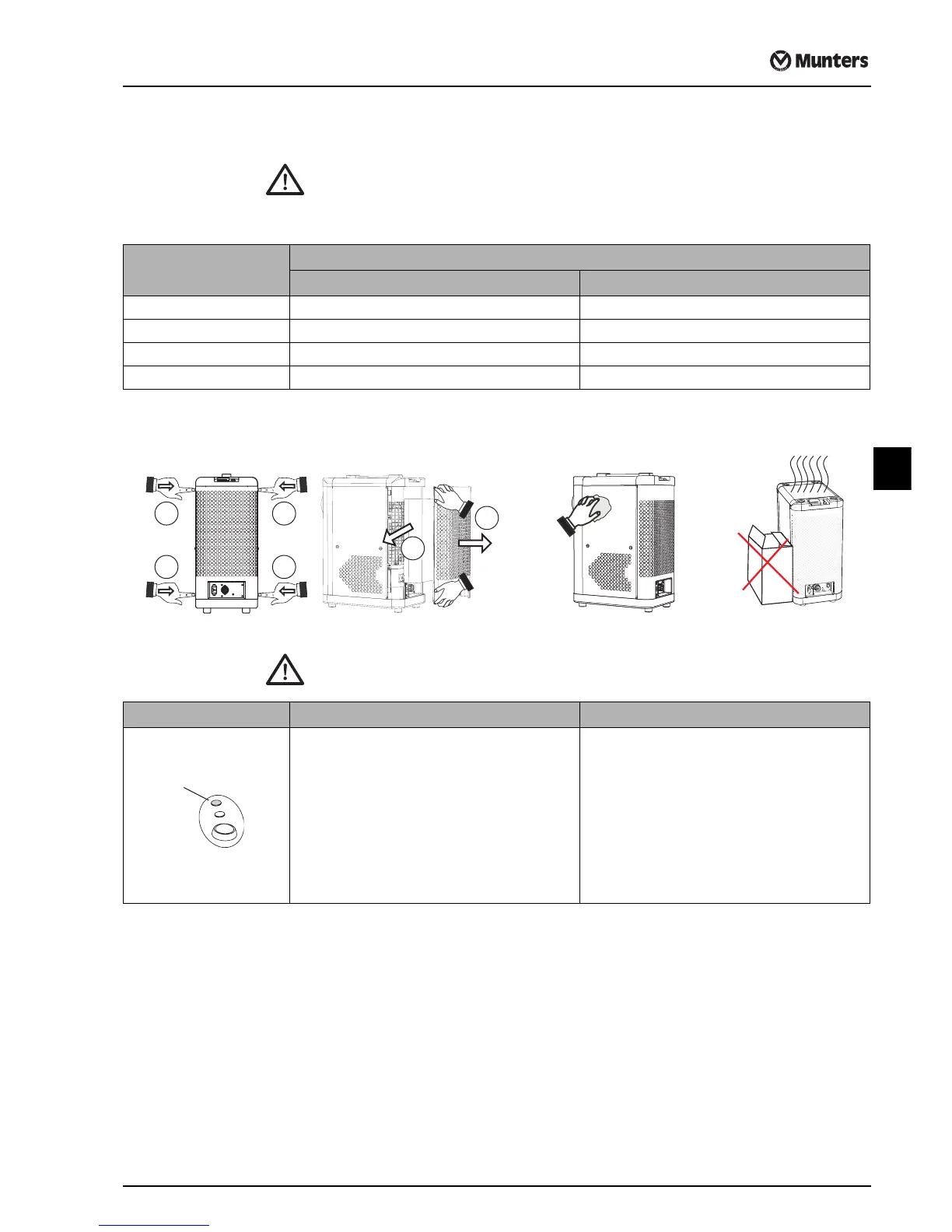
Air Outlets & Drainage hose Check and remove for any obstruction -
Filter G3 (EU3) Clean filter holder and replace filter -
Unit, general Clean unit exterior -
Complete unit - General unit overhaul
(2)
(2) To be performed by Munters Service personnel only.
Fault Symptom Possible Cause Corrective Action
Unit has stopped and:
Alarm – Fast flashing
Red light
Alarm – Slow flashing
No alarm or any indications
Excess temperature thermostat has tripped due to:
- Filter is clogged or other airflow obstruction
- Excessive air temperature in the room
Water drain blocked (optional function)
Failure of the electrical supply or high temperature cut-
out has tripped
The thermostat will reset automatically when the unit is
cooled down.
- Clean filter or remove obstruction
- Wait until the room temperature cools below 25°C
To reset alarm and start the unit, press and release
the start/stop button.
Clear blockage and ensure there is a free flow.
Check power supply to the unit or contact your local
authorized service department for advice.
2 2
3
4
1 1


 To Next Page