35 | © Munters AB, 2019
8. MAINTENANCE
WARNING
Moving parts, disconnect power before servicing.
WARNING
High voltage, disconnect power before servicing.
The following inspection and cleaning procedures should be performed monthly:
1. INSPECT PROPELLER: Check that propeller is secure on drive hub and that there are no signs of damage. The
blades are of a self-cleaning design and should not require maintenance.
2. CLEAN: regularly for best results:
• FAN MOTOR: Remove any dust accumulation from motor using a brush or cloth. (DO NOT use a pressure
washer). A clean motor will run cooler and last longer. At the same time, verify that the motor is secure in its
mount.
• DAMPER: Carefully clean dust from damper door and frame so that damper door opens and closes freely. A
brush or cloth should be used.
• GUARD: Clean any dust or feathers from fan guards using a brush. Dirty guards can reduce airflow.
3. CHECK FASTENERS: For safety, all fasteners should be inspected. Tighten any loose connections.
4. INSPECT FAN CONTROL: With power disconnected, inspect all electrical connections. Wiring should be secure
and in good condition. Remove any dust build-up from control case and sensor using a soft brush or cloth. NEVER
CLEAN ELECTRICAL EQUIPMENT WITH A PRESSURE WASHER!
WARNING Keep motor body clean. Dust deposit on motor body will lead to overheating and failure of bearings
and motor itself.
Do not use water for motor cleaning. Use compressed air only. Water spraying will cause rust inside the bearings
and lead to their failure.
WARNING We recommend to avoid to use water for washing fans since the electric motors and the bearings of
the central hub and centrifugal system support might get damaged by water infiltration.
In case there is an unbreakable need to use water for cleaning the fans, the electric motor, the central hub and
the centrifugal weight mechanism have to be adequately protected by water sprays.
WARNING Do not operate the fan with the safety protections removed: safety meshes can be removed only
with specific tools by qualified technicians when the fan reaches a complete standstill.
The fixing systems of the safety protections are not interchangeable with other devices. Therefore, if for
maintenance reasons the user damages or loses any component, this must be definitely ordered from the manufacturer
as spare parts and it cannot just be replaced with other components, even similar, not supplied by the constructor itself. In
this particular event the manufacturer refuses all responsibility on consequent damages caused to things and people and
considers any kind of warranty lost.
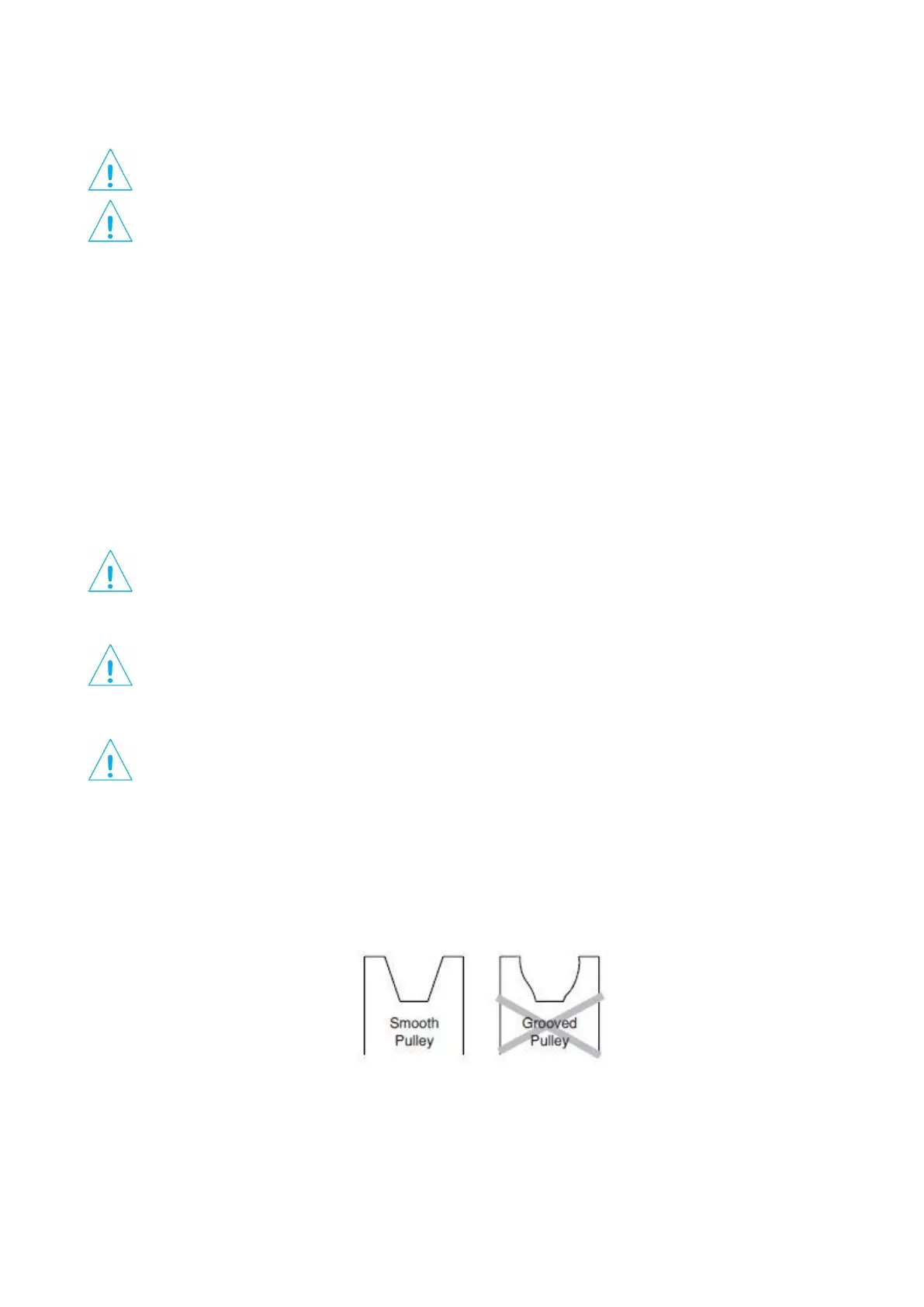
5. CHECKING PULLEYS: Roll the belt off and look at both pulleys. If the pulley has grooves in it or is no longer
smooth, it needs replacement. A loose or slipping belt will reduce fan performance up to 60% and cause premature
belt failure.
6. BELT TIGHTENING: To adjust the belt tensioner to the proper setting, remove the V-belt and loosen 10 mm bolt
(using 17mm spanner) to allow tensioner arm to rotate. The Belt Tensioner has to be perpendicular to the Central
Support. tighten the 10mm bolt to 50 Nm.
Slide V-belt over Propeller and install by wrapping it around the 2 smaller pulleys and starting it over the larger
pulley, continue rolling it onto the larger pulley until it fits onto pulley.


 To Next Page