VJ-1628TD/2628TD INSTALLATION MANUAL
VJXX28TDE-I-00 2
1 2
4
5 6 7
3
8 9
1
2 3
8
7
9
10
1
2
3
5
4
5
6
6
11
1
2
3
6
8
14
11
13
10
7
5
4
12
9
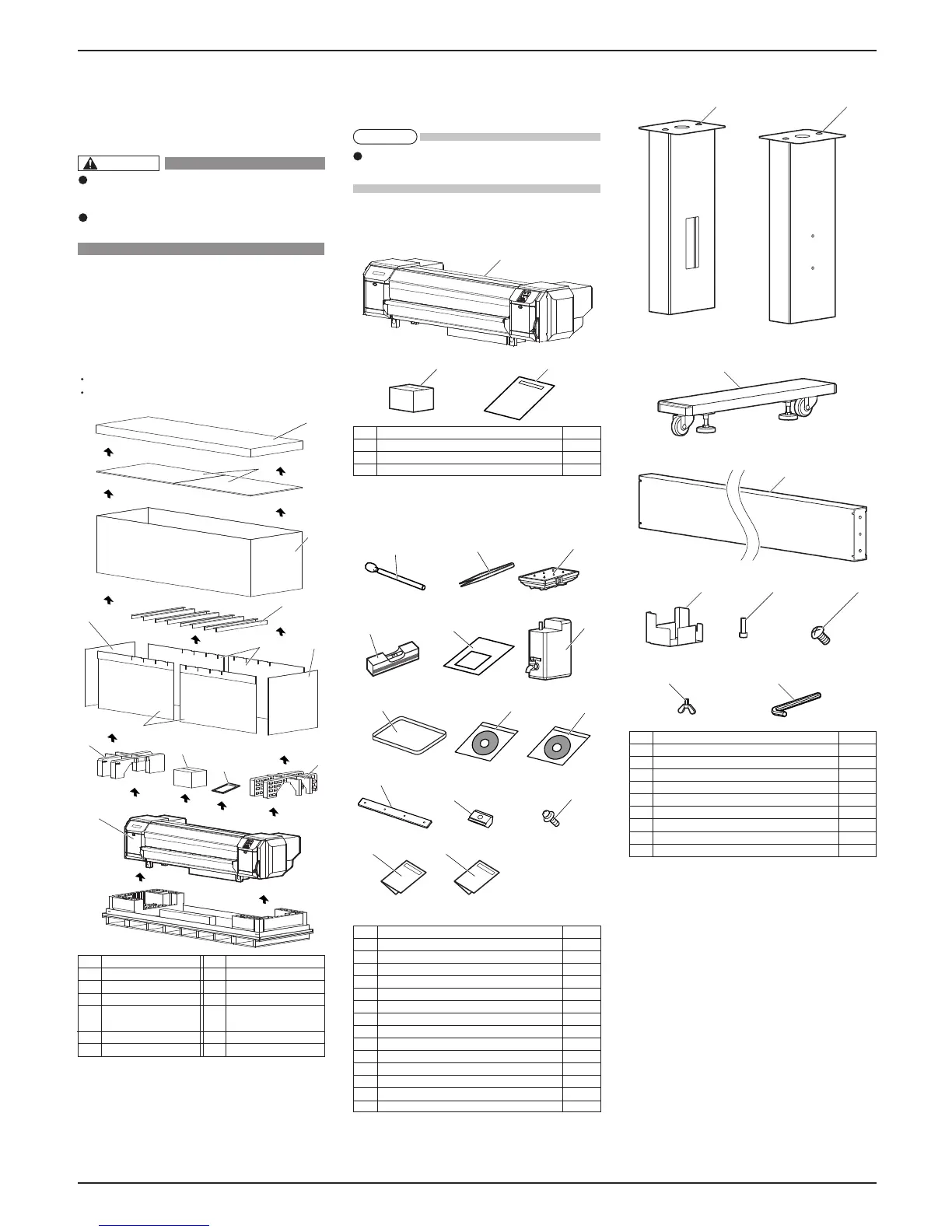
1Unpacking boxes
Procedures for unpacking boxes are explained.
This product is packaged separately, divided into the
printer and the stand.
Make sure to unpack this product with
four persons or more.
While taking out the printer from the box,
make sure to remove the vinyl sheet.
1.1Unpacking printer box
Unpack the printer box in accordance with the following steps.
1.Carry the box to where you will unpack it.
2.Remove the bands.
3.Open the box and take out the following components.
Installation Manual (this manual)
Accessory box
1.2Unpacking stand box
Unpack the stand box in accordance with the following steps.
1.Carry the box to where you will unpack it.
2.Open the box and take out the components.
2 Confirming bundled items
After unpacking, please confirm that the product has
not damaged and no components are missing.
If any items are damaged or missing, contact
MUTOH local dealer.
2.1Items in the printer box
2.2Items in the accessory box
2.3Items in the stand box
No. Name Q'ty
1 Printer main body 1 set
2 Accessory box 1
3 Installation Manual (this manual) 1
No. Name Q'ty
1 Leg part (Right) 1
2 Leg part (Left) 1
3 Base parts 2
4 Connector bar 1
5 Waste fluid tank holder 1
6 Hexagon socket head cap screws 8
7 Waste fluid tank holder fixing screws 4
8 Butterfly screws 8
9 Hexagonal wrench 1
No. Name Q'ty
1 Clean stick 10
2 Forceps 1
3 Flushing box sponge 5
4 Spirit level 1
5 Paper towel 5
6 Waste fluid tank 1
7 Tray 1
8 MUTOH Status Monitor CD 1
9 Quick Reference&Operation Manual CD 1
10 Counter weight 2
11 Roll-in T-slot Nut 8
12 Counter weight fixing screw 1
13 Using Quick Reference&Operation Manual CD 1
14 Printer Activation Guide 1
No. Name
No. Name
1 Top cover
2 Top board
3 Outer board
4 Center board
5 Side board A
6 Side board B
7 Cushion (Left)
8 Cushion (Right)
9 Accessory box
10 Installation Manual
(this manual)
11 Printer main body
NOTE
CAUTION












 To Next Page