7
7
1. Enable Bluetooth on your mobile device
2. Open ZeCircle
2
App on your mobile device. Sign up if you are a new member or Log in
with your existing account. After entering your personal information, tap Set up
3. Make sure ZeCircle
2
is nearby and select ZeCircle
2
in the list of devices
4. You will receive a pairing request on your mobile device. Press Pair to accept it
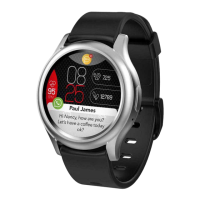
5. Then, a pairing request will appear on your ZeCircle
2
display
Tap on your ZeCircle
2
to accept the pairing
6. When ZeCircle
2
is successfully paired, you will be notified on ZeCircle
2
and on your mobile device’s screen
i
If pairing fails, repeat the same steps. Pairing is a one-time process. If you want to
pair ZeCircle
2
with another account, you first need to unpair it from the current
one. Open ZeCircle
2
App, go to Settings > Connect ZeCircle
2
> Unpair ZeCircle
2
.
Tap Connect ZeCircle
2
to pair a new device







 To Next Page