Page 13www.wineenthusiast.com
CONTROLLER FUNCTIONS
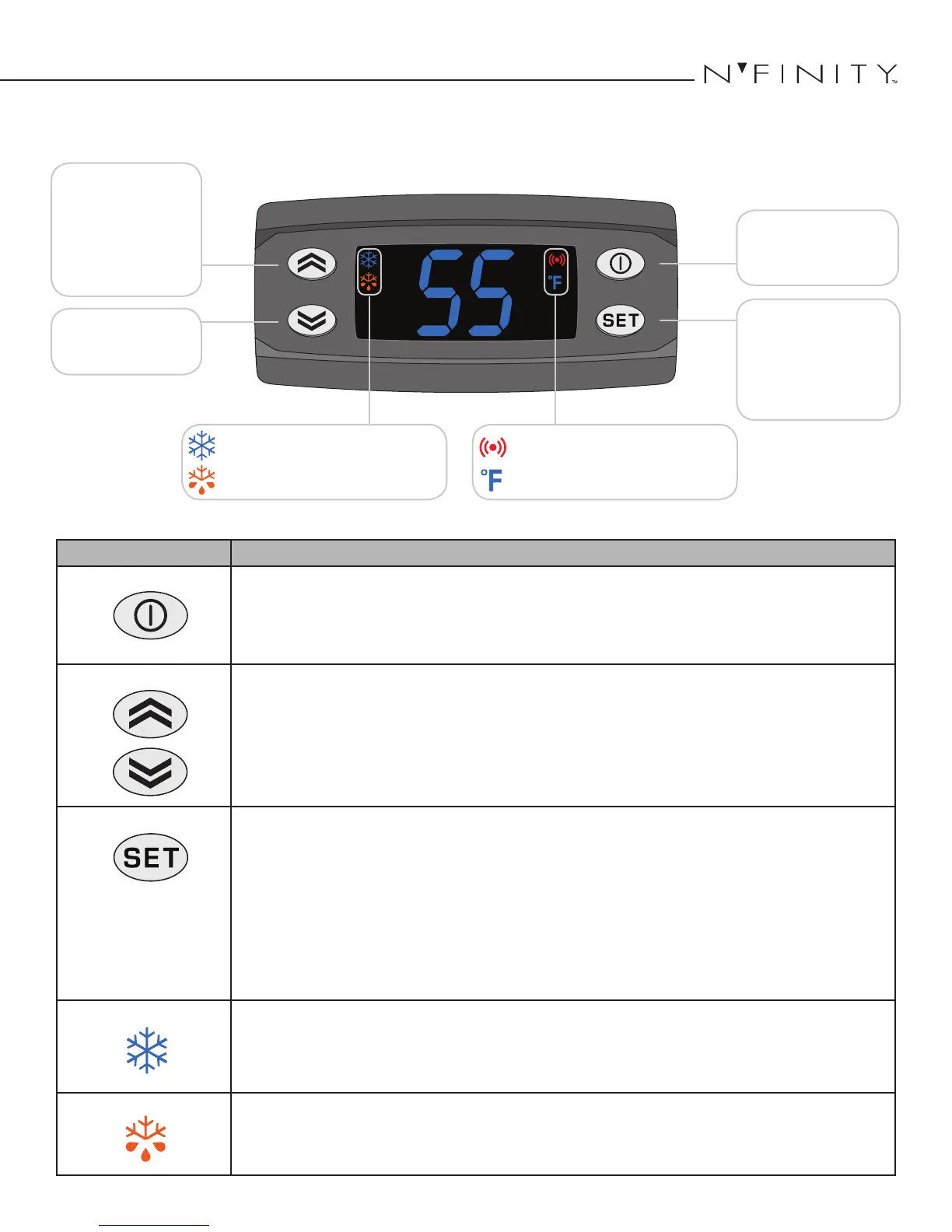
Button/Symbol Normal Functions
ON/OFF
• Press and hold the ON/OFF button for approximately 3 seconds to turn the unit on or o.
NOTE: is does not disconnect power from the unit. In order for the power to be shut o
from the unit, the power cord must be unplugged from the wall receptacle.
• is button also serves as an escape button.
UP/DOWN ARROWS
• Use these buttons to scroll up or down a menu.
• Press and hold the UP ARROW button for approximately ve seconds to manually start the defrost
sequence.
SET
• Press the SET button once to view the set point, temperature of the air-sensing probe.
• Once the SET button is pressed, "SEt" will be displayed. Press the UP or DOWN ARROW buttons to
scroll through Pb1 and the set point parameter.
• Press the SET button again to view any of these values.
• To change the set point, press the SET button when "SEt" is displayed on the screen. e current set
point will be displayed. Use the UP or DOWN ARROW buttons to change the set point to the desired
temperature. Press the SET button again once the desired temperature is reached.
• Hold the SET button for approximately 5 seconds to enter the CPSM (Customer Preference Selection
Mode) menu. CPSM details are available on the next page.
SNOWFLAKE
Constant - Unit is in cooling mode and the compressor and fans are running.
Blinking - e unit is calling for cooling, but must wait ve minutes before restarting the compressor. is
ve-minute delay serves as an anti-short cycle for the compressors protection.
DRIPPING SNOWFLAKE
Unit is running an Anti-Frost Cycle. e compressor and fans will be turned o during this cycle.
Compressor On
Unit is in Defrost Mode
Alarm is Present
Temperature Measurement
Menu Navigation
& Value Increase
(Press and hold to
manually enter defrost
mode.)
Power On/O
(hold for approx. 3 seconds)
& Escape
Menu Navigation
& Value Decrease
Probe Value & Alarm
Folder
(Press and hold to enter the
parameter menu.)


 To Next Page