EasyManua.ls Logo

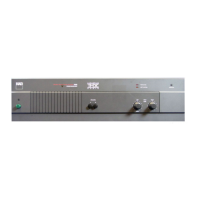
NAD 2600 - POWER; INPUT LEVEL; SOFT CLIPPING INDICATOR; PROTECTION INDICATOR

NAD 2600
6 pages
Print Icon
To Previous Page IconTo Previous Page
Loading...
thing
which
shares
a
common
ground
with
the
amplifier's
inputs
You
can
use
the
input-level
controls
to
correct
these
fixed
(such
as
a
switching
comparator
or
a
distortion
analyzer).
(5)
After
the
preceding
conditions
have
been
satisfied,
re-set
the
Bridging
switch.
It
is
held
in
place
by
a
plastic
bracket
fastened
by
two
screws.
Use
a
small
screwdriver
to
loosen
the
bracket
screws,
turning
each
about
a
half-
turn
counterclockwise;
then
slide
the
switch
to
ON
(MONO).
The
bracket
will
move
with
the
switch.
Re-tighten
the
screws
to
secure
the
switch
in
its
new
position.
Finally,
turn
the
power
on.
(6)
To
return
the
amplifier
to
normal
stereo
operation
at
a
later
date,
first
turn
off
the
power.
Loosen
the
bracket
screws,
re-set
the
Bridging
switch
to
OFF
(STEREO),
and
tighten
the
bracket
screws
to
prevent
the
switch
from
being
moved
acci-
dentally.
Restore
normal
Left
and
Right
input
connections,
and
re-connect
loudspeaker
wires
to
the
speaker
terminals
as
described
above
under
SPEAKERS.
FRONT
PANEL
CONTROLS
1.
POWER
Press
the
Power
button
to
turn
on
the
amplifier.
The
green
LED
glows
when
the
power
is
on.
Press
the
Power
button
again
to
switch
the
amplifier
off.
2.
INPUT
LEVEL
The
amplifier
is
equipped
with
separate
input
level
controls
for
the
two
channels.
Normally
both
controls
should
be
turned
to
maximum.
But
there
are
several
circumstances
in
which
reduced
settings
may
be
useful:
(1)
Level-Matching.
!n
a
multi-amplifier
system,
use
these
controls
to
match
the
output
of
this
amplifier
to
others
in
the
system.
(2)
Extended
Volume-Control
Range.
Many
stereo
sys-
tems
have
so
much
voltage
gain
that
the
speakers
(or
your
ears)
are
over-driven
at
any
preamplifier
Volume-control
setting
higher
than
11
or
12
o’clock.
As
a
result
you
are
confined
to
using
only
the
lower
half
of
the
Volume
control's
range,
where
adjustments
are
imprecise
and
where
most
Volume
controls
produce
channel-balance
errors.
The
solution
is
to
turn
the
power
amplifier’s input-level
controls
down
part-way
(to
about
1
o'clock,
for
example)
in
each
channel.
Now
you
can
turn
up
your
preamplifier’s
Volume
control
further,
making
effective
use
of
most
of
its
range.
(Suggestion:
adjust
the
power
amplifier’s
input
level
controls
so
that
your
preferred
maximum
sound
levels
usu-
ally
occur
at
about
2
or
3
o’clock
on
your
Volume
control.)
As
an
added
benefit,
this
procedure
suppresses
any
noise
produced
by
the
preamp’s
high-level
circuitry
(e.g.
any
residual
hum
or
hiss
that
does
not
go
away
when
the
Volume
is
turned
down).
(3)
Balance
Correction.
Small
errors
in
channel
balance
can
dramatically
degrade
the
apparent
“depth”
and
“air”
of
the
stereo
image.
Such
balance
errors
may
be
due
to
normal
production-line
differences
in
speaker
sensitivity,
differences
in
the
acoustic
environment
around
the
two
speakers,
and
slightly
different
distances
from
your
chair
to
each
speaker.
balance
errors,
freeing
your
preamplifier’s
balance
control
to
correct
balance
errors
in
recordings.
Switch
the
preamp
to
mono
and
sit
in
your
normal
listening
location.
Ideally
the
“phantom”
central
image
should
seem
to
be
floating
in
mid-air
halfway
between
the
left
and
right
speakers.
If
it
is
located
off-center,
closer
to
one
speaker,
turn
down
the
input-level
control
for
that
chan-
nel
slightly
in
order
to
center
the
phantom
mono
image.
Then
restore
the
preamp
to
normal
stereo
operation.
If
you
have
turned
the
input-level
controls
down
part-way
to
adjust
the
overall
volume
level,
do
this
balance
correction
as
the
final
step.
NOTE:
In
bridged
mode,
the
volume
is
adjusted
with
the
Left
input
level
contro!
only.
3.
SOFT
CLIPPING
INDICATOR
This
amber
LED
glows
when
the
Soft
Clipping
switch
(on
the
rear
panel)
is
ON.
4.
PROTECTION
INDICATOR
The
amplifier
can
safely
and
cleanly
drive
impedances
as
low
as
2
ohms
with
wide-range
musical
signals
whose
peak
level
is
500
watts
or
more.
But
if
called
upon
to
de-
liver
high
power
continuously
into
a
low
impedance,
the
output
transistors
may
overheat.
In
this
case,
protection
relays
will
automatically
disconnect
the
speakers
and
the
PROTECTION
light
will
illuminate.
If
this
occurs,
switch
off
the
Power.
When
the
output
stage
cools,
the
relays
will
automatically
re-connect
the
speakers,
and
normal
operation
can
be
resumed.
In
most
cases
a
very
slight
reduction
in
volume
level
will
prevent
further
interruptions
in
the
sound.
If
the
protection
relays
interrupt
the
sound
frequently,
several
possible
causes
should
be
considered:
a
loose
strand
of
wire
causing
a
partial
short-circuit
between
speaker
terminals,
or
continuous
high-power
operation
into
a
very
low
impedance
in
the
Bridged
mode,
or
any
obstruction
of
the
free
flow
of
air
needed
to
ventilate
the
amplifier
and
dissipate
its
heat.
If
the
protection
relay
interrupts
the
sound
even
when
the
amplifier
is
cool,
return
the
amplifier
to
your
NAD
dealer
for
service.
The
protection
circuit
may
be
responding
to
protect
the
speakers
from
an
internal
fault,
such
as
an
improper
DC
voltage
at
the
speaker
terminals.
5.
OVERLOAD
INDICATOR
This
is
an
“audible
clipping”
indicator.
It
flashes
on
when
the
amplifier
is
over-driven
into
audible
distortion.
An
input/output
comparator
continually
compares
the
ampli-
fier’s
output
signal
in
each
channel
with
the
corresponding
input
waveform;
any
difference
that
lasts
long
enough
to
be
audible
(longer
than
a
few
thousandths
of
a
second)
triggers
the
LED
on.
If
this
indicator
illuminates
frequently,
you
should
reduce
your
volume
levels
slightly
(or
purchase
a
second
Model
2600
and
use
both
amplifiers
in
the
bridged
mode
for
greater
power).
NAD
ELECTRONICS
BOSTON/LONDON
©1900
BY
NAD
41
PRINTED
ON
JAPAN
OM-674A
8703

Related product manuals