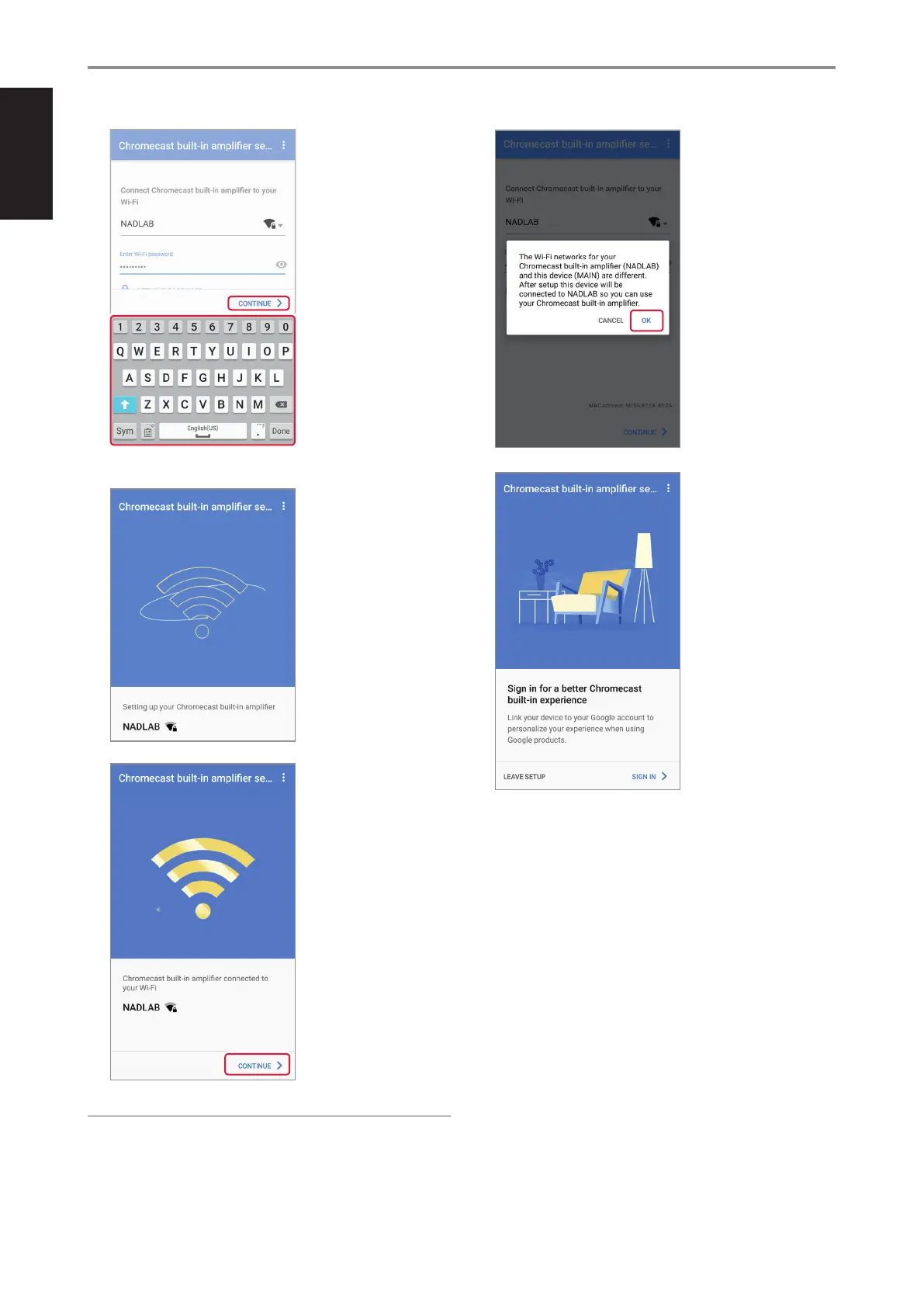
13 Enter your Wi-Fi password
in the eld provided using
the on-screen keyboard.
Select “CONTINUE” to
proceed to next step.
Note that it is also
possible to select “GET
WI-FI PASSWORD” - Wi-Fi
password from the current
mobile device is copied.
14
15 This will be displayed
upon successful network
connection. Select
“CONTINUE” to proceed to
next step.
IMPORTANT NOTE
• If the Wi-Fi network of your Chromecast built-in amplier (C 338) and
your media control device (iOS or Android device) are dierent, below
screen will be shown. Select “OK” to complete Wi-Fi connection of your
Chromecast built-in amplier (C 338).
16 This completes the Wi-Fi
setup connection. Select
“LEAVE SETUP” to exit Wi-Fi
setup or “SIGN-IN” to sign-
up your Google Account or
other accounts.
OPERATION
USING THE C 338
12
ENGLISH FRANÇAIS ESPAÑOL ITALIANO DEUTSCH NEDERLANDS SVENSKA РУССКИЙ


 To Next Page