ENGLISH
Player
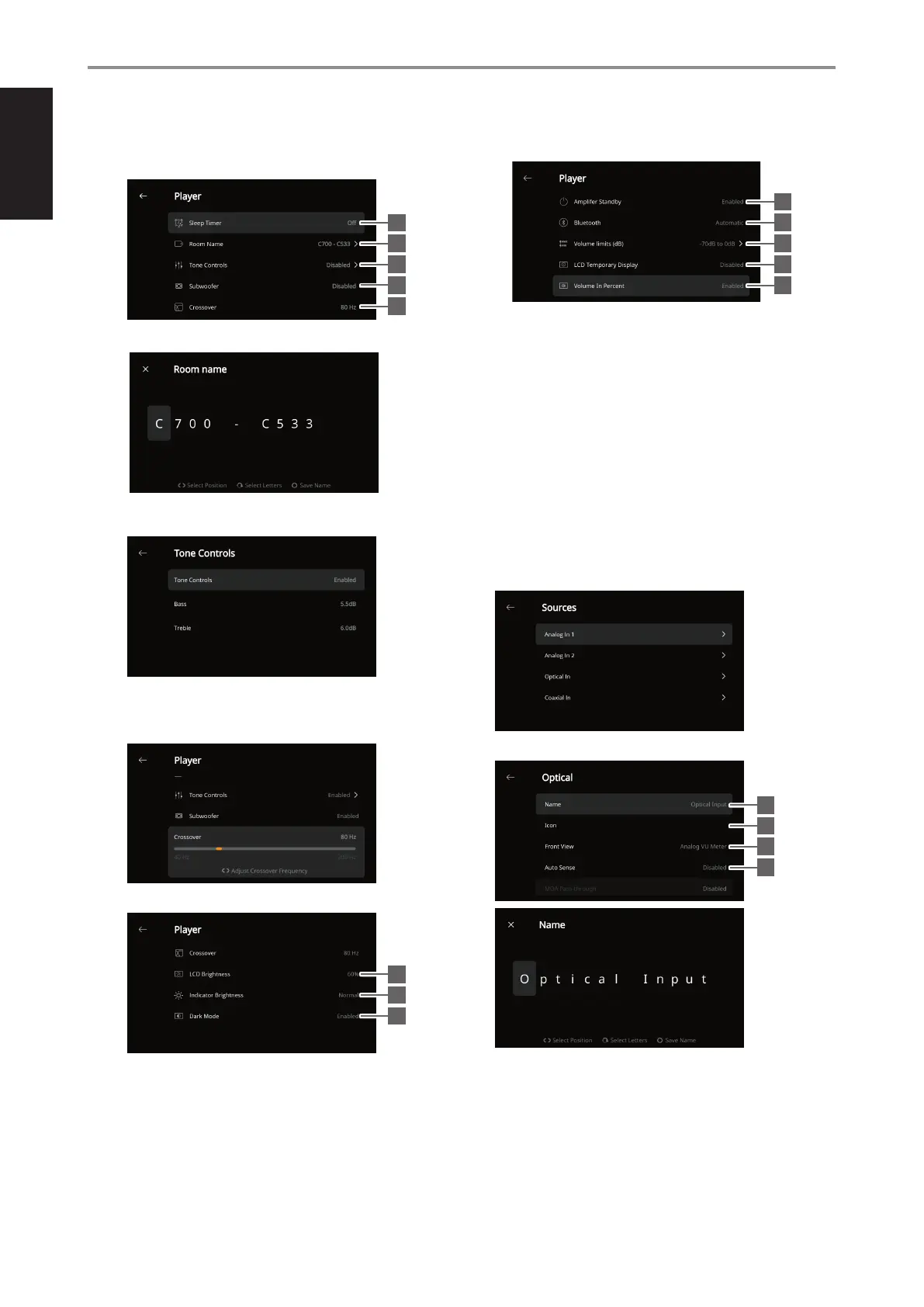
1 Sleep Timer: Stop playback after a set amount of time via gentle
volume decline
2 Room Name: Create a customized room name for the C 700
3 Tone Controls: Boost or reduce Bass and Treble response levels.
Tone Controls can be enabled or disabled.
4 Subwoofer: Enable or disable connected Subwoofer
5 Crossover: The subwoofer will reproduce only low frequency
information below the selected crossover setting.
6 LCD Brightness: Adjust front panel display brightness level
7 Indicator Brightness: Change NAD logo indicator brightness to
Normal, Dim or O
8 Dark Mode: Background of Front View display for particular source
is either dark (enabled) or bright (disabled)
9 Amplier Standby: Maintain network connection at standby
mode when enabled
10 Bluetooth: Set Bluetooth connection to Manual, Automatic, Guest
or Disable Bluetooth availability
11 Volume limits (dB): Set lower limit and upper limit of volume level
in dB units
12 LCD Temporary Display: Enabled mode will turn o display
temporarily after 1 minute of non-user interface. Disabled mode
will keep display shown. At enabled mode and with display turned
o, display can be awaken by pressing front panel a s buttons or
rotating the VOLUME-MENU knob.
13 Volume In Percent: Volume level is displayed in percent when
enabled. At disabled mode, volume level is displayed in dB.
SOURCE SETUP
Select and congure Source
1 Sources: Select Source to congure
2 Name: Customize the Source’s Name
CONFIGURING C700
10
9
2
10
3
11
4
12
5
13
6
7
8
1
2
3
4
5


 To Next Page