CONFIGURING KEy
ILLUMINATION
Keys to Press
(for 3 seconds)
Mode
DISP + Digit Key
(0-9)
Set key illumination
timeout to number of
seconds corresponding
to digit key. Zero turns
o the key illumination
entirely.
DISP + OFF Disable light sensor. Key
illumination will turn on
with any key press.
DISP + ON Enable light sensor.
DISP + ENTER Set the light sensor
threshold to the current
light level.
DISP + RTN Restore all key illumina-
tion settings to the
defaults.
FACTORy RESET
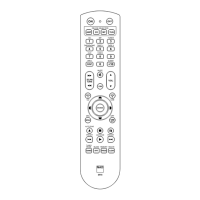
The HTR 8 can be reset to its factory state,
deleting all learned commands, copied
and punched-through keys, macros,
and other setup information; reverting
all keys to their pre-programmed library
commands.
To perform a factory reset simultane-
ously press-and-hold for 10 seconds the
HTR 8’s [ON] and [RTN] keys; the Learn
LED will start to ash green. Release
[ON] and [RTN] before the second ash
is complete; the Learn LED will turn red,
indicating the remote has been reset.
Note
You must release [ON] and [RTN]
before the second ash goes out, oth-
erwise the unit will not reset; should
this occur, repeat the full procedure.
DELETE MODE
The HTR 8 can store learned, copied, and
“default library” commands on any single
key. The default library commands are the
pre-programmed NAD codes, such as the
native NAD receiver commands on the
[AMP] “page”.
You can delete commands by layers back
“down” to the default library command
on any key, removing learned com-
mands, punched-through functions, and
copied keys.
Note
The default library commands can-
not be deleted, so you need not worry
that using Delete Mode might cause
irreparable changes.
9
ENGLISHFRANÇAISESPAÑOLITALIANODEUTSCHNEDERLANDSSVENSKAРУССКИЙ
HTR8_eng_OM_v03.indd 9 20/01/2012 1:46am



 To Next Page