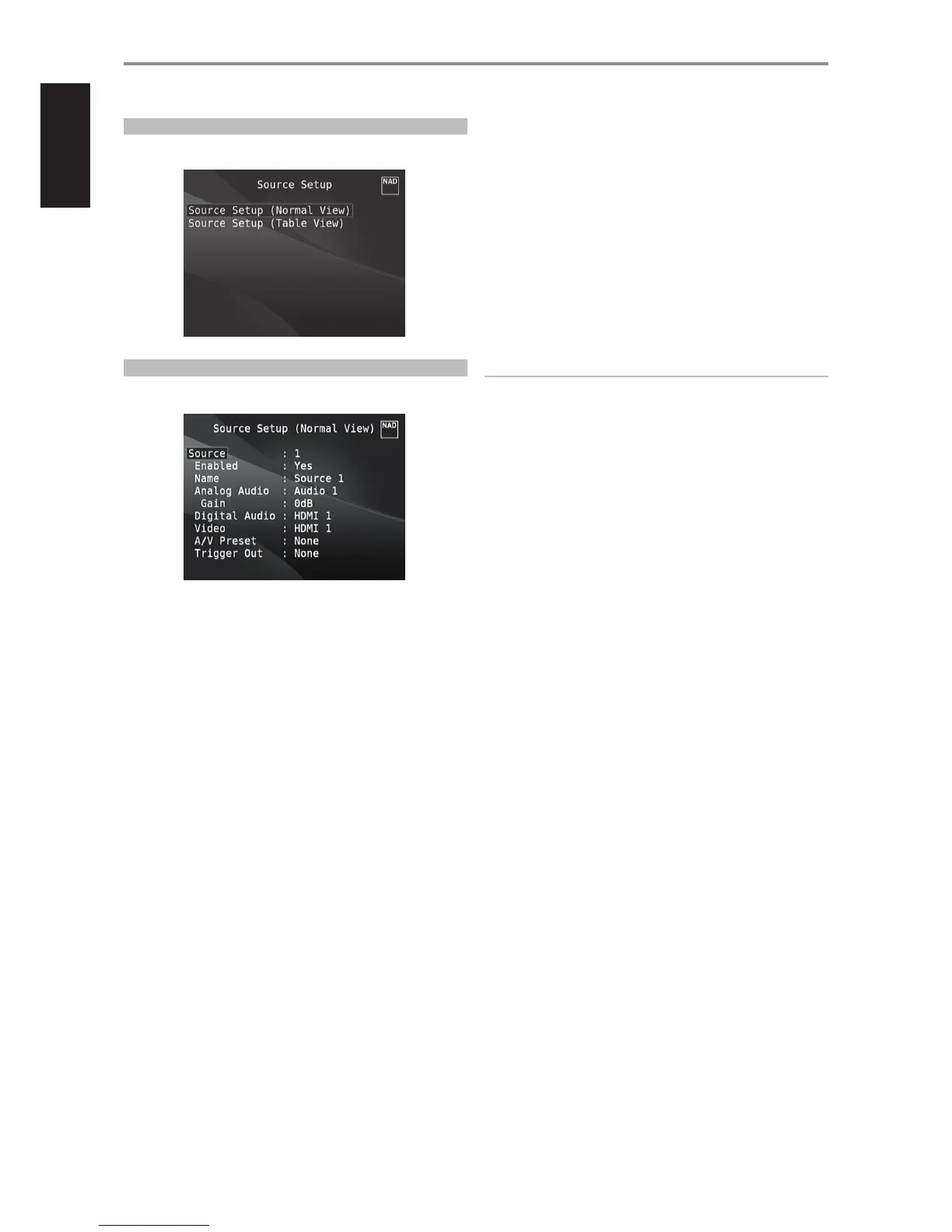
SOURCE SETUP
There are two sub-menu items under Source Setup. These are Source
Setup (Normal View) and Source Setup (Table View).
SOURCE SETUP (NORMAL VIEW)
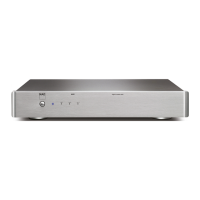
The Source Setup (Normal View) menu makes it possible to set, allocate or
change the following settings.
SOURCE
All available Sources are congurable. A particular Source can be enabled
or disabled, renamed, assigned analog and digital audio sources, video
sources, A/V Presets, Trigger settings among other settings.
These settings can be implemented through the following parameters.
ENABLED
One can enable/disable a Source via this option. This is particularly useful
if only few Sources are used and one directly selects the Source from the
front panel display options, bypassing unused sources.
Select “Yes” to enable the particular Source or “No” to disable the Source.
NAME
A new Name maybe assigned to a Source label. For example, if your BD
player is attached to “Source 1”, it is possible to rename “Source 1” to “BD”.
In order to rename the Source label, scroll to the “Name” parameter. Press
[E] to go to the rst character. Then, press [R/T] to pick through the
alphanumeric selections.
Press [E] to move to the next character and at the same time save the
changes done on the current character. The name can be as long as twelve
characters.
The new Name will be shown in the VFD as well as on the OSD.
ANALOG AUDIO
All available analog audio input can be variably assigned to any of the
Sources.
Scroll to “Analog Audio”, press [E] and then [R/T] to select and assign an
analog audio input to the particular Source. There are two choices - Audio
or O.
When “Audio” is chosen, press [E] and then [R/T] to select and assign the
desired audio input -1 to 7.
If “O” is selected, no incoming analog audio signal is selected by the
particular Source. Note that when “Analog Audio” is set to “O”, “Gain” will
not be enabled as an option.
NOTE
An incoming digital signal present at the assigned digital input will
always take precedence over the assigned analog audio input, even if
both are present. To maintain the analog audio input for the particular
Source, select “O” at the “Digital Audio” setting of the same “Source”
menu.
GAIN
Gain adjustment allows all sources to play back at the same volume level so
you don’t need to adjust the volume every time a new source is selected. It
is generally preferable to reduce the level of the loudest source rather than
making louder the softer sources.
Scroll to “Gain”, press [E] and then [R/T] to step through the desired level
from -12dB to 12dB.
Note that when “Analog Audio” is set to “O”, “Gain” will not be enabled as
an option.
OPERATION
USING THE M17 SETUP MENU
16


 To Next Page