THANK YOU FOR CHOOSING NAD.
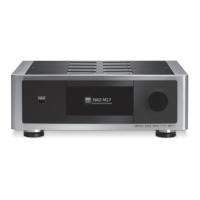
The M17 AV Surround Sound Preamp Processor is a technologically advanced
and highly capable product — yet we have invested great eort in making it
simple and easy to use. The M17 delivers a range of genuinely useful options
for surround sound and stereo listening alike, using powerful digital signal
processing and superbly accurate digital-audio circuitry. However, we have also
been careful to ensure that the M17 is as musically transparent, faithful to every
video detail and spatially accurate as possible, incorporating much of what
we’ve learned from a quarter-century’s experience designing audio, video and
home-theater components. As with all our products, NAD’s “Music First” design
philosophy guided the M17’s design, such that it can condently promise you
both state-of-the-art surround home-theater and audiophile-quality music
listening for years to come.
We encourage you to take a few minutes now to read right through this
manual. Investing a little time here at the outset might save you a good
deal of time later, and is by far the best way to ensure that you make the
most of your investment in the M17, and get the most from this powerful
and exible home-theater component.
One more thing: We urge you to register your M17 ownership on the NAD
Worldwide Web site:
http://NADelectronics.com/salon
For warranty information contact your local distributor.
INTRODUCTION
TABLE OF CONTENTS
IMPORTANT SAFETY INSTRUCTIONS .........................2
INTRODUCTION
GETTING STARTED ...............................................5
WHAT’S IN THE BOX ..................................................5
CHOOSING A LOCATION .............................................5
DEFAULT SOURCE SETTINGS .........................................5
RESTORING M17 TO ITS FACTORY DEFAULT SETTINGS ................5
IDENTIFICATION OF CONTROLS
FRONT PANEL ....................................................6
REAR PANEL .....................................................8
OPERATION
USING THE M17 – MAIN MENU ...................................11
ABOUT THE ONSCREEN DISPLAY OSD ............................ 11
MAIN MENU ........................................................ 11
LISTENING MODE .................................................. 11
ADJUSTING LISTENING MODES .................................... 12
DSP OPTIONS ...................................................... 13
TONE CONTROLS ................................................... 14
ZONE CONTROLS. . . . . . . . . . . . . . . . . . . . . . . . . . . . . . . . . . . . . . . . . . . . . . . . . . . 14
USING THE M17 – SETUP MENU ..................................15
SETUP MENU ....................................................... 15
CONTROL SETUP ................................................... 15
SOURCE SETUP .................................................... 16
SOURCE SETUP NORMAL VIEW ................................... 16
SOURCE SETUP TABLE VIEW ....................................... 17
SPEAKER SETUP .................................................... 18
AUDYSSEY AUTO CALIBRATION .................................... 18
SPEAKER CONFIGURATION ......................................... 20
SPEAKER LEVELS .................................................... 20
SPEAKER DISTANCE ................................................ 21
ADJUSTING THE VOLUME .......................................... 21
ADJUSTING CHANNEL LEVELS “ON THE FLY’ ........................ 22
ZONE SETUP ....................................................... 22
TRIGGER SETUP .................................................... 23
LISTENING MODE SETUP ........................................... 23
DOLBY SETUP ...................................................... 25
DTS SETUP ......................................................... 25
DTS SURROUND MODES ........................................... 25
ENHANCED STEREO ................................................ 26
DISPLAY SETUP ..................................................... 26
A/V PRESETS ........................................................ 26
USING THE HTRM 2 REMOTE CONTROL ..........................30
CONTROLLING THE M17 ............................................ 30
LEARNING CODES FROM OTHER REMOTES ......................... 31
PUNCH THROUGH .................................................. 31
COPY A COMMAND FROM ANOTHER KEY .......................... 31
MACRO COMMANDS ............................................... 31
KEY ILLUMINATION TIMEOUT ....................................... 32
CONFIGURING KEY ILLUMINATION ................................. 32
FACTORY RESET .................................................... 32
DELETE MODE ...................................................... 32
LOADING CODELIBRARIES ......................................... 33
SEARCH MODE ..................................................... 33
CHECKING CODELIBRARY NUMBER ................................ 33
SUMMARY OF THE HTRM 2 MODES ................................ 34
USING THE ZR 7 REMOTE CONTROL ................................ 34
REFERENCE
TROUBLESHOOTING ............................................35
NAD SHALL NOT BE HELD LIABLE FOR ANY TECHNICAL OR USER INTERFACE DISCREPANCIES IN THIS MANUAL. THE M17 OWNER’S
MANUAL MAY BE SUBJECT TO CHANGE WITHOUT PRIOR NOTICE. CHECK OUT THE NAD WEBSITE FOR THE LATEST VERSION OF THE M17
OWNER’S MANUAL.
4


 To Next Page