13
CD/SACD
Press CD or SACD on the M5 remote, during play.
MP3/WMA
Press MENU until the desired media directory is selected, and then press ENTER.
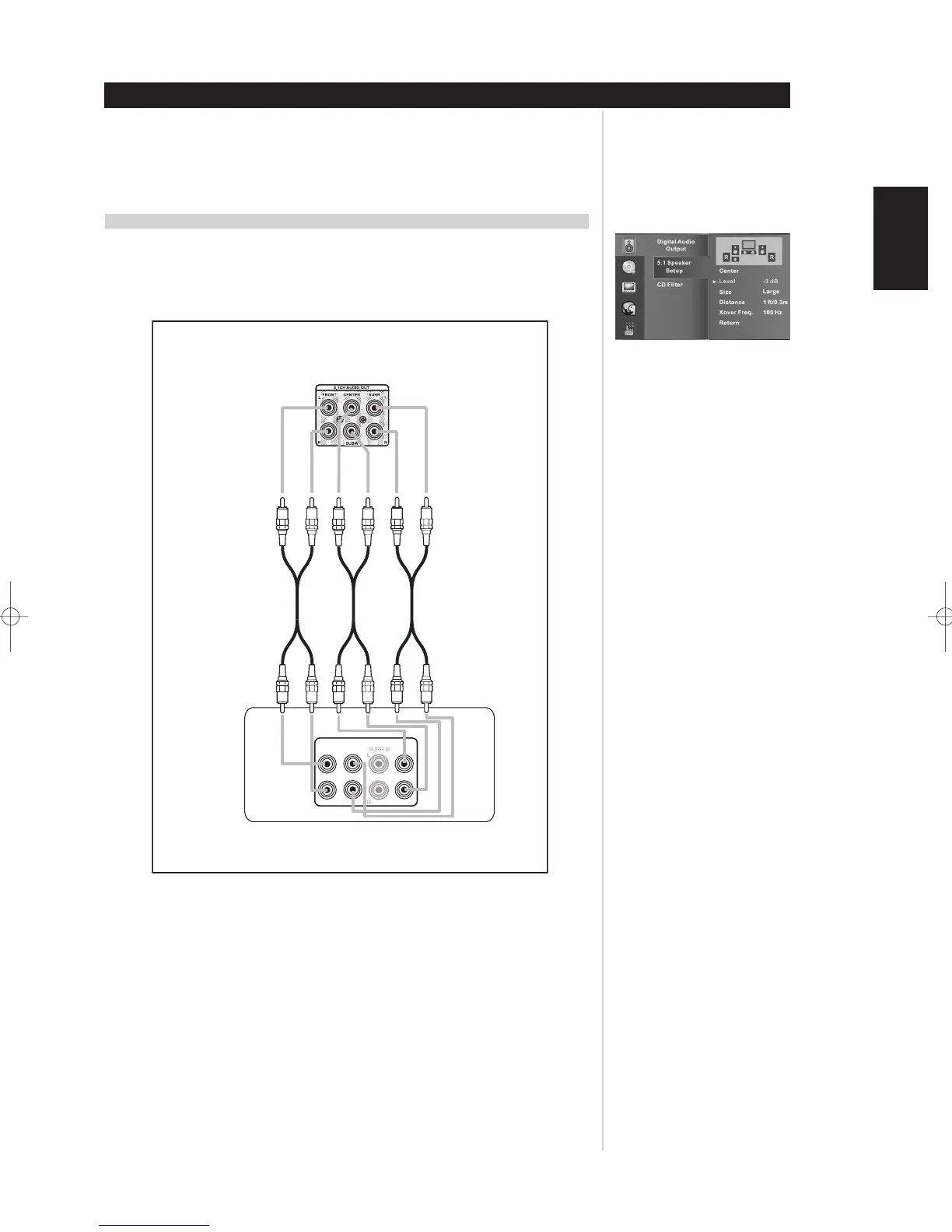
CONNECTING TO A MULTI-CHANNEL SOUND SYSTEM (SACD)
Connect the audio outputs to your integrated multi-channel amplifier or multi-channel preamplifier as
shown below. Then set up the speaker bass response and configuration as per the 5.1 SPEAKER
SETUP, or while playback of the multi-channel SACD media.
NOTES:
• For multi-channel SACD surround sound, connect the 5.1 CHANNEL AUDIO OUT for 2-channel and
multi-channel SACD media to your 5.1 surround sound preamplifier.
• For CD, MP3, and WMA PCM media connect the 2 CHANNEL AUDIO OUT to your stereo system.
PCM media is only available on both Analog Audio OUT and DIGITAL OUT.
PLAYBACK AUDIO WITH CD, SACD, MP3 AND WMA
Operation


 To Next Page