14
By using the Setup menu, you can make various adjustments to items such as channel levels, speaker size,
and crossover frequency. You can also set a language of OSD and SACD text. These settings will be
retained in the memory until they are changed, even if the power is switched off.
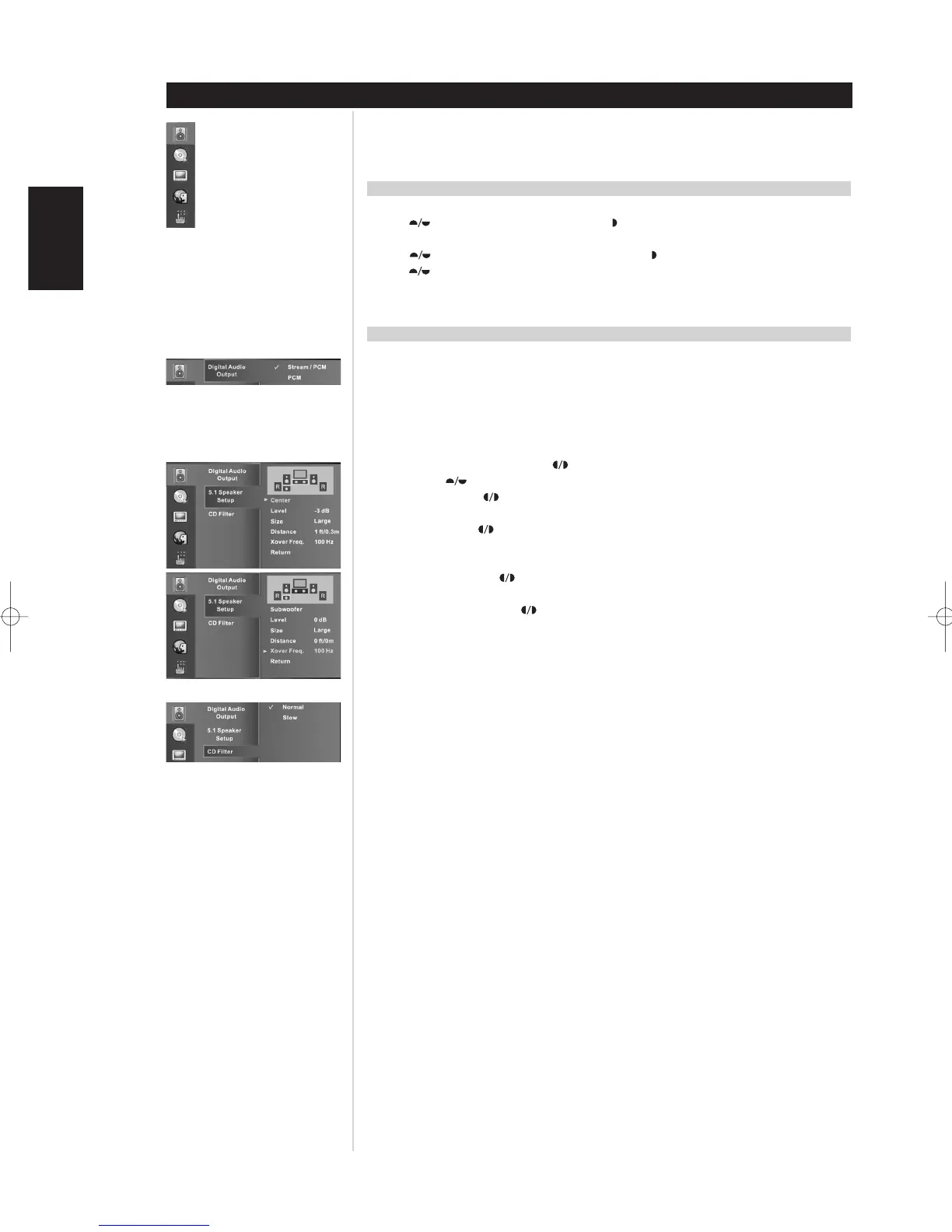
GENERAL OSD NAVIGATION
1 Press SETUP. The Setup menu appears.
2 Use to select the desired option then press to move to the second level. The screen shows the
current setting for the selected item, as well as alternate setting(s).
3 Use to select the second desired option then press to move to the third level.
4 Use to select the desired setting then press ENTER to confirm your selection. Some items require
additional steps.
5 Press SETUP to exit the Setup menu.
AUDIO
DIGITAL AUDIO OUT
Stream/PCM: Select this option if you connect the CD Player’s DIGITAL OUT jacks to a surround
sound processor or other equipment with a Dolby Digital, DTS, or MPEG decoder.
PCM: Select when connected to a two-channel digital stereo preamplifier. CDs encoded in Dolby
Digital or MPEG will be automatically downmixed to two-channel PCM audio.
5.1 SPEAKER SETUP
Speaker selection: Using the arrows select each speaker you want to adjust and then
navigate to the options to change.
Level: Using the arrows, increase or decrease the level of the channel form -10 dB to 0 dB.
The default is 0 dB.
Size: Using the arrows, select the best size representation or your speakers. The high-pass
frequency of the Small speakers will be at the crossover frequency set in the Subwoofer menu. The
channel will be full frequency response when speakers are set to Large.
Distance: Using the arrows, select the distance of the front and rear speakers relative to the
listening position. The Center distance is then set relative to the front speaker’s settings.
Xover Freq.: Using the arrows to adjust the crossover frequency for both Subwoofer and
Small Speakers.
Return: First select Return and then press ENTER on the remote to save your settings once
completed.
CD FILTER
Normal: Select Normal bandwidth to engage the a standard CD high-pass filter slope for playback
of CD music through the two channel stereo audio jacks.
Slow: Select Slow bandwidth to engage a gentle high-pass filter slope for playback of CD music
through the two channel stereo audio jacks. This feature is particularly useful for higher bit rate
recordings.
DEFAULT SETTINGS
Special Features
ENGLISH FRANÇAIS
DEUTSCH
NEDERLANDS
ESPAÑOL
ITALIANO
PORTUGUÊS
SVENSKA
Language
Video
Audio
System Restore
CD/SACD


 To Next Page