15
SACD/CD
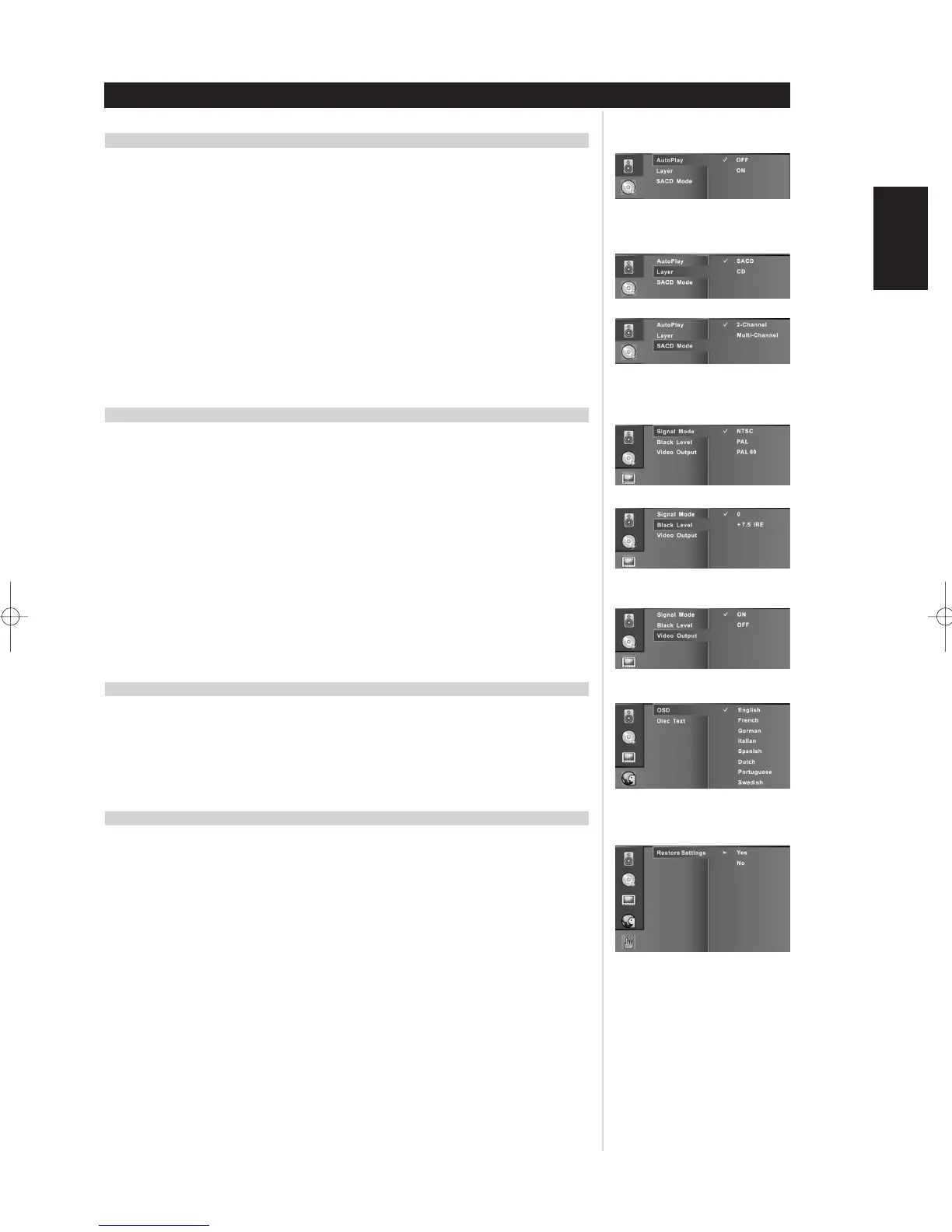
AUTOPLAY:
OFF: Select OFF when you want to press the play button on the remote or front panel to start the
playback sequence. Press ENTER to save the setting.
ON: Select ON when you want the M5 to start playing media when turned on or the disc tray is
closed. Press ENTER on the remote control to save the setting.
SACD/CD LAYER:
SACD: Select SACD when you want the M5 to automatically play the SACD layer of SACD/CD
media. Press ENTER on the remote control to save the setting.
CD: Select CD when you want the M5 to automatically play the CD layer of SACD/CD media. Press
ENTER to save the setting.
SACD MODE:
2-Channel: Select 2-Channel when you want the M5 to automatically play 2-channel SACD audio
at startup. Press ENTER on the remote control to save the setting.
Multi-Channel: Select Multi-Channel when you want the M5 to automatically play all 5.1 SACD
audio at startup. Press ENTER on the remote control to save the setting.
VIDEO
SIGNAL MODE
There are three settings to choose from; NTSC, PAL, and PAL-60. Select one that best matches your
TV and then press ENTER on the remote control to save the setting.
BLACK LEVEL
Personal taste may require the adjustment of the black level for the video you are viewing to either
“0” or “+7.5” IRE. This adjustment sets the reference level for absolute black as seen on your TV
set. Press ENTER on the remote control to save the setting.
NOTES
• The black level defaults are different for each type of M5; NTSC M5 is +7.5 IRE, PAL M5 is 0 IRE.
• Setting the black level incorrectly may result in poor contrast.
VIDEO OUTPUT
ON: Select ON when you want the M5 to automatically output video on the COMPOSITE OUT RCA
jack at startup. Press ENTER on the remote control to save the setting.
OFF: Select OFF when you want the M5 to turn off the output video on the COMPOSITE OUT RCA
jack at startup. Press ENTER on the remote control to save the setting.
LANGUAGE
OSD
Select between the eight languages for the M5’s default OSD. Press ENTER on the remote control
to save the setting.
DISC TEXT (SACD)
If the SACD media supports multiple languages, then the disc text can be scrolled across the VFD
as in the language of choice. Press ENTER on the remote control to save the setting.
SYSTEM RESTORE
RESTORE SETTINGS
Yes: Select Yes and then press ENTER on the remote control.
No: Select No and then press ENTER on the remote control to back out of the Restore Settings
menu.
DEFAULT SETTINGS
Special Features
ENGLISH
FRANÇAISDEUTSCHNEDERLANDSESPAÑOL
ITALIANO
PORTUGUÊS
SVENSKA


 To Next Page