SPEAKER LEVELS
Adjusting the relative balance of your system’s loudspeakers ensures that
surround-sound recordings, whether music or lm, will present the balance
of eects, music, and dialog that the artists intended. Additionally, if your
system incorporates a subwoofer it establishes a correct relationship
between the volume of the subwoofer and the other speakers, and thus of
low-frequencies (bass) to other sonic elements.
USING AN SPL METER
It is quite practical to perform the T 737 level setup routines “by ear”, and
careful work will produce acceptably accurate results. However, the use of
an inexpensive sound-pressure level (SPL) meter, such as Radio Shack part
number 33-2050, makes this task easier, more accurate and more repeatable.
Ownership of such a meter could prove a valuable audio tool.
The SPL meter should be placed at the primary listening position, at
approximately the height of the seated listener’s head. A tripod is helpful
but with a little duct tape almost anything — a pole lamp, music-stand, or
ladder-backed chair, for example — can do as well. Just be sure that no large
acoustically reective surfaces obstruct or are near the microphone element.
Orient the meter with its microphone (usually at one end) pointing straight
up toward the ceiling (not toward the speakers) and ensure that “C”
weighting scale is selected. Set the meter to display 75 dB SPL. On Radio
Shack meters, this necessitates either setting the meter to its 80 dB range
and taking your readings at the -5 point or selecting the 70 dB range and
reading at the +5 point.
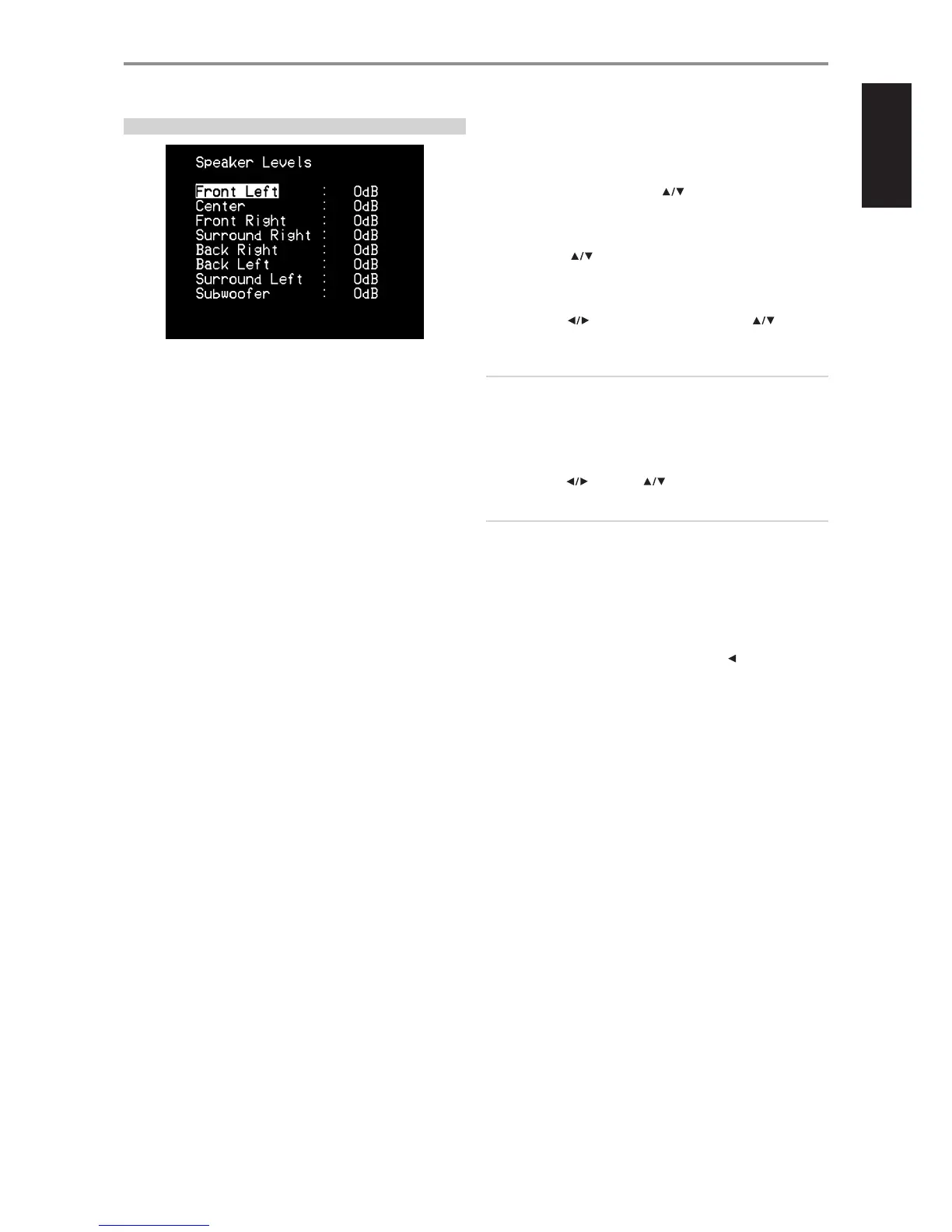
SETTING SPEAKER LEVELS AT TEST MODE
While at “Speaker Levels” menu, press the AVR 3 remote’s “Test” key
activating the T 737’s Speaker Levels balancing test signal. You will hear a
“surf” sound as you step through your speakers beginning with the Front
Left. To test each channel, use AVR 3’s [ ] keys to move up or down
the speaker channels. If you do not hear the test signal, check your speaker
connections or your “Speaker Setup” menu settings.
Use the remote’s [ ] keys to adjust the loudness of the noise output
from the currently playing channel to the required level (it’s usually simplest
to begin with the Front Left). The “level oset” reading on the right will
change by 1 dB increments; ±12 dB adjustment is available. After adjusting
a channel, press [ ] to eect the change in level. Press [ ] to go to
the next channel.
NOTE
If you are balancing levels “by ear”, choose one speaker—usually the
center— as a reference and adjust each of the others in turn to “sound
as loud” as the reference. Be sure that you remain in the primary
listening position while balancing all channels.
To produce the same SPL meter reading (or subjective loudness), use a
combination of [ ] and then [ ] to adjust each speaker.
NOTES
• All speakers must be in their nal locations before level-setting.
• Your subwoofer (if any) should be set with its integral crossover defeated,
or if undefeatable, set to its highest-possible frequency if you are using the
T 737’s Subwoofer output. Final subwoofer-level adjustment “by-ear”, using
music and lm sound material, is frequently useful.
• Due to the eects of room acoustics, matched-pair speakers (front; surround;
back) will not always calibrate to exactly the same level oset readings.
You can exit “Test” mode at any time by pressing the [ ] key, bringing you
back to “Speaker Setup” menu.
OPERATION
USING THE T 737 SETUP MENU
21
ENGLISHFRANÇAISESPAÑOLITALIANODEUTSCHNEDERLANDSSVENSKAРУССКИЙ


 To Next Page