SPECIFICATIONS
• Controls up to 8 devices.
• 44 function keys.
• Learns up to 352 commands.
• Records up to 44 macros with a maximum of 64 commands each.
• Congurable punch-through.
• Key illumination with programmable timeout.
• Upgradable.
• Contains pre-programmed library of NAD remote codes.
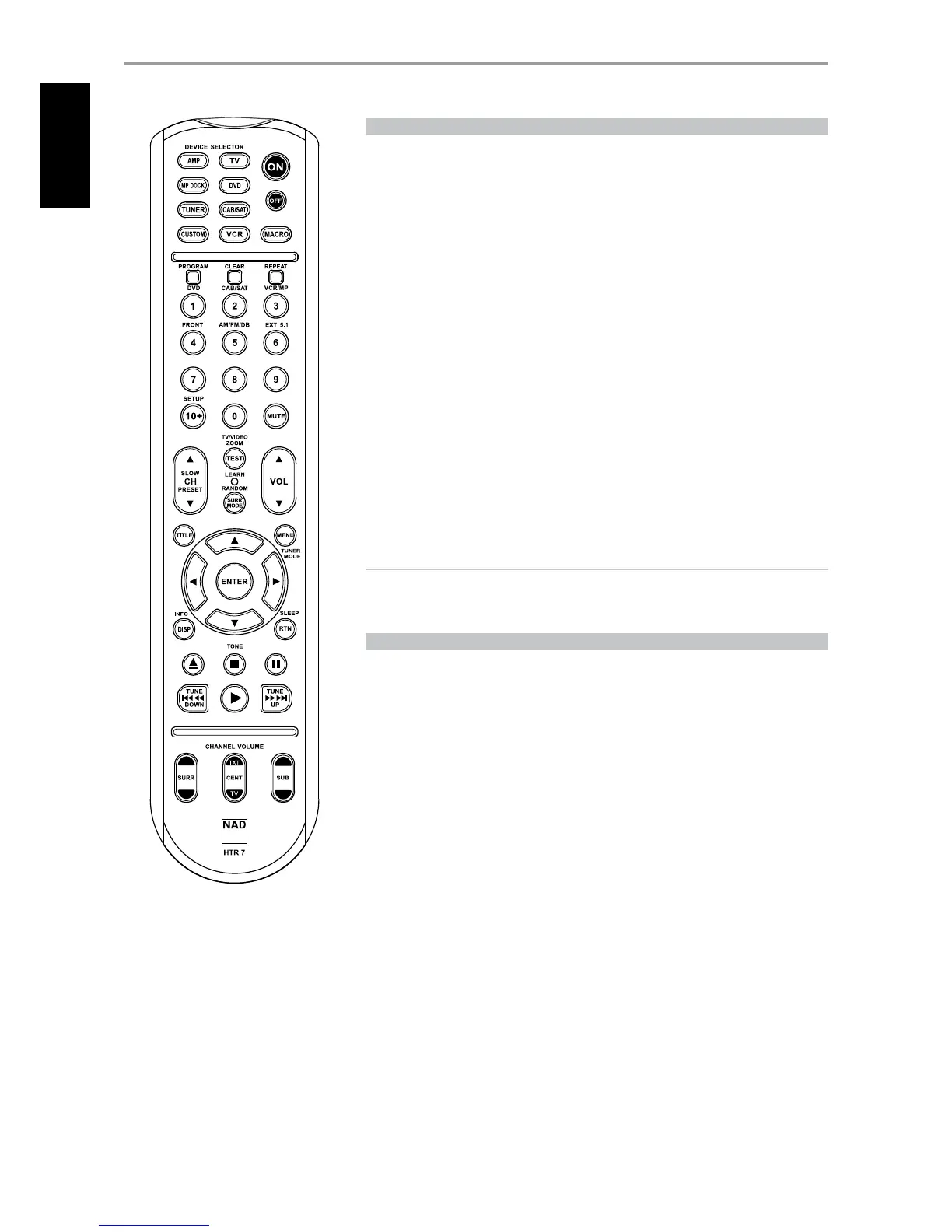
The NAD HTR 7 is ready to operate the VISO FIVE right out of the box, but it is really eight remotes in
one. Each of the 8 Device Selector keys at the top of the handset can call up a new “page” of remote
control codes to be transmitted by the remaining 44 keys. You may “teach” codes from any infrared-
remote controlled component, regardless of brand, to any or all of these.
Obviously, the most logical system is that you teach the codes from your DVD player to the [DVD]
Device Selector “page,” your television’s codes to the [TV] “page,” and so on, but there is no required
scheme: You may load any commands to any key on any page (see “Learning Codes From Other
Remotes,” below).
The HTR 7 is already preprogrammed with a full complement of commands for the VISO FIVE on
its [AMP] Device Selector page, and as well as with library commands to operate most NAD-brand
DVD or CD components on the corresponding Device Selector “pages.” These default commands are
permanent: Even if you teach the HTR 7 new commands to take their place, the underlying library
commands remain in place and can easily be recalled should you add an NAD component to your
system later (see “Delete Mode”, below).
NOTE
For use with the VISO FIVE, it should not be necessary to re-program any keys on the HTR 7 [AMP]
page. However, in order for the HTR 7 to control your specic NAD-brand components you may
need to load one or more dierent code-libraries (see “Loading Code Libraries,” below).
CONTROLLING THE VISO FIVE
The HTR 7 is divided into two main sections. Eight Device Selector keys at the top—[AMP], [DVD],
[TV] and so on—set the handset’s remaining keys to a “page” of commands to control a particular
component. A Device Select key determines only what component the HTR 7 will command; it does
not perform any function on the VISO FIVE. All of the remaining keys are function keys that can “learn”
control codes from virtually any infrared remote controller, allowing you to teach the codes of your
equipment, regardless of brand, to the HTR 7.
However, the HTR 7 is already preprogrammed to operate the VISO FIVE. All of the function keys on the
[AMP] Device Selector “page” perform VISO FIVE functions. (The HTR 7 can also command many other
NAD components, from its [DVD], [CD], [TUNER] and [CUSTOM] pages.)
It is important to note that certain HTR 7 keys perform dierent functions depending on the selected
Device Selector “page.” The color of the Device Selector key-labeling corresponds to the labeling of
the function keys. Most centrally, the orange [AMP] Device Selector “page” corresponds to the orange
input-select labeling above the numeric keys: When the HTR 7’s [AMP] Device Selector page is active,
these keys select the Viso Five inputs. Similarly, the purple [DVD] Device Selector “page” corresponds to
several purple labels, the green [TV] page to green labels, and so on.
SELECTING SOURCES
To directly switch or select sources using the HTR 7, set rst your DEVICE SELECTOR to “AMP”. Press
the corresponding numeric key of the source you want to select (the orange label directly above
the appropriate numeric keypad is the Source allocated for such key). For example, press “2” to select
“Cable/Sat” source mode, “1” to switch to “DVD” mode and so on.
OPERATION
USING THE HTR 7 REMOTE CONTROL
30
ENGLISH FRANÇAIS ESPAÑOL ITALIANO DEUTSCH NEDERLANDS SVENSKA РУССКИЙ



 To Next Page