44
EN
3.1 Connecting your NAC 332 to the NAP 350 power ampliers
Connect two XLR cables (supplied with the NAP 350) from the XLR outputs of the
NAC 332 to the XLR inputs of each NAP 350. Ensure the cables are channel-matched: the
pre-amplier left output is connected to the power amplier driving the left speaker and
the same for the right. Please ensure that the XLR plugs are inserted correctly, which is
achieved with the Naim logo on the plug facing upwards.
Connect the system automation cables (supplied with the NAP 350) between the
NAC 332 Remote Out terminals and the Remote In terminals on the NAP 350.
3.2 Connect your source components
Connect your source components to the NAC 332 inputs as required. The front panel
buttons may be assigned to select any input, see section 4.2
The factory default assignments are:
Tuner Input 3 RCA
Stream Input 7 5 pin DIN
AV Input 4 RCA
Phono Input 6 8 pin DIN
AUX Input 1 XLR
CD Input 8 5 pin DIN
3.3 Powering up
Once you have connected your sources and the NAC 332 to the power ampliers, there
are just a few more simple steps to take before you can power up your NAC 332 and start
playing music.
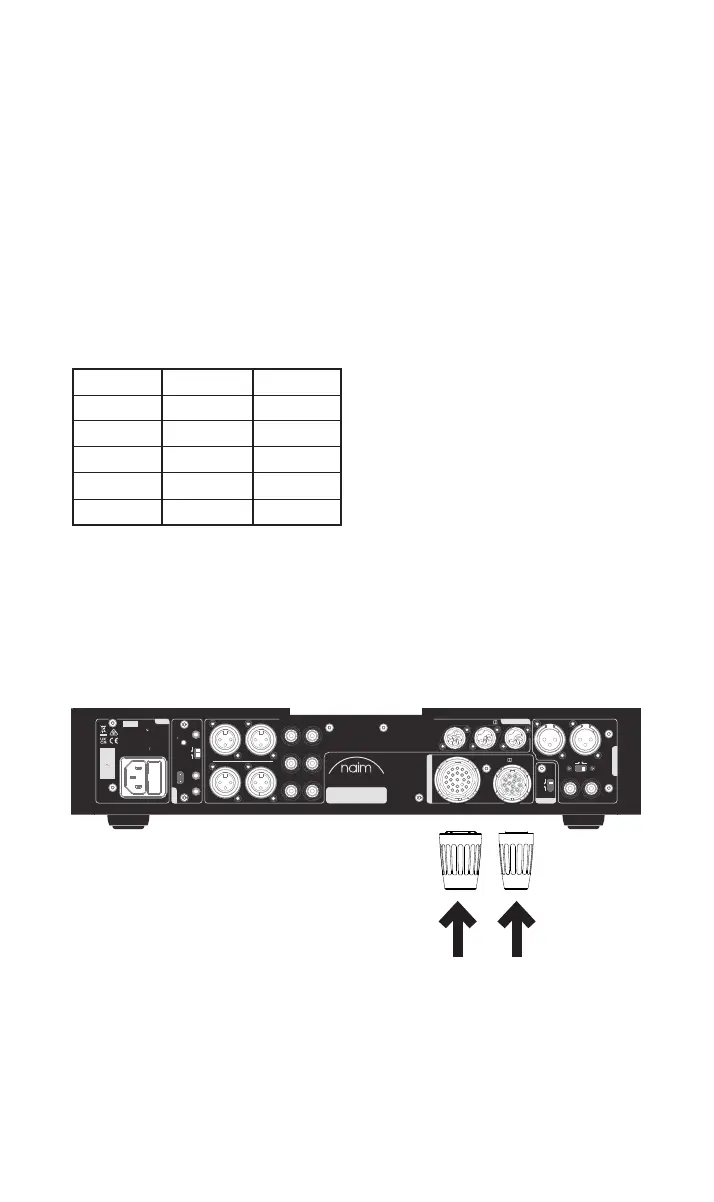
Connect the two supplied link plugs to the NAC 332 power supply upgrade sockets.
WARNING:
Disconnect power before opening
AC ONLY
FUSE RATING: ANTISURGE
1 0-120 V:1 T4AL
2 0-240 V:2 T2AL
FREQUENCY: 0 60Hz5 /
I 70VANPUT POWER:
Power
300 SERIES
PREAMPLIFIER
NAC 332
DESIGNED AND MADE IN THE UK
BY NAIM AUDIO, SALISBURY, SP1 2LN
/ .oNS
Ground
Power Supply Up grade
Preamp Output s
Analogue Inputs
Ground
Default
R L
R
L
RCA
XLR
Refer to User Manual
Type 3
Type 4
Remote
in
Remote
out
Auto
standby
Instant
on
1
2
Control
USB
update
Brightness
Reset/
On
RCA
output
O
3
4
6
Analogue Inputs
R
R
R
L
L
L
5
8
7
1
2
R
L
R
L
Contains FCC ID: 2ACURZIGEE IC ID: 12217A-ZIGEE
Refer to User Manual



 To Next Page