16
HOW TO OPERATE
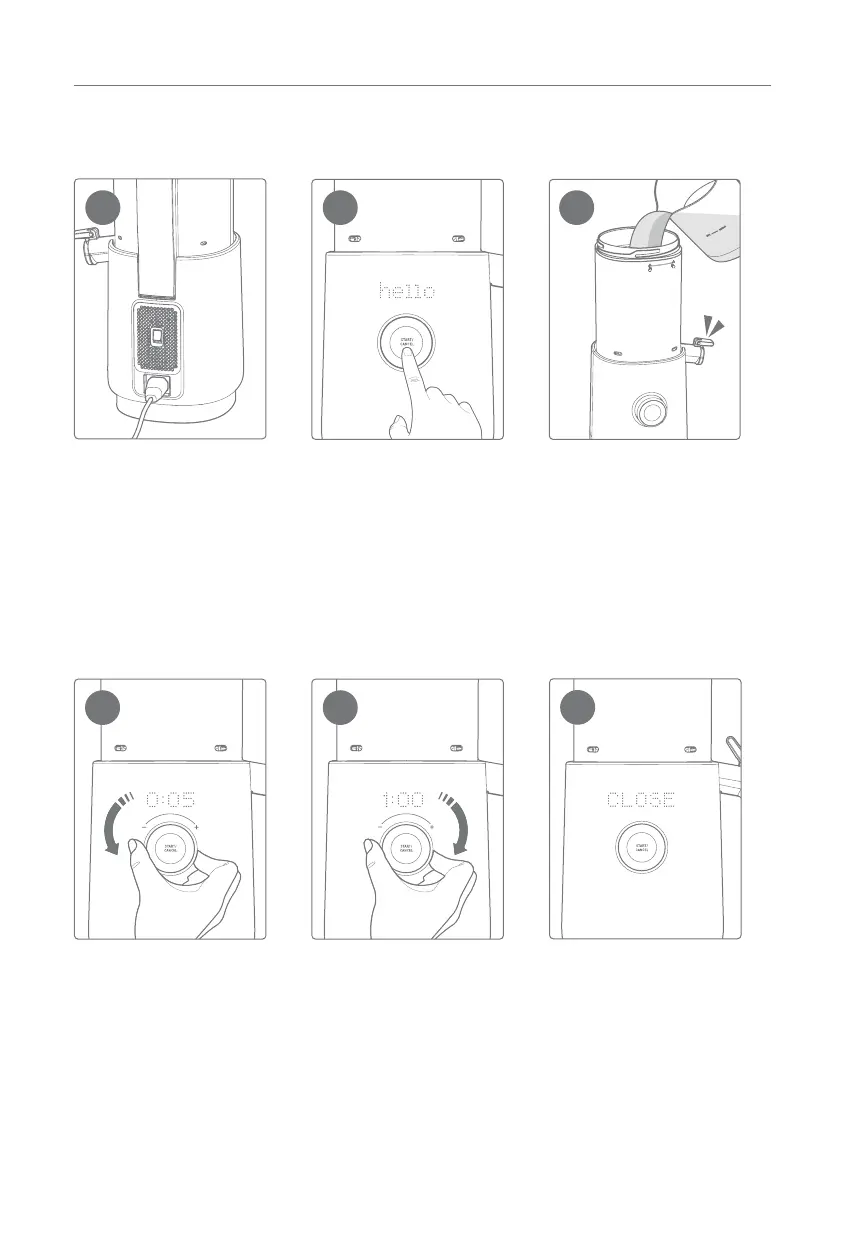
First, plug the power
cord into the back of
the base and then into
a power outlet.
Turn on the power
switch on the back
of the base.
The display will turn on,
and “hello” will show
for 5 seconds. Then,
1:00 minute will appear
on the screen.
Note: If the M1 is idle
for 15 seconds, the
display will show SET
BLEND TIME.
Add all ingredients,
including liquid, into the
lter basket. Note: The
order does not matter.
Make sure the spout is
closed before adding
water or liquid. Do not
ll chamber above the
MAX FILL line.
The default blend time is
set for 1:00 minute.
To adjust the blend time
lower, turn the control
knob counterclockwise
to decrease blend time to
a minimum of 5 seconds.
Note: Decreasing lower
than 0:05 seconds will
automatically engage
the SPIN ONLY cycle.
To adjust the blend
time higher, turn the
control knob clockwise
to increase time to a
maximum run time of
1:00 minute.
1
M1Illustrations for placement/linked to User Manual.
Do not scale line weights.
32
4 5
Note: Make sure the
spout is closed, blending
will not start if the spout
is open, the display
will prompt the user to
CLOSE SPOUT.
6
M1Illustrations for placement/linked to User Manual.
Do not scale line weights.


 To Next Page