WWW.NANLITE.COM
37
⑬EXPLOSION MANUAL
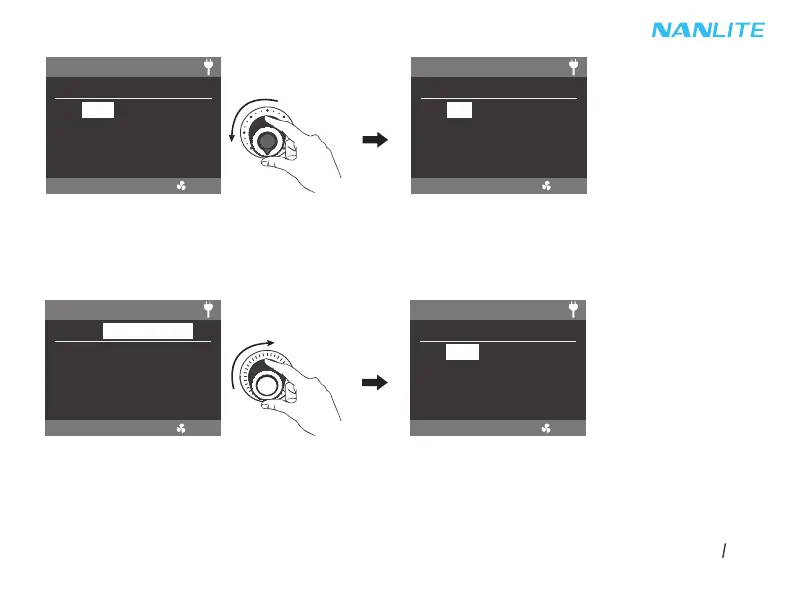
Rotate the right knob to select DIM, CCT or DECAY (range 1-100), and rotate the left knob to
set the corresponding parameters, press the right knob to trigger the explosion effect.
Rotate the left knob to set the corresponding parameters.
Rotate the right knob to select DIM, CCT or DECAY.
EFFECT MODE
CH: 512
EFFECT: EXPLOSION AUTO
SMART
DIM: 100%
CCT: 5600K
SPEED: 50
DECAY: 50
EFFECT MODE
CH: 512
EFFECT: EXPLOSION AUTO
SMART
DIM: 99%
CCT: 5600K
SPEED: 50
DECAY: 50
EFFECT MODE
CH: 512
EFFECT: EXPLOSION MA
DIM: 100%
CCT: 5600K
DECAY: 50
SMART
PRESS RIGHT KNOB TO TRIGGER
SMART
PRESS RIGHT KNOB TO TRIGGER
EFFECT MODE
CH: 512
EFFECT: EXPLOSION MA
DIM: 100%
CCT: 5600K
DECAY: 50


 To Next Page
 Loading...