WWW.NANLITE.COM
42
SMART
PRESS “MENU” TO RETURN
MENU
FAN HAS SWITCHED
OFF, MAX POWER
OUTPUT IS 15%
CH: 512
SMART
MENU
SMART
FULL SPEED
LOW SPEED
OFF
CH: 512
PRESS “MENU” TO RETURN
SMART
MENU
SMART
FULL SPEED
LOW SPEED
OFF
CH: 512
PRESS “MENU” TO RETURN
MENU
SMART
CH: 512
OUTPUT MODE
ADDRESS/DMX
WIRELESS CONTROL
FAN CONTROL
ROTATE SCREEN
3.4 FAN CONTROL
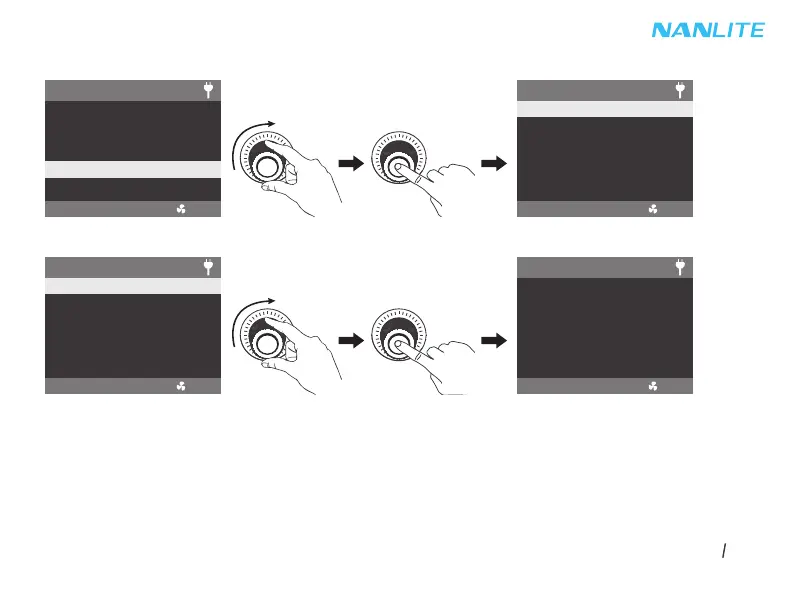
Rotate the right knob to FAN CONTROL, and press the right knob to enter the secondary menu.
Rotate the right knob to select SMART, FULL SPEED, LOW SPEED or OFF, and press the right knob to set.
Note: When the fan is in off state, the fan will stop working, at this moment the maximum power output of the fixture is 15%.
When the fan is in LOW SPEED state, the maximum power output of the fixture is 50%.
When the fan is in SMART or FULL SPEED state, the maximum power output of the fixture is 100%.



 To Next Page