WWW.NANLITE.COM
46
MENU
SMART
CH: 512
FAN CONTROL
ROTATE SCREEN
SCREEN BRIGHTNESS
LANGUAGE
FIRMWARE UPDATE
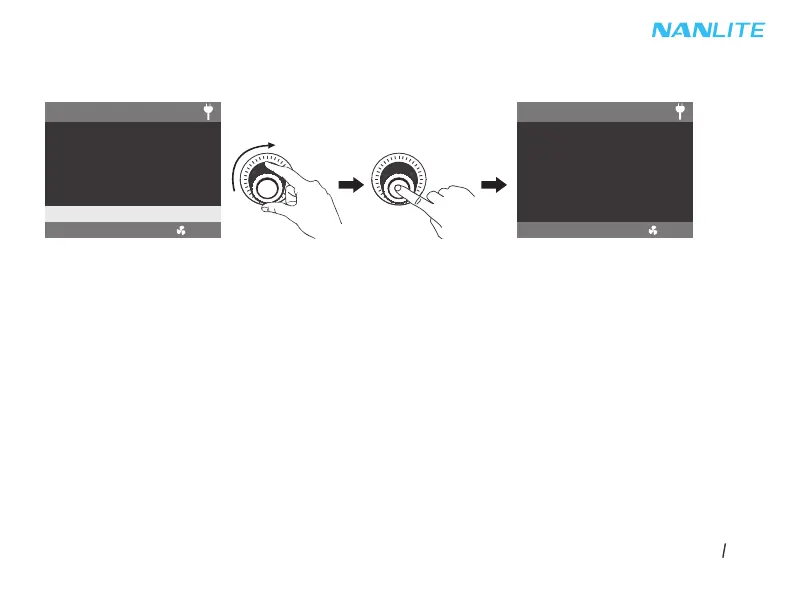
·Download the firmware file and put into the root directory of the USB drive, and insert the USB drive to the USB port.
3.8 FIRMWARE UPDATE
Rotate the right knob to FIRMWARE UPDATE, press the right knob to enter the interface to search for the firmware files.
Note:
①Please do not rename the firmware file.
②Ensure the USB drive is formatted to FAT, FAT32 or exFAT.
③If prompted that "NO FIRMWARE FOUND", please check whether the firmware file is correct, whether the firmware
file is stored in the root directory of the USB drive, or whether the USB drive format is FAT, FAT32 or exFAT.
④If all the above steps are done and the firmware file still cannot be found, please try to format the USB drive again.
⑤If the light fixture still cannot identify the USB drive, please replace the USB drive.
MENU
CH: 512
SEARCHING FOR
FIRMWARE FILE
. . . . . .
SMART
PRESS “MENU” TO RETURN



 To Next Page