WWW.NANLITE.COM
39
⑭WELDING
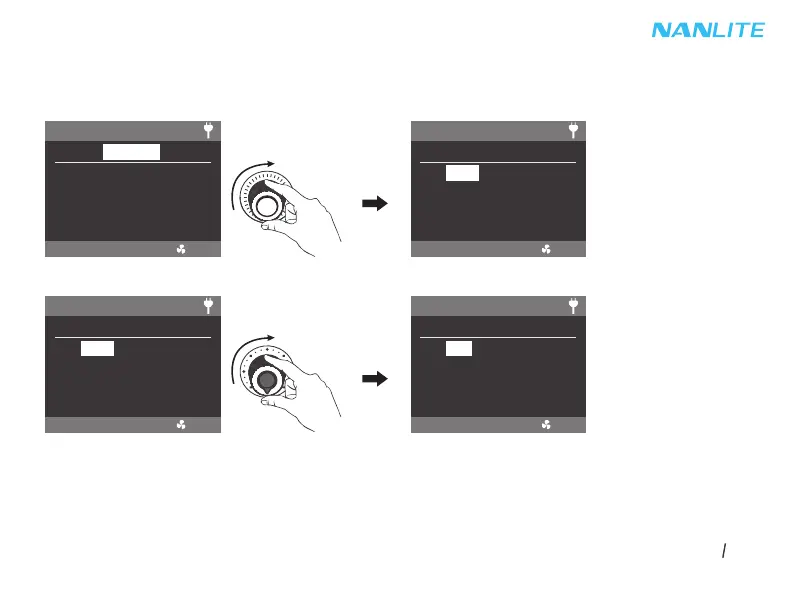
Rotate the right knob to select DIM, CCT, SPEED (range: 1-100) or PAUSE, and rotate the left knob
to set the corresponding parameters.
NOTE: The PAUSE can be set on/off. When the PAUSE is on, the welding effect will pause.
Lighting effects and additional functionality will be probably updated with later firmware version.
Detailed information is subject to the instruction of firmware function.
Rotate the right knob to select DIM, CCT, SPEED or PAUSE.
Rotate the left knob to set the corresponding parameters.
EFFECT MODE
CH: 512
EFFECT: WELDING
SMART
DIM: 100%
CCT: 5600K
SPEED: 50
PAUSE: OFF
EFFECT MODE
CH: 512
EFFECT: WELDING
SMART
DIM: 100%
CCT: 5600K
SPEED: 50
PAUSE: OFF
EFFECT MODE
CH: 512
EFFECT: WELDING
SMART
DIM: 100%
CCT: 5600K
SPEED: 50
PAUSE: OFF
EFFECT MODE
CH: 512
EFFECT: WELDING
SMART
DIM: 99%
CCT: 5600K
SPEED: 50
PAUSE: OFF


 To Next Page
 Loading...