NAPCO Security Group
NAPCO Gemini C-Series Control Panel Programming Instructions--Volume 1
Page 28 Programming Instructions, Volume 1
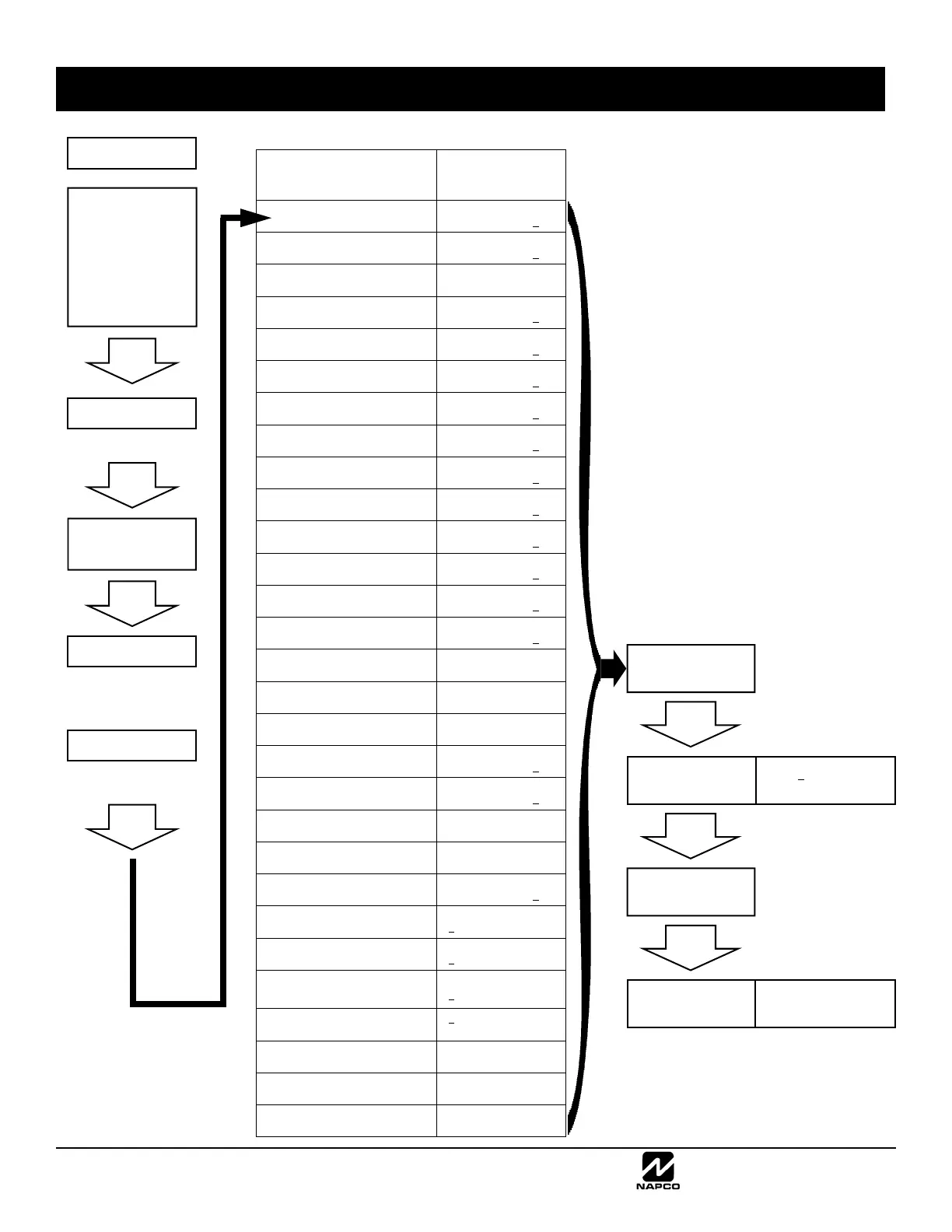
DESCRIPTION
EASY MENU-DRIVEN
PROGRAM MODE
KEYPAD DISPLAY
Total Number of Fire Zones in Area 1
(Seen during initial configuration only)
#of Zns in Area1
Enter # Zones 08
Total Number of Burg Zones in Area 2
(Seen during initial configuration only)
#of Zns in Area2
Enter # Zones 00
Local or Central Station Reporting System
(Seen during initial configuration only)
Report All Zones
To Central? Y/N
Exit/Entry Zones in Areas 2-8
(Seen during initial configuration only)
Exit/Entry Zones
Enter Zone # 00
Interior Zones
(Seen during initial configuration only)
Interior Zones
Enter Zone # 00
24 Hour Zones in Area 2 and Up
(Seen during initial configuration only)
24 Hour Zones
Enter Zone # 00
Chime Zones in Area 2 and Up
(Seen during initial configuration only)
Chime Zones
Enter Zone # 00
Chime 2 Zones in Area 2 and Up
(Seen during initial configuration only)
Chime 2 Zones
Enter Zone # 00
Exit/Entry 2 Zones in Area 2 and Up
(Seen during initial configuration only)
Exit/Entry 2 Zns
Enter Zone # 00
50mS Loop Response Zones
(Seen during initial configuration only)
50mS Loop Zones
Enter Zone # 00
Burg Module PGM1 Output Activated on
Alarm Zones (Seen during initial configuration only)
Aux Output Zones
Enter Zone # 00
Sensor Watch Zones
(Seen during initial configuration only)
Sensor Watch Zns
Enter Zone # 00
Keypad Sounder On Alarm Zones
(Seen during initial configuration only)
KP Sndr Alrm Zns
Enter Zone # 00
Auto Bypass Re-entry Zones
(Not evaluated by UL) (Seen during initial configuration only)
Auto Byp REnt Zn
Enter Zone # 00
Enable No EOLR Zones
(Seen during initial configuration only)
Enable No EOLR
Zones Y/N
Enable Telco Line Fault Test?
(Seen during initial configuration only)
Enable Telco
Line Test? Y/N
Enable Burg Bell Chirp on Keyfob?
(Seen during initial configuration only)
Enable Burg Out
Chirp? Y/N
Number of Fire Keypads in Area 1
(Seen during and after initial configuration)
# Area 1 Keypads
Enter # KPs 01
Number of Keypads in Area 2
(Seen during and after initial configuration)
# Area 2 Keypads
Enter # KPs 00
Central Station Receiver 1 Telephone
Number
(Seen during and after initial configuration)
Central Phone #
_
Central Station Receiver 1 Account
Number (Seen during and after initial configuration)
Central Station
Account # (_ )
Central Station Receiver 1 Format
(Seen during and after initial configuration)
See WI for Info
Rcvr Format (·)
Enter User Codes
(Seen during and after initial configuration)
Enter user code
001 123 - 1-
RF Transmitter/SLC Points
(Seen during and after initial configuration)
Zn# DevID+CS P R
01- 000000:0-0 0
Keyfob Transmitters as Arm/Disarm &
Control Devices
(Seen during and after initial
configuration)
KF A XMIT#+CS OP
01-0 000000:0 00
Enter Zone Descriptions ("cell phone" style
entry) (Seen during and after initial configuration)
001-
Enter Date
(Seen during and after initial configuration)
Enter Date
(_ / / )
Enter Time
(Seen during and after initial configuration)
Enter Time
(_ : )
Enter a Dealer Keypad Program Code
(Seen during and after initial configuration)
Dealer Code
_
Return to
Normal Operation
SYSTEM NORMAL
11/01/14 12:05 AM
DIRECT ADDRESS
PROGRAM MODE
0000 C3 H
ADDR DATA
Press C button
(at any time)
Press C button
(at any time)
Unlock the GEMC-FK1
Fire Keypad by pressing
any of the following
codes:
Master Security
Code
Dealer Keypad
Program Code
...then press ENTER
(press MENU)
SYSTEM NORMAL
11/01/14 12:05 AM
KEYPAD UNLOCKED
ZONE DIRECTORY
Enters the Fire Keypad
(GEMC-FK1)
Function Menu
(press MENU until the
following appears:)
CF DEALER
PROG MODE
(press ENTER)
EASY MENU-DRIVEN PROGRAM MODE-- FIRE KEYPAD
...press NEXT to
scroll through the
Easy Menu...



 To Next Page
 Loading...