3
How to live stream via Screen Recorder 4 using
NS110
Screen Recorder 4 that comes with the NS110 is a feature-rich, easy-to-use live streaming
software. Before starting to use the software provided, please be sure to complete the
connection process section of the Quick Start Guide.
1. The software only supports Windows 10, 8.1, 7 SP1 (Windows 10 64-bit is recommended)
2. The NS110 package only provides the software serial number, and not the software CD.
3. The accompanying Screen Recorder 4 cannot be updated with the ocial version of Cyberlink.
Downloading and Installation
First, go to Narvitech's ocial website, and then open the menu on the top right corner.
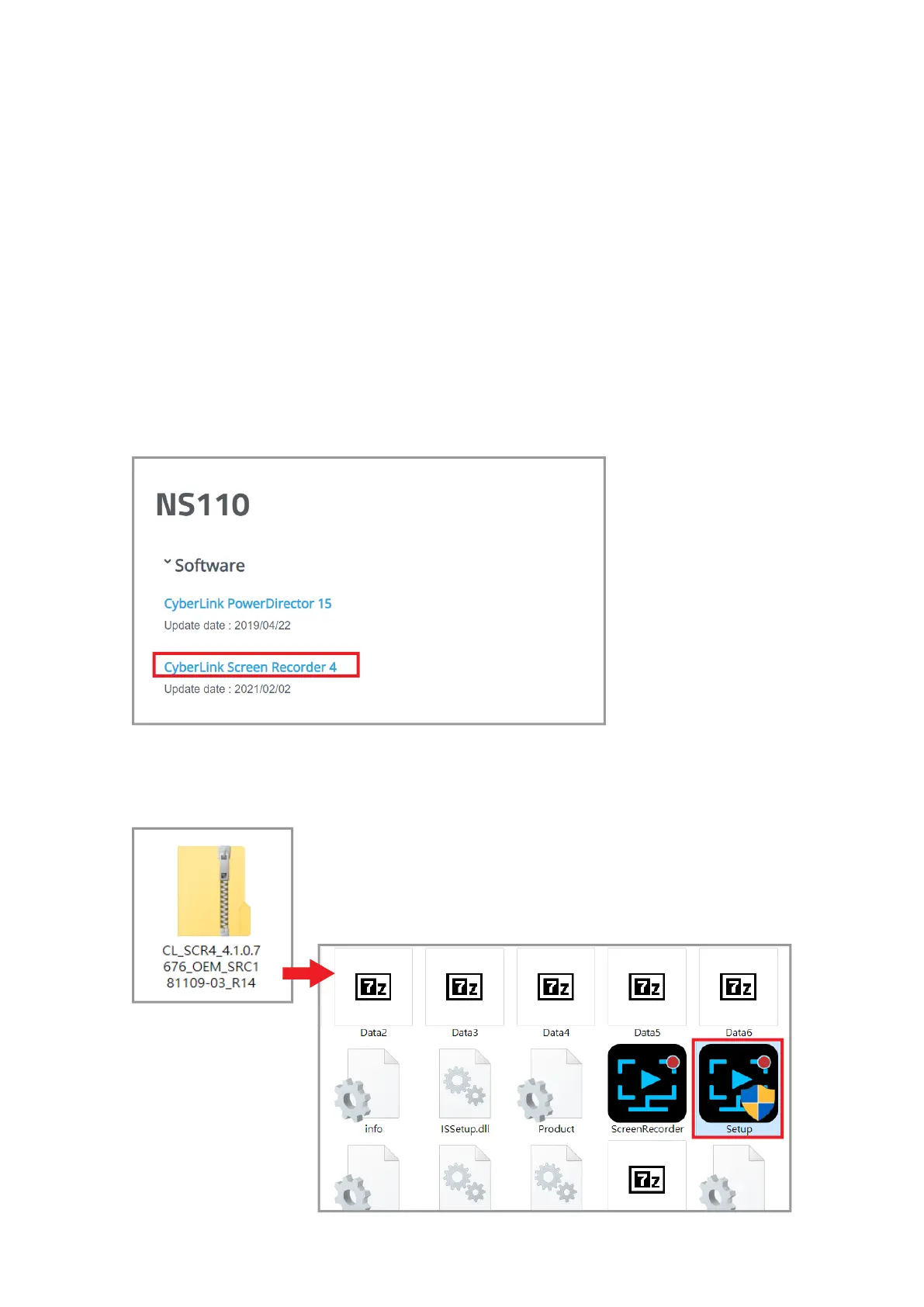
Go to [Support] > [Download] > [NS110] > [Software], and click on Cyberlink Screen
Recorder 4 to download the application.
After entering the page, scroll
up to NS110 to see the
Once the download is complete, extract the le and click on the folder to open the "Setup"
application.



 To Next Page