6
Start streaming
Once the hardware connections and software settings are completed, you're ready to go
live. Please be sure to test before the live broadcast (e.g. create a separate account for live
testing) in order to ensure that the resolution, volume, and quality of the live broadcast are
set to your standards.
1. To livestream on Youtube, your account must be activated rst.
2. Youtube activation process: [Youtube homepage] > [camera icon on the top right corner of the
page] > [Go Live], verify a working phone number and wait for 24 hours to activate an account.
3. Facebook Live only supports streaming resolutions up to 720p.
4. If you want to go live on other platforms, you will need to enter the URL and streaming key.
5. You can go live on multiple platforms simultaneously.
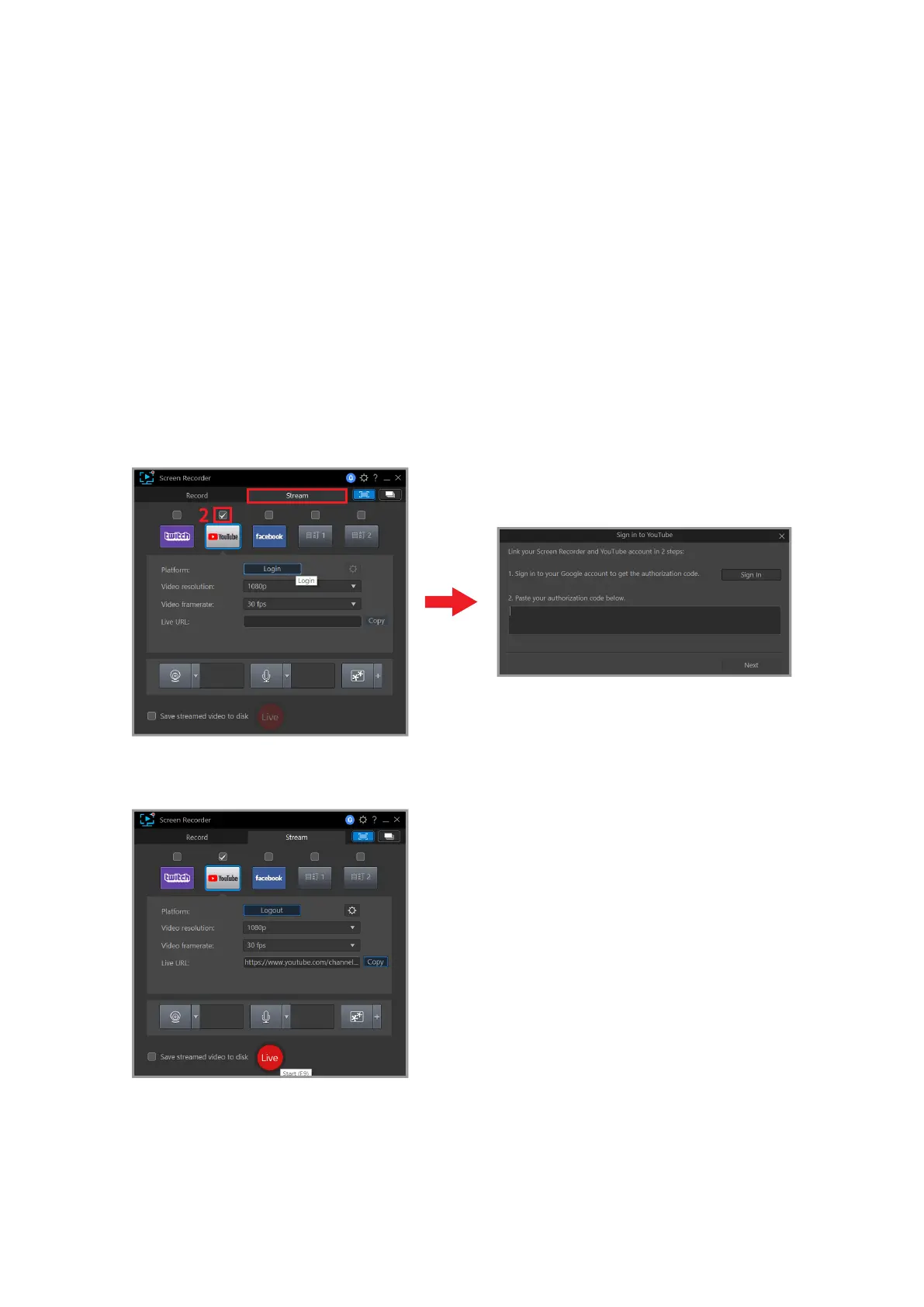
First, click on the Stream Button and choose one of the streaming platforms of Twitch,
Youtube, Facebook. After selecting, follow the instructions below to begin going live.
The example below will be shown using Youtube as a streaming platform.
1
If your login is successful, you will be able to see the screen below.



 To Next Page