Chapter 2 Hardware Overview of the NI 78xxR
© National Instruments Corporation 2-23 R Series Multifunction RIO User Manual
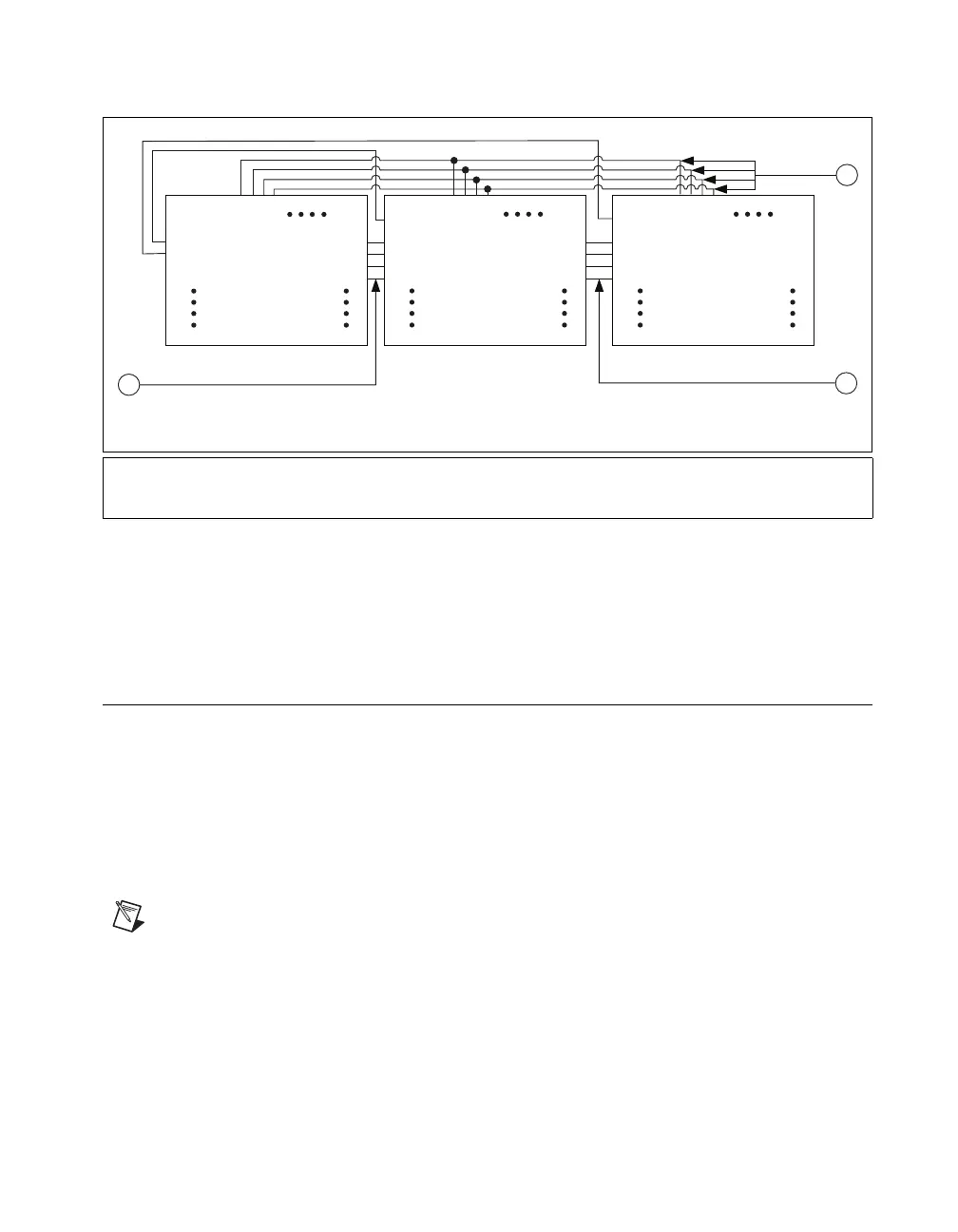
Figure 2-12. PXI Star Trigger Connections in a PXI Chassis
Refer to the PXI Hardware Specification Revision 2.1 and PXI Software
Specification Revision 2.1 at
www.pxisa.org for more information about
PXI triggers.
Switch Settings (NI 781x R/783x R Only)
Refer to Figure 2-13 for the location of switches on the NI PCI-781xR and
Figure 2-14 for the location of switches on the NI PXI-781xR. Refer
to Figure 2-15 for the location of switches on the NI PCI-783xR and
Figure 2-16 for the location of switches on the NI PXI-783xR. For normal
operation, SW1 is in the OFF position. To prevent a VI stored in Flash
memory from loading to the FPGA at power up, move SW1 to the
ON position, as shown in Figure 2-17.
Note SW2 and SW3 are not connected.
1 Shared Local Bus Lines between Slot 2 and Slot 3
2 Shared Trigger Lines between Slot 2, Slot 3, and Slot 4
3Shared Local Bus Lines between Slot 3 and Slot 4
Lbr0
Lbr1
Lbr2
Lbr3
PXI_Star*
Slot 2
Lbl0
Lbl1
Lbl2
Lbl3
Lbr0
Lbr1
Lbr2
Lbr3
PXI_Star
Slot 3
Lbl0
Lbl1
Lbl2
Lbl3
Lbr0
Lbr1
Lbr2
Lbr3
PXI_Star
Slot 4
3
1
2
* A Slot 2 device ties the PXI_Star Line to the PXI 10 MHz clock
Lbl0
Lbl1
Lbl2
Lbl3
Trigger 0
Trigger 1
Trigger 2
Trigger 3
Trigger 0
Trigger 1
Trigger 2
Trigger 3
Trigger 0
Trigger 1
Trigger 2
Trigger 3



 To Next Page
 Loading...