Contents
Introduction...............................................................................................................................2
What You Need to Get Started..........................................................................................2
Unpacking.........................................................................................................................3
Software Programming Choices....................................................................................... 3
Safety Information............................................................................................................ 3
Installing and Configuring........................................................................................................ 5
Installing the Software...................................................................................................... 5
Installing the Hardware.....................................................................................................5
Configuring the Module....................................................................................................6
Hardware Overview..................................................................................................................6
PXIe-6672 Front Panel..................................................................................................... 8
Hardware Features.......................................................................................................... 10
Clock Generation and Routing........................................................................................11
Routing Triggers............................................................................................................. 13
Calibration.............................................................................................................................. 21
Factory Calibration......................................................................................................... 21
Additional Information................................................................................................... 22
Compliance............................................................................................................................. 22
Electromagnetic Compatibility Information...................................................................23
Legal Information................................................................................................................... 23
Limited Warranty............................................................................................................ 24
Copyright........................................................................................................................ 25
Trademarks......................................................................................................................26
Patents.............................................................................................................................27
Export Compliance Information..................................................................................... 27
WARNING REGARDING USE OF NATIONAL INSTRUMENTS PRODUCTS...... 27
Introduction
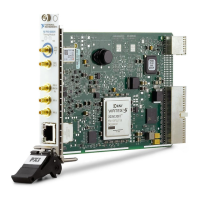
The PXIe-6672 can generate and route clock and trigger signals between devices in a single
chassis or multiple chassis, providing a method to synchronize multiple devices in a PXI
Express system.
What You Need to Get Started
To set up and use the PXIe-6672, you need the following items:
• PXIe-6672 Timing and Synchronization Module
• PXI Express chassis
• PXI Express embedded controller or a desktop computer connected to the PXI Express
chassis using MXI-Express hardware.
• PXI EMC filler panels, National Instruments part number 778700-01
• NI-Sync driver
2
| ni.com | PXIe-6672 User Manual


 To Next Page
 Loading...