www.naxa.com Page 7
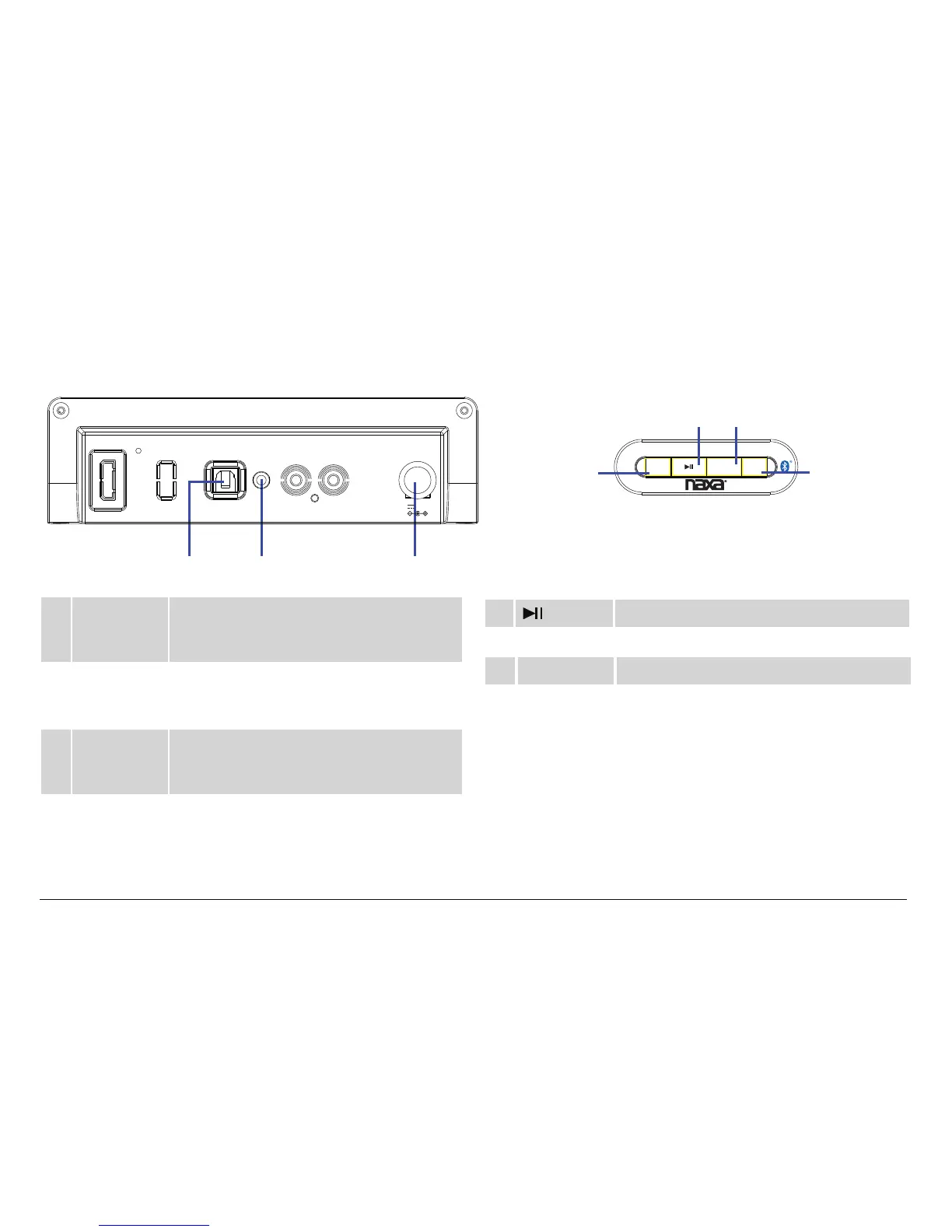
Rear View
4 OPTICAL IN
connector
Optical In mode. Digital optical audio
connection for devices with optical audio
output.
5 AUX IN
connector
AUX IN mode. 3.5mm stereo connection
for devices with 3.5mm line-out or head-
phone output.
6
7
Power
Socket
Connector for the included power adapter.
8
STANDBY/
SOURCE
button
Press and hold to turn the unit Off, press
againto turn it back on.
Press to change the active connection mode
(Bluetooth, Optical IN, AUX IN)
9 VOL– button
Press to decrease the volume.
10
VOL+ button Press to increase the volume.
button
Press to start, pause, or resume playback.
Top View
5. AUX IN
6. DC IN jack
4. OPTICAL IN
O P T IC A L I N
A UX I N
D C 5 .8 V, 2A
VOL+VOL-
S T A NDB Y /
S O UR C E
7. STANDBY/SOURCE
button
8. Play/Pause button
9. Volume down button
10. Volume up button


 To Next Page