C
C
B
1. Purchase a new battery
If you and your service provider have agreed you will replace the battery for your
nbn
™
connection box, you should buy a replacement battery that is equivalent to
the original. You can purchase the battery at most specialist battery retailers –
you can find a list at nbn.com.au/battery along with other useful information.
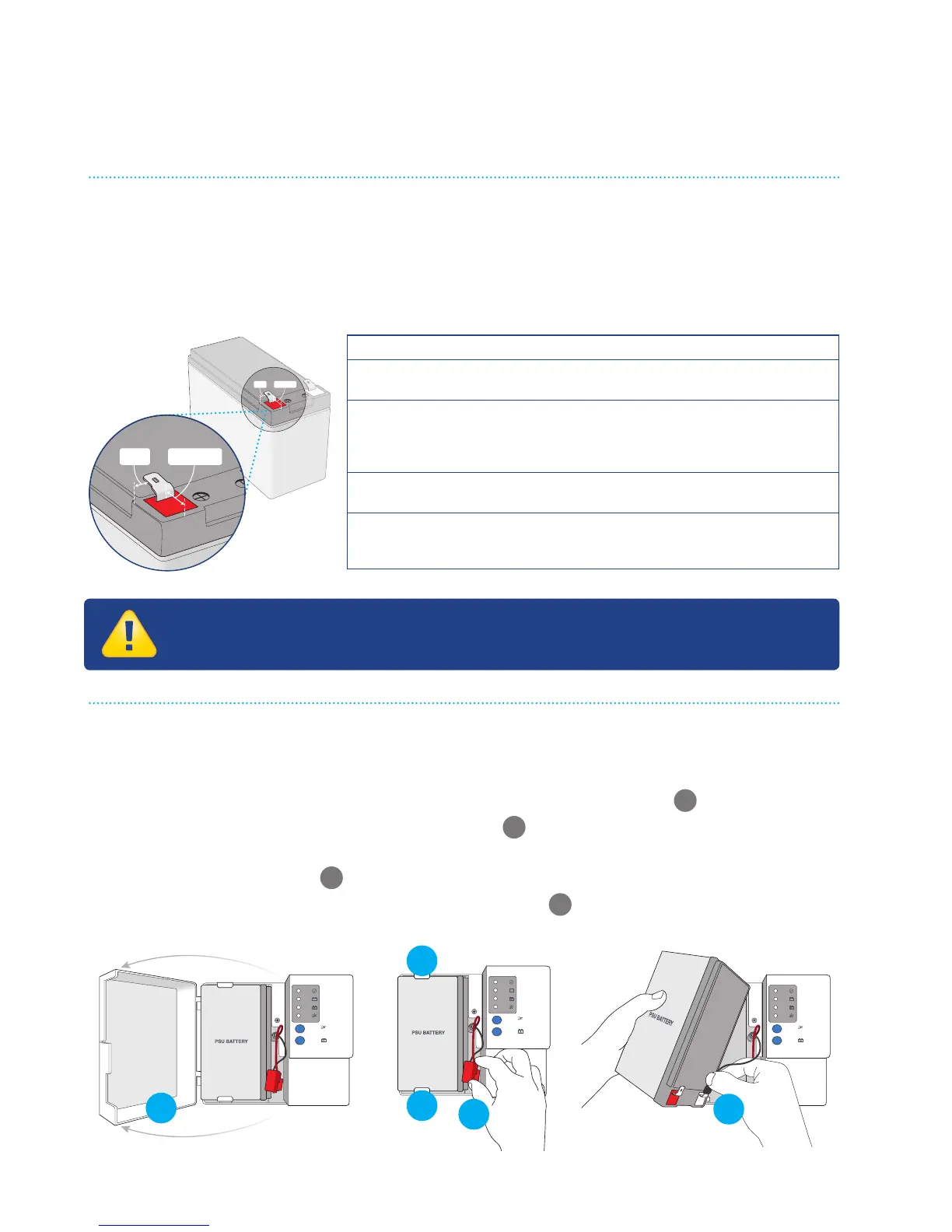
2. Remove the old battery
• Turn o at the power point and disconnect the power supply from the
mains power.
• Open the front cover of the Power Supply with Battery Backup
A
.
• Disconnect the red ‘+’ plug from the battery
B
.
• Push the tabs holding the battery, one above and one below, outward and
then lift the battery out
C
.
• Disconnect the black ‘–’ plug and remove battery
D
.
How to replace your backup battery
Specifications
Battery Type 12V 7.0-7.2Ah 6 Cell VRLA Sealed Lead
Acid Battery
Dimensions 94mm (H) x 151mm (W) x 65mm (D)
(excl. terminals)
100mm (H) x 151mm (W) x 65mm (D)
(incl. terminals) (all tolerances +/- 1mm)
Terminal Type Spade-type. Quick disconnect ‘F2’
6.35mm (W) x 0.81mm (Thickness)
Terminal position
relative to the
battery case
8mm from the battery sides, 12 - 24mm from
the battery end. Positive terminal positioned
on the side depicted in the drawing.
12-24MM8MM



 To Next Page