© 2015 nbn co ltd | ABN 86 136 533 741
Identifying your
nbn
™
supplied equipment
nbn
™
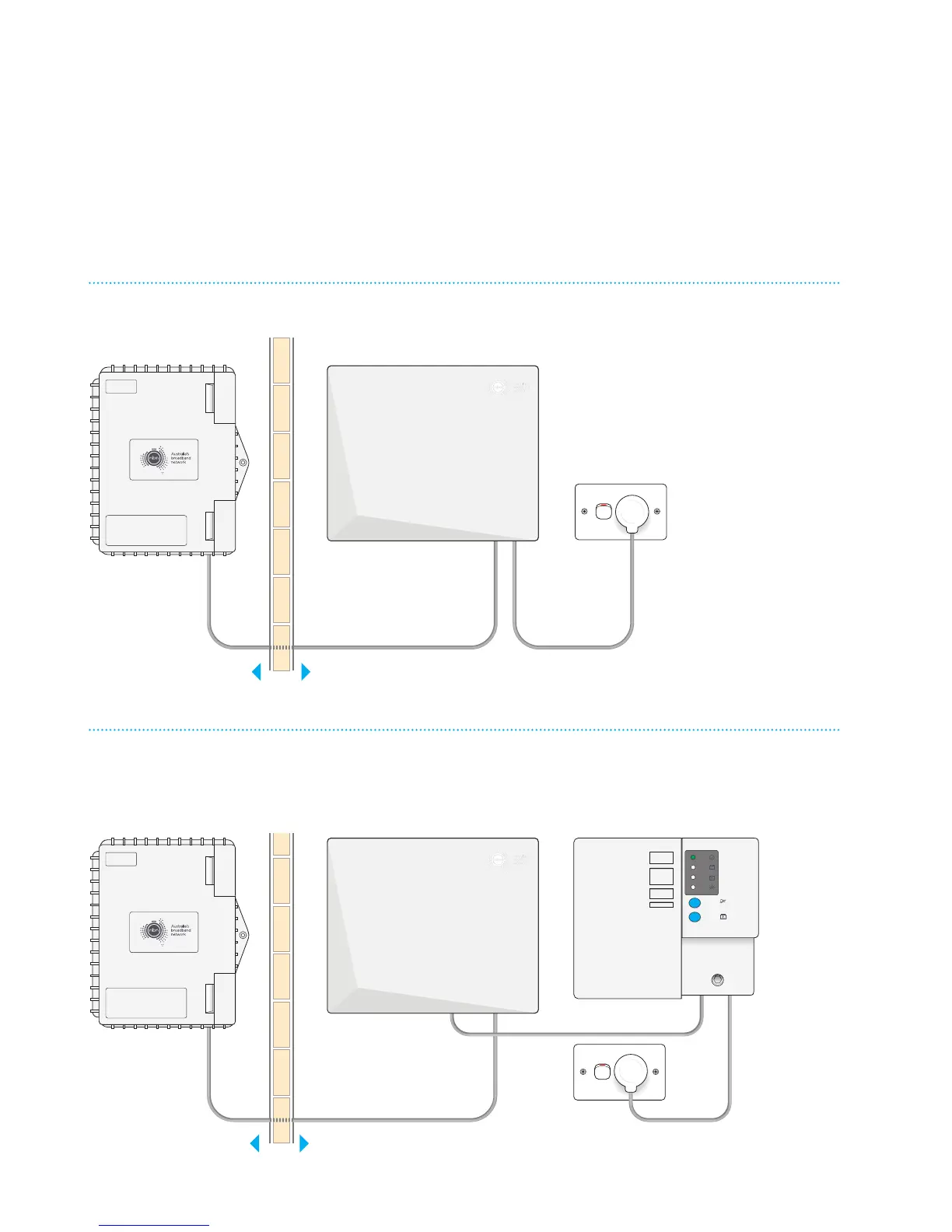
supplied equipment may be installed several dierent ways depending on your
building type and requirements. These diagrams show the three main combinations
of equipment and will help you identify what each piece of equipment is for.
With nbn
™
connection box cover and standard power supply
Contact your service provider for
assistance with this equipment
Proper ty of NBNCo - Do not Re move
Contact your service provider for
assistance with this equipment
Proper ty of nbn - Do not Remove
SYSTEM
STATUS
BATTERY
POWER
REPLACE
BATTERY
ALARM
SILENCE
ALARM
SILENCE
BATTERY
EMERGENCY
USE
Proper ty of NBNCo - Do not Re move
Contact your service provider for
assistance with this equipment
Proper ty of nbn - Do not Remove
SYSTEM
STATUS
BATTERY
POWER
REPLACE
BATTERY
ALARM
SILENCE
ALARM
SILENCE
BATTERY
EMERGENCY
USE
SYSTEM
STATUS
BATTERY
POWER
REPLACE
BATTERY
ALARM
SILENCE
ALARM
SILENCE
BATTERY
EMERGENCY
USE
Proper ty of NBNCo - Do not Re move
Contact your service provider for
assistance with this equipment
Proper ty of nbn - Do not Remove
SYSTEM
STATUS
BATTERY
POWER
REPLACE
BATTERY
ALARM
SILENCE
ALARM
SILENCE
BATTERY
EMERGENCY
USE
Contact your service provider for
assistance with this equipment
Proper ty of NBNCo - Do not Re move
Contact your service provider for
assistance with this equipment
Proper ty of nbn - Do not Remove
nbn
™
connection box
Inside your
premises
Outside your
premises
nbn
™
utility box
*
With nbn
™
connection box cover and Power Supply
with Battery Backup
Contact your service provider for
assistance with this equipment
Proper ty of NBNCo - Do not Re move
Contact your service provider for
assistance with this equipment
Proper ty of nbn - Do not Remove
SYSTEM
STATUS
BATTERY
POWER
REPLACE
BATTERY
ALARM
SILENCE
ALARM
SILENCE
BATTERY
EMERGENCY
USE
Proper ty of NBNCo - Do not Re move
Contact your service provider for
assistance with this equipment
Proper ty of nbn - Do not Remove
SYSTEM
STATUS
BATTERY
POWER
REPLACE
BATTERY
ALARM
SILENCE
ALARM
SILENCE
BATTERY
EMERGENCY
USE
SYSTEM
STATUS
BATTERY
POWER
REPLACE
BATTERY
ALARM
SILENCE
ALARM
SILENCE
BATTERY
EMERGENCY
USE
Proper ty of NBNCo - Do not Re move
Contact your service provider for
assistance with this equipment
Proper ty of nbn - Do not Remove
SYSTEM
STATUS
BATTERY
POWER
REPLACE
BATTERY
ALARM
SILENCE
ALARM
SILENCE
BATTERY
EMERGENCY
USE
Contact your service provider for
assistance with this equipment
Proper ty of NBNCo - Do not Re move
Contact your service provider for
assistance with this equipment
Proper ty of nbn - Do not Remove
nbn
™
utility box
*
nbn
™
connection box
Power Supply with
Battery Backup
Inside your
premises
Outside your
premises



 To Next Page