AUDIO
POWER
MUTE
R.LIST
RECODER
MOUSE
DEL
#
HOME
NICAM/A2
ANGLE
LANG
D.SETUP D.MENU
A-B
REPEAT
S.MENU
T.SHIFT
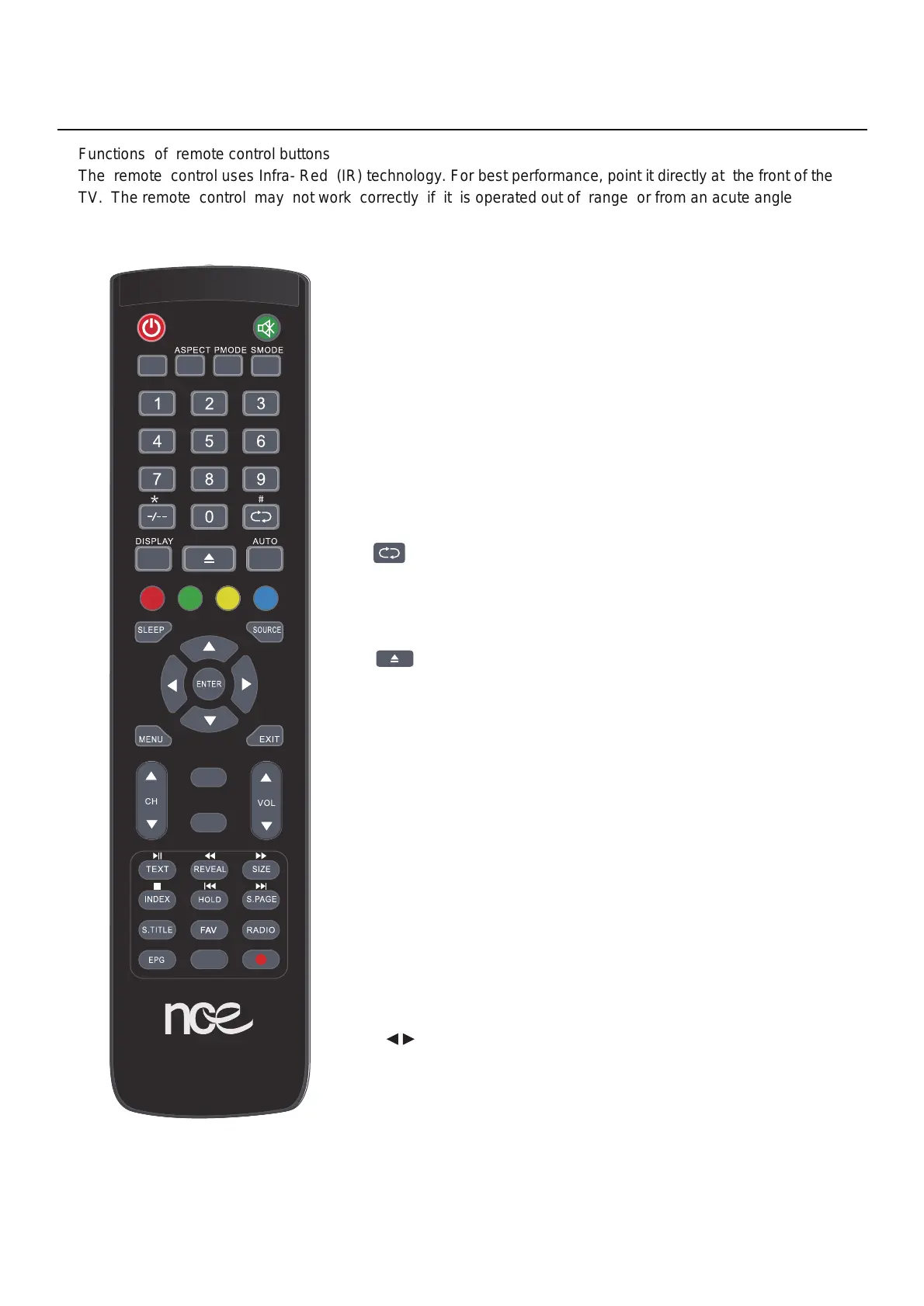
1, POWER: Press for turning the TV On/Off
Functions of remote control buttons
The remote control uses Infra- Red (IR) technology. For best performance, point it directly at the front of the
TV. The remote control may not work correctly if it is operated out of range or from an acute angle .
2, MUTE: Press this button to mute or restore sound
3, NICAM/A2:Press this button to switch sound system
between mono and stereo
4, ASPECT:Press to adjust picture ratio
5, PMODE:Select picture mode
6, SMODE:Select sound mode
14,GREEN button :used for TXT , DTV and TV
LANG: Change language in DVD mode
15,YELLOW button :used for TXT , DTV and TV
D.SETUP: DVD mode setup
16, BLUE button :used for TXT , DTV and TV
D.MENU:Menu buttons in DVD mode
17,SLEEP button :setting the TV to turn off automatically
18. SOURCE button: source settings
19. ENTER button: to confirm the entry
on display when highlighted or bold
20. buttons: to increase/ decrease
the value in the menu
13,RED button :used for TXT , DTV and TV
Angle:adjust angle in DVD mode
12, AUTO:Adjust the picture automatically in pc mode
DEL: Delete function button in SMART mode
11,T.SHIFT:Press to switch to timeshift mode
:Eject/insert disc
10,DISPLAY: Press to display the source and channel info
9, : Back to previous program
# : Input # in SMART channel
8, -/--: Switch the program digit
* :Input * in SMART channel
7, NUMBER(0-9):Press 0-9 to select a TV channel directly
The channel will change after 2 seconds
Remote Control
12



 To Next Page