NAVIGATION
Additional Maps and Upgrades – Please visit www.ndrive.com
Technical Help – Please contact the helpline on 0844 557 9677
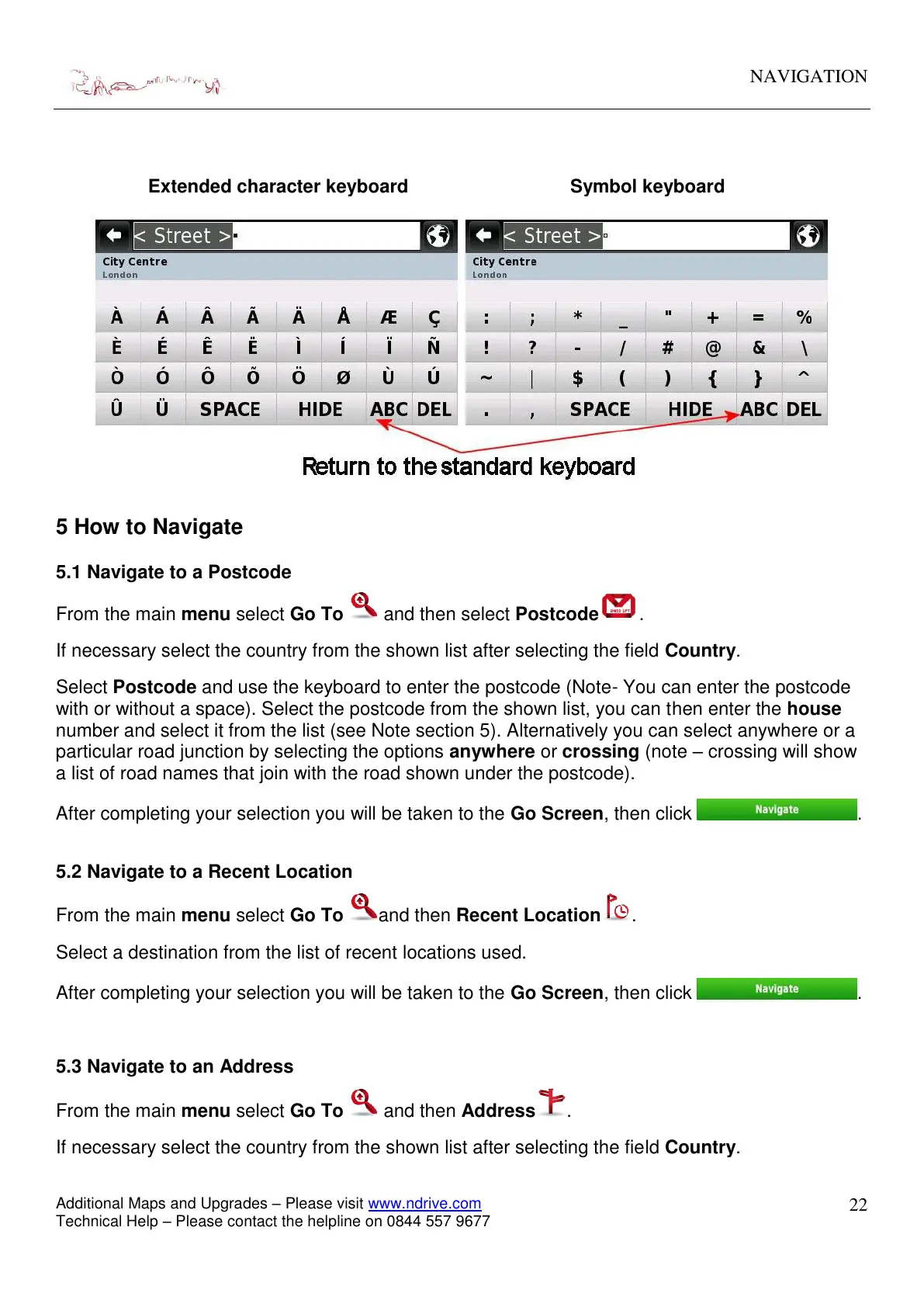
Extended character keyboard Symbol keyboard
5 How to Navigate
5.1 Navigate to a Postcode
From the main menu select Go To and then select Postcode .
If necessary select the country from the shown list after selecting the field Country.
Select Postcode and use the keyboard to enter the postcode (Note- You can enter the postcode
with or without a space). Select the postcode from the shown list, you can then enter the house
number and select it from the list (see Note section 5). Alternatively you can select anywhere or a
particular road junction by selecting the options anywhere or crossing (note – crossing will show
a list of road names that join with the road shown under the postcode).
After completing your selection you will be taken to the Go Screen, then click
.
5.2 Navigate to a Recent Location
From the main menu select Go To and then Recent Location .
Select a destination from the list of recent locations used.
After completing your selection you will be taken to the Go Screen, then click .
5.3 Navigate to an Address
From the main menu select Go To and then Address .
If necessary select the country from the shown list after selecting the field Country.


 To Next Page