NAVIGATION
Additional Maps and Upgrades – Please visit www.ndrive.com
Technical Help – Please contact the helpline on 0844 557 9677
6 Go Screen
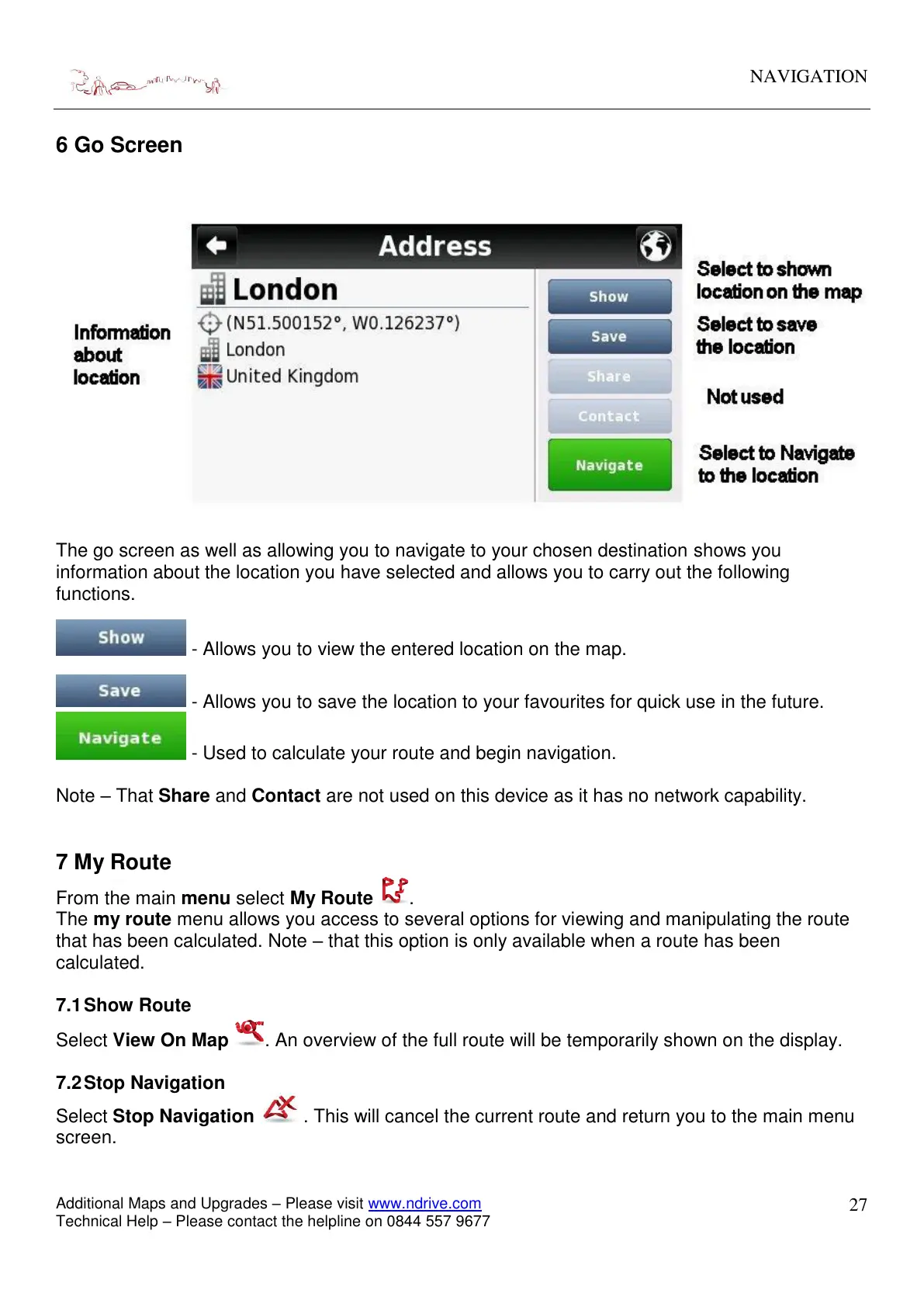
The go screen as well as allowing you to navigate to your chosen destination shows you
information about the location you have selected and allows you to carry out the following
functions.
- Allows you to view the entered location on the map.
- Allows you to save the location to your favourites for quick use in the future.
- Used to calculate your route and begin navigation.
Note – That Share and Contact are not used on this device as it has no network capability.
7 My Route
From the main menu select My Route .
The my route menu allows you access to several options for viewing and manipulating the route
that has been calculated. Note – that this option is only available when a route has been
calculated.
7.1 Show Route
Select View On Map . An overview of the full route will be temporarily shown on the display.
7.2 Stop Navigation
Select Stop Navigation . This will cancel the current route and return you to the main menu
screen.


 To Next Page