58
4. Convenient Features
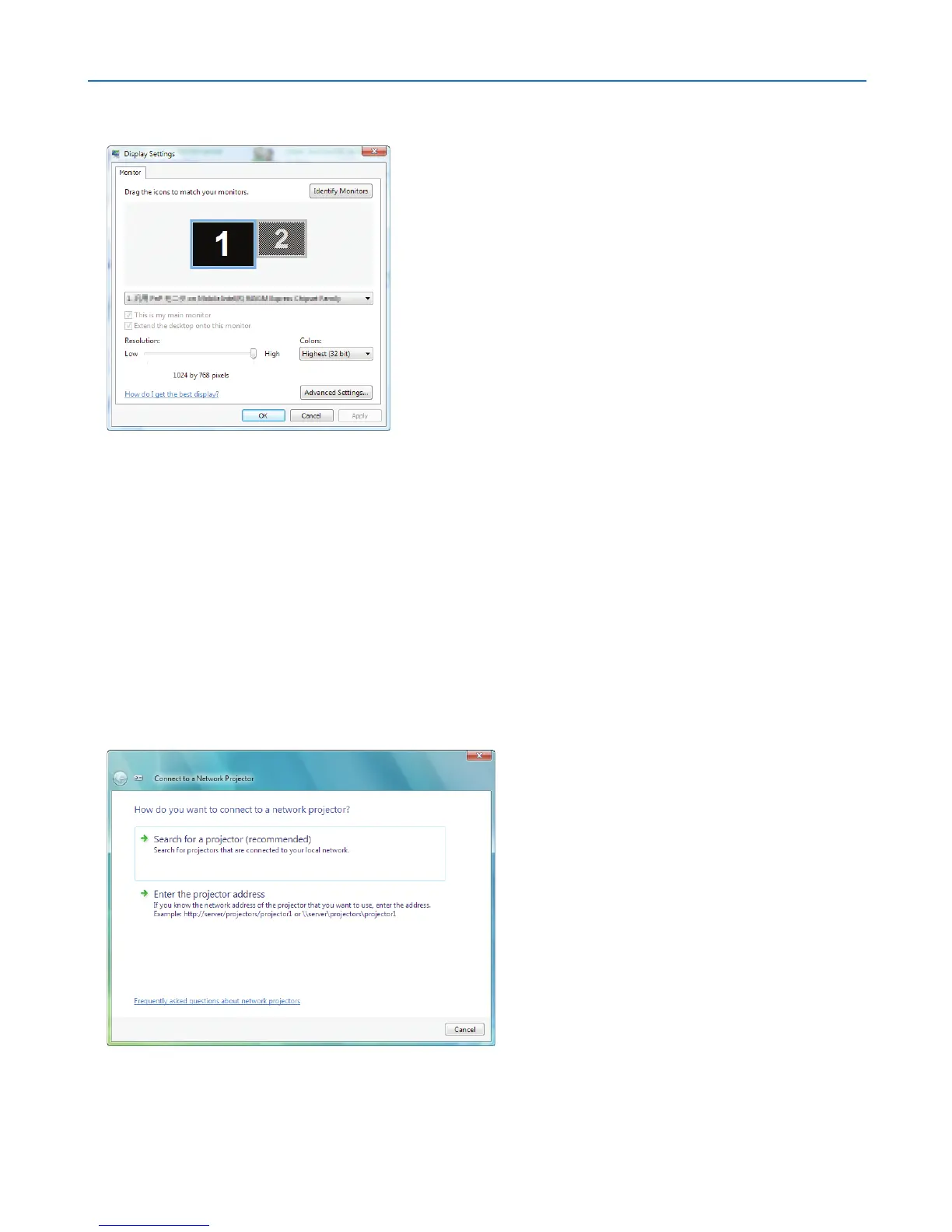
4. Operate [Resolution] slide bar to change the resolution to the resolution displayed on [DISPLAY RESO-
LUTION] in the NETWORK PROJECTOR screen.
5. Click [OK].
The message “Do you keep this screen setting?” is displayed.
6. Click [Yes].
The resolution of Windows Vista screen is changed to the resolution displayed on [DISPLAY RESOLUTION] in
the NETWORK PROJECTOR screen.
Projecting the Image with Network Projector
1. Click [Start] from the desktop of Windows Vista.
2. Click [All Programs].
3. Click [Accessories].
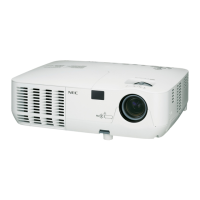
4. Click [Connect to a Network Projector].
When the [Permission Connect to a Network Projector] window appears,click [Yes.].
The “Connect to a Network Projector” window appears.
5. Click [
→
Search for a projector (recommended)].
In the “Available projectors” box, “NP3250 Series” is displayed.
6. Click [NP3250 Series].
The message “Enter the password for the projector that you selected.” is displayed at the bottom of the window.


 To Next Page