25
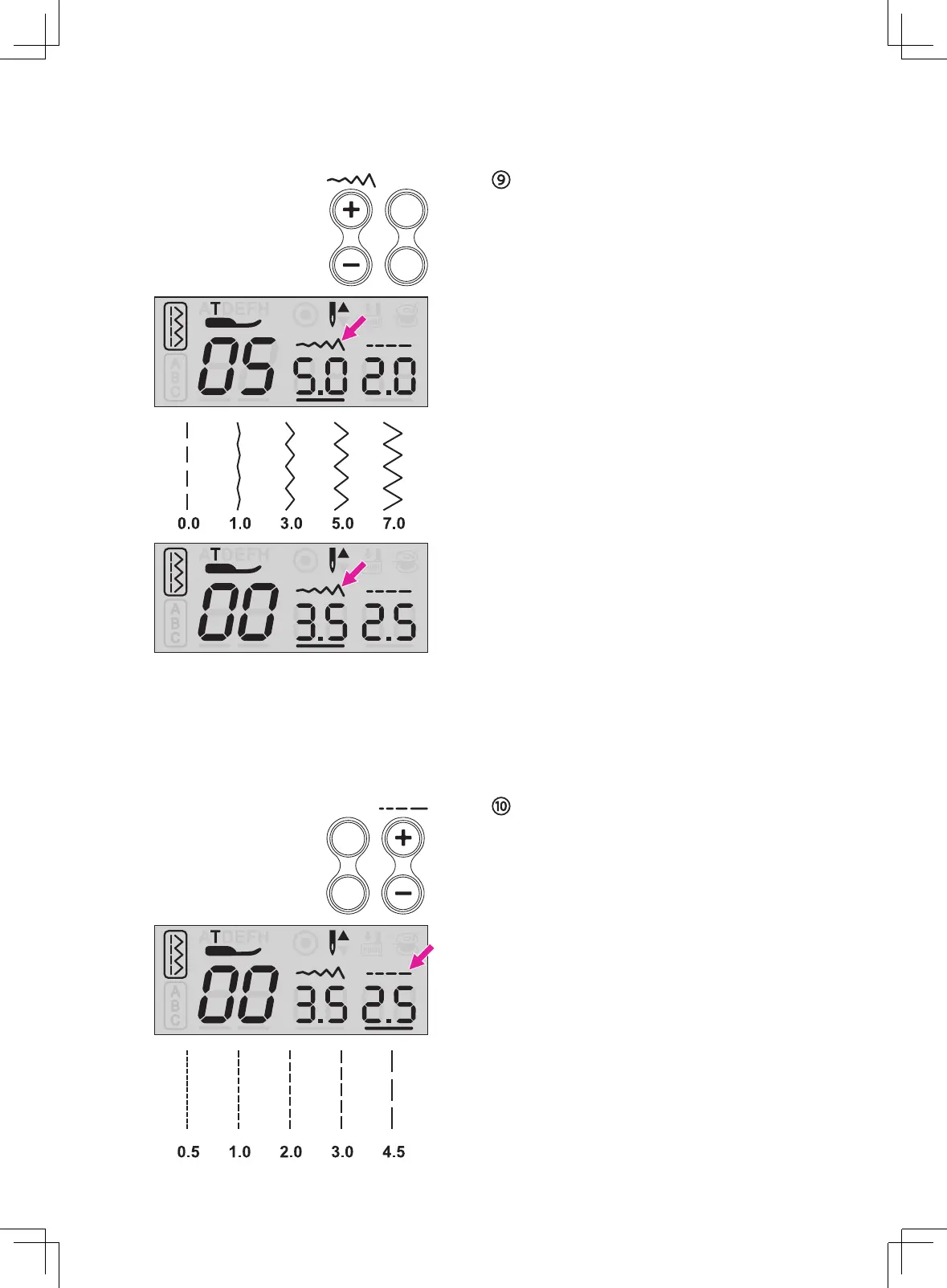
Stitch length adjustment button
When you select a stitch, the machine will
automatically set the recommended stitch
length values which will be shown on the LCD
screen. The stitch value display will blink 3
times while adjusting to its default setting.
The stitch length can be regulated by pressing
the stitch length adjustment buttons. For a
shorter stitch, press the "–" button. For a
longer stitch, press the "+" button.
Different stitches will have different length
limitation.
Stitch width adjustment button
When you select a stitch, the machine will
automatically set the recommended stitch
width values which will be shown on the LCD
screen. The stitch value display will blink 3
times while adjusting to its default setting.
The stitch width can be regulated by pressing
the stitch width adjustment buttons. For a
narrower stitch, press the "–" button. For a
wider stitch, press the "+" button.
Different stitches will have different width
limitation.
Needle position adjustment
When the Regular Pattern Group number 00-
04 is selected, the needle position can be
changed by adjusting the stitch width.
The pre-set position is "3.5", center position.
Press the "+" button, the needle position will
be moved to the right. Press the "-" button,
the needle position will be moved to the left.



 To Next Page