© by NECTA VENDING SOLUTIONS SpA
29
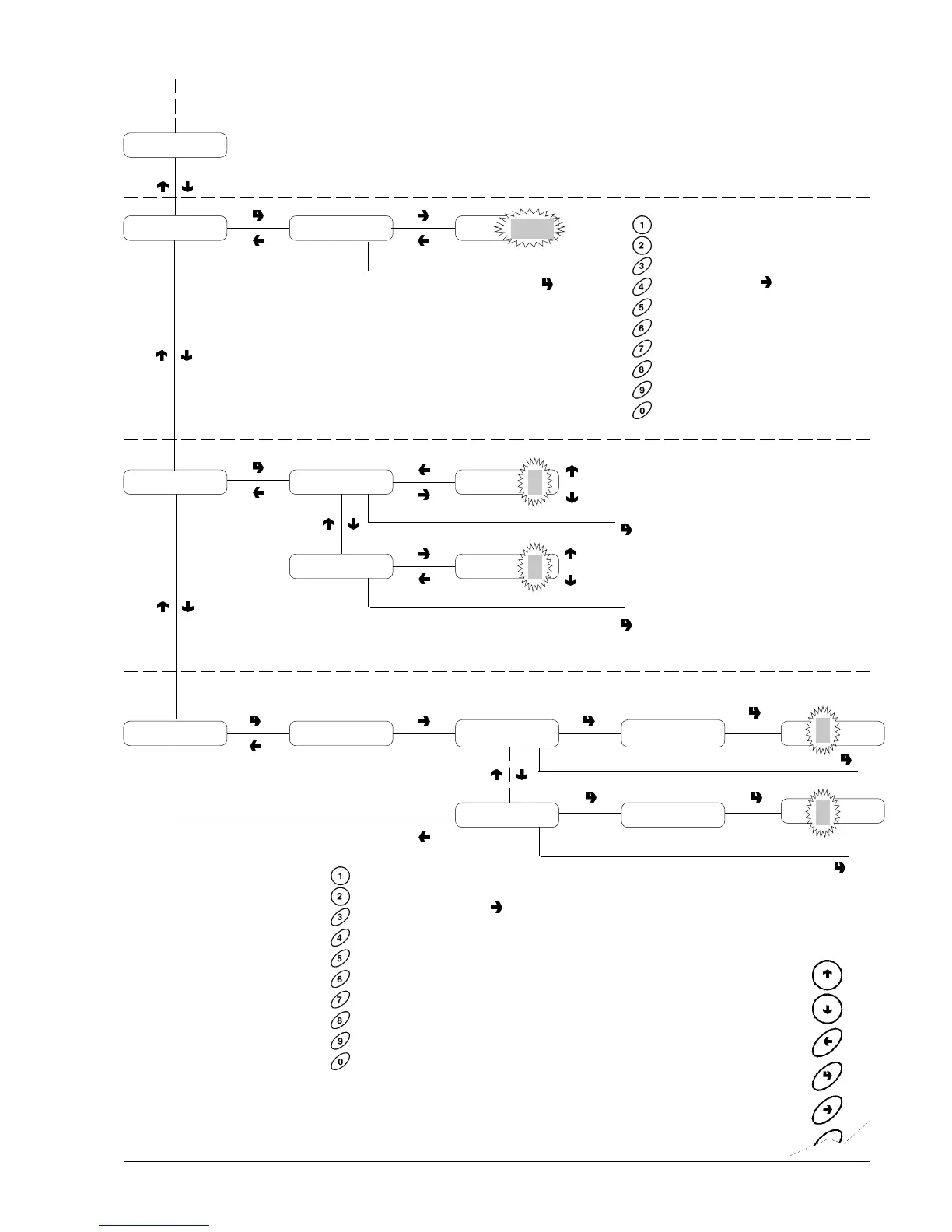
0101 Brio C-I
Programming menu
PREVIOUS FUNCTION/
DECREASE DATA UNIT (-1)
NEXT FUNCTION/
INCREASE DATA UNIT (+1)
DELETE DATA/
EXIT FUNCTION
CONFIRM DATA/
CONFIRM FUNCTION
CHANGE DATA
Enabled
Disabled
Air-break
Tank
MACHINE CONFIGURATION
To be done after initialising
the RAM.
When pressing the change
button the first digit
starts blinking.
The buttons are assigned
numeric value.
When pressing a button,
the blinking digit is
assigned that value and
the next digit starts
blinking.
The password is equal to
the sequence "4", "2", "3"
and "1".
MACHINE IDENTIFICATION
CODE
When pressing the change
button the first digit
starts blinking.
The buttons are assigned
numeric value.
When pressing a button,
the blinking digit is
assigned that value and the
next digit starts blinking.
Instant models only
Initialising
Machine code Code XXXX Code
XXXX
Machine Config.
Air-b./Ta
A
A
T
Enable/DisableMixer heating
A
D
A
Air-b./Tank
P= :A=nnnn
P= :A=nnnn
P=nnnn:A=nnnn
P=nnnn:A=nnnnInstant
Espresso coffee
Password=####Selection counter
nn
nn








 To Next Page