en Accessories
10
compartment is well lit and a cooling fan prevents the
appliance from overheating.
Opening the appliance door
If you open the appliance door when the appliance is in
operation, the appliance will continue to operate as
before.
Interior lighting
With most heating functions and other functions, the
interior lighting in the cooking compartment will remain
lit while the oven is in operation. When the function
selector is turned to bring operation to an end, the
lighting will go out.
By turning the function selector to the interior lighting
setting, you can switch on the lighting without heating
the oven. This makes it easier to clean your appliance,
for example.
Cooling fan
The cooling fan switches on and off as required. The
hot air escapes above the door.
Caution!
Do not cover the ventilation slots. Otherwise, the
appliance may overheat.
So that the cooking compartment cools down more
quickly after operation, the cooling fan continues to run
for a certain period afterwards.
_Accessories
Accessor i es
Your appliance is accompanied by a range of
accessories. Here, you can find an overview of the
accessories included and information on how to use
them correctly.
Control accessories
The accessories supplied may differ depending on the
appliance model.
--------
Only use original accessories. They are specially
adapted for your appliance.
You can buy accessories from the after-sales service,
from specialist retailers or online.
Note: The accessories may deform when they become
hot. This does not affect their function. Once they have
cooled down again, they regain their original shape.
Inserting accessories
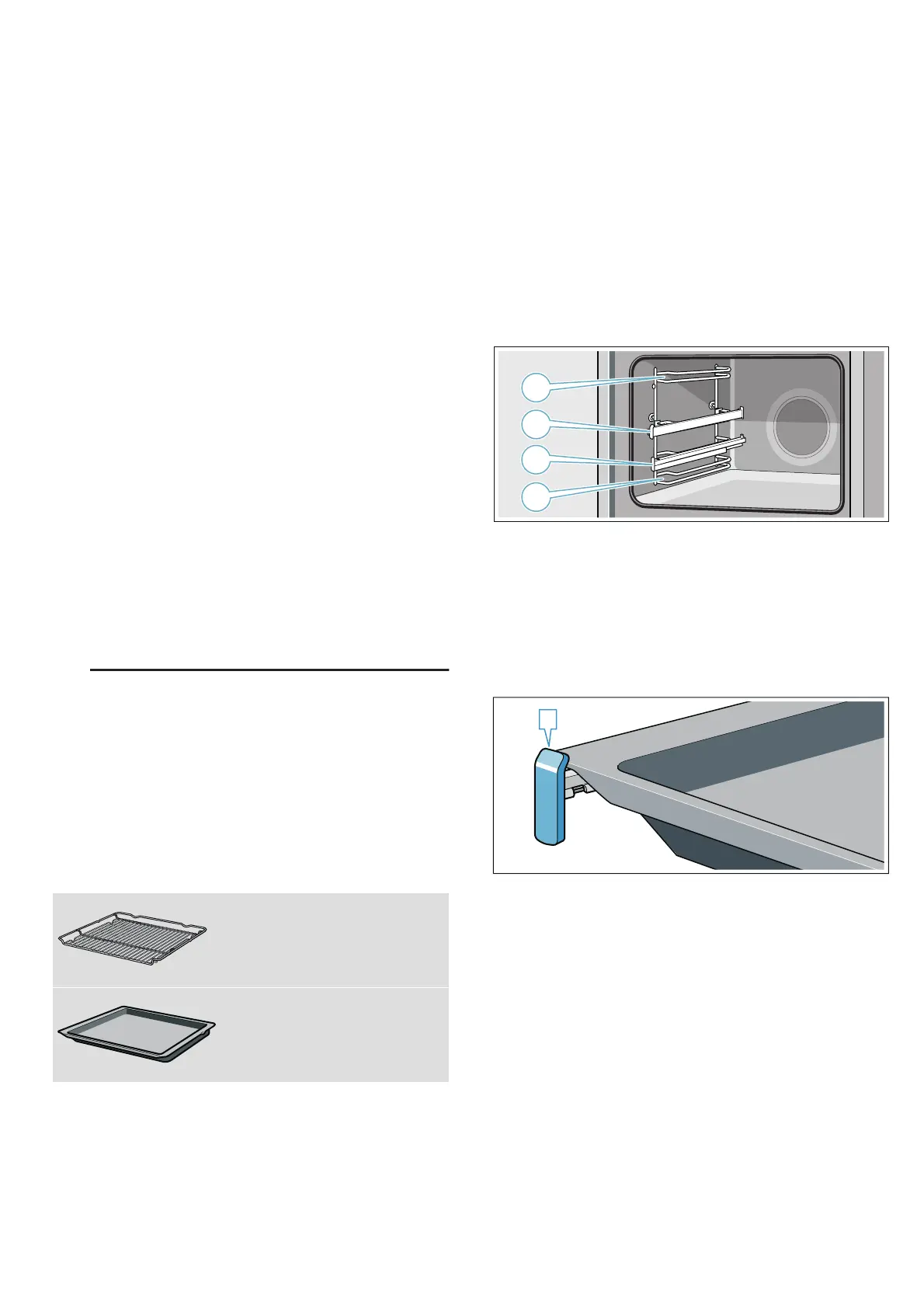
The cooking compartment has four shelf positions. The
shelf positions are numbered from bottom to top.
Depending on the appliance model, your cooking
compartment will have one or more pull-out rails and a
clip-on pull-out rail.The pull-out rails are fixed in place
and cannot be removed.The clip-on pull-out rail can be
fitted as required to shelf supports that are not currently
being used.
Always insert accessories between the two guide rods
for the shelf position.
Accessories can be pulled out approximately halfway
without tipping. You can use the pull-out rails to pull the
accessories out further.
Make sure that the accessory is placed behind the lug
‚ on the pull-out rail.
Example in the picture: universal pan
The pull-out rails lock in place when they are fully pulled
out. This makes it easy to place the accessories in
position. To unlock the pull-out rails, use a little force to
push them back into the cooking compartment.
Notes
■ Make sure that you always insert the accessories
into the cooking compartment the right way round.
■ Always insert the accessories fully into the cooking
compartment so that they do not touch the appliance
door.
■ Take any accessories that you will not be using out
of the cooking compartment.
■ The shelf supports can be taken out of the cooking
compartment for cleaning. ~ Page 21
Locking function
The accessories can be pulled out approximately
halfway until they lock in place. The locking function
prevents the accessories from tilting when they are
Wire rack
For ovenware, cake tins and ovenproof
dishes.
For roasts, grilled items and frozen
meals.
Universal pan
For moist cakes, pastries, frozen meals
and large roasts.
It can be used to catch dripping fat when
you are grilling directly on the wire rack.
D


 To Next Page