33
Cleaning the telescopic shelves
You can unhook the telescopic shelves for easier cleaning.
ã=Risk of burning due to hot components in the cooking
compartment!
Wait until the cooking compartment has cooled down.
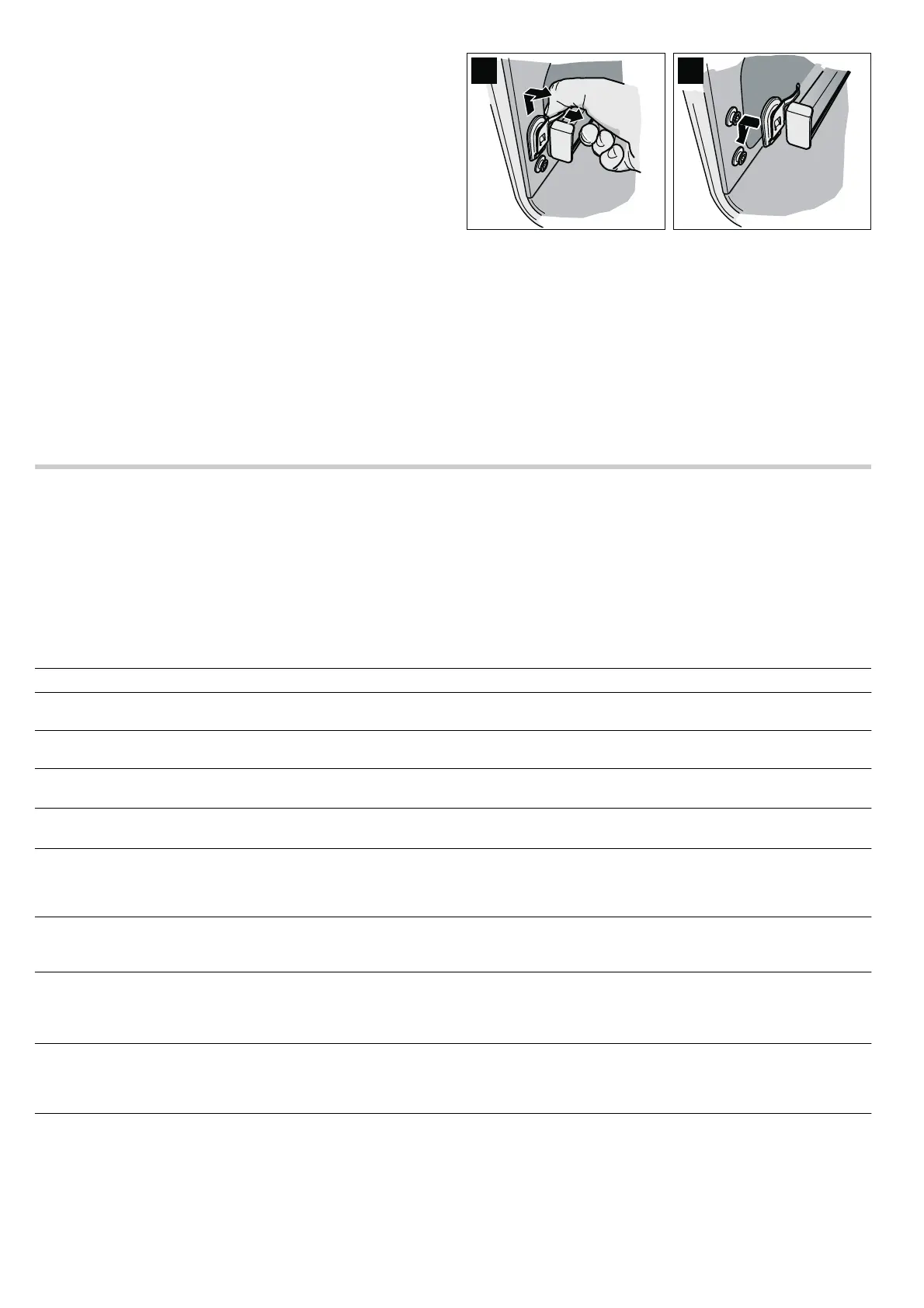
Removing the telescopic shelves
1. Hold the flat spring (Fig. A).
2. Move the telescopic shelf upwards at the front and unhook it
to the side.
3. Pull out the telescopic shelf at the back.
Cleaning the telescopic shelves
Clean the telescopic shelves with washing-up liquid and a
sponge or brush.
Hooking in the telescopic shelves
1. Insert the telescopic shelf at the rear as far as it will go.
2. Insert the telescopic shelf at the front from the top and push it
down until it engages (Fig. B).
3. Push telescopic shelves to the limit stop and close appliance
door.
Faults and repairs
It is not always necessary to call the after-sales service.
Sometimes, you can find a remedy yourself. You will find some
tips for troubleshooting in the following table.
ã=Risk of electric shock!
■ Work on the appliance electronics may only be performed by
a specialist.
■ Always disconnect the appliance from the power supply
when work is carried out on the electronics. Switch off the
circuit breaker or remove the fuse from your household fuse
box.
Problem Possible cause Remedial action
Electrical function is faulty (e.g. indicator
lamps do not light up)
Fuse defective Check fuses in the fuse box and replace if
necessary
Liquid or thin dough runs to one side Appliance not installed level Check appliance installation (see
the Installation instructions)
‹:‹‹ flashes in the clock display
There was a power cut
Press the KJ clock function button, reset
the clock (see section: Electronic clock)
‹:‹‹ flashes on the clock display, "rrr"
appears on the temperature display
The power supply was interrupted while
the appliance was in operation
Press the KJ clock function button, reset
the clock (see section: Electronic clock)
The appliance prompts you to descale or
to run the 1st or 2nd rinse
The power supply was interrupted or the
appliance was switched off during the des-
caling process
After you have switched the appliance
back on, repeat the process that was inter-
rupted (e.g. 1st rinse) and then continue
with the descaling process.
"E011" appears in the temperature display Permanent assignment of a button Cancel the permanent assignment of the
button and press the
KJ clock function
button
The temperature display shows, "EXXX",
e.g. E300
Internal fault in the appliance electronics
Press the
KJ clock function button. If the
message does not go out, pull out the
mains plug and plug it back in again after
approx. 10 seconds
It is not possible to operate the appliance,
"Appliance locked" appears on the text
display,
D and -†- appear on the temper-
ature display.
The appliance has been locked Deactivate the lock
(see section: Childproof lock)
It is not possible to operate the appliance,
"Appliance permanently locked" appears
on the text display,
D and †˜ appear on
the temperature display.
The appliance controls are locked perma-
nently
Deactivate the permanent lock
(see section: Childproof lock)



 To Next Page