9
Changing the operating mode
1. Turn the operating mode selector until the desired operating
mode is selected.
2. Turn the temperature selector to change the temperature.
3. Press the ƒ Start button.
Current temperature
Press the
± info button. The current temperature appears for
3seconds.
Note: The current temperature can only be displayed with
operating modes with a default temperature.
Heating indicator
The heating indicator displays the rising temperature in the
cooking compartment.
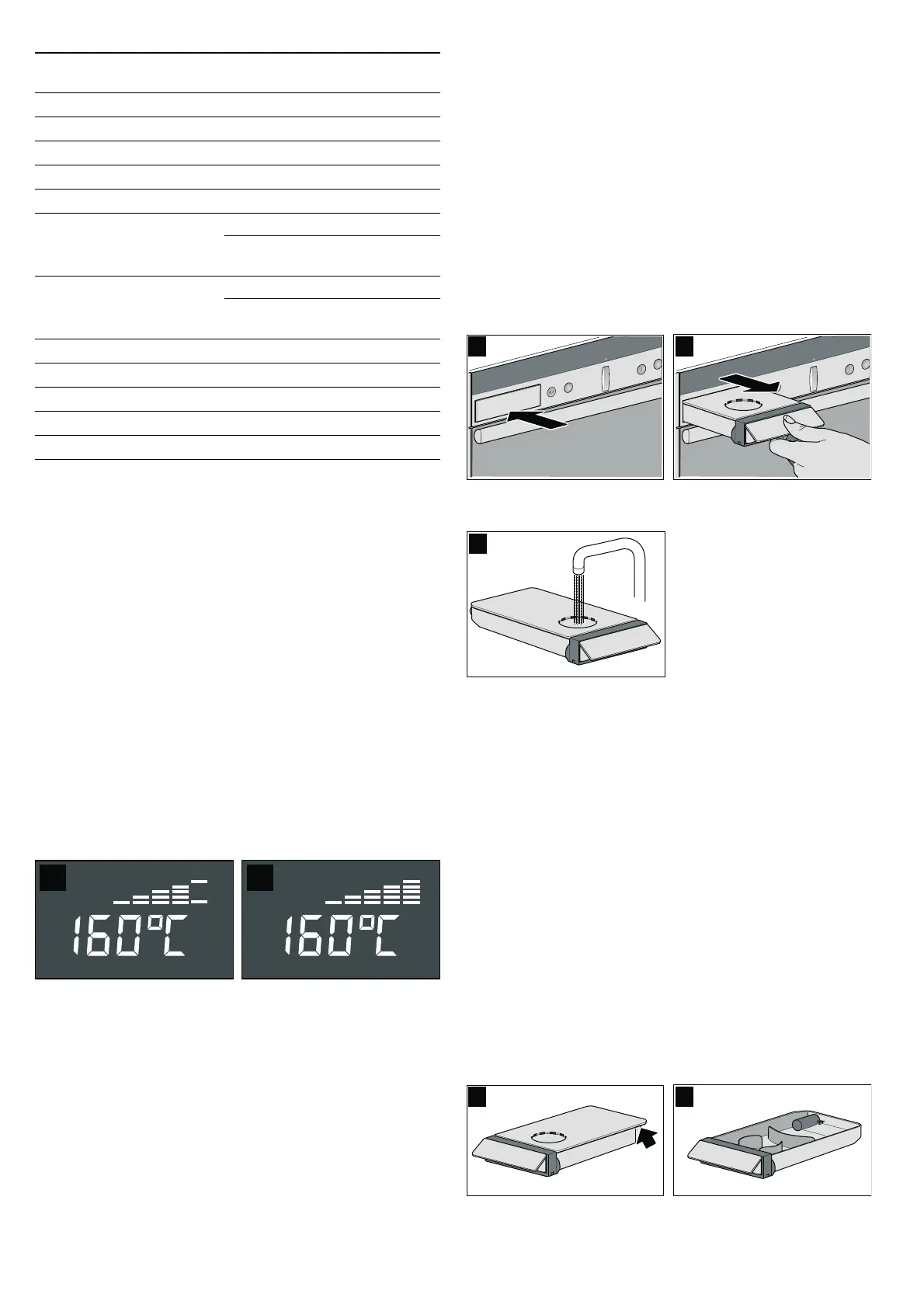
■ Temperature reached (figure A)
■ Appliance reheating (figure B)
Filling and emptying the water tank
ã=Risk of injury and risk of fire!
Only fill the water tank with water or with the descaling solution
that is recommended by us.
Do not pour any flammable liquids (e.g. alcoholic drinks) into
the water tank.
Due to hot surfaces, vapours from flammable liquids may catch
fire in the cooking compartment (explosion). The appliance
door may spring open. Hot steam and jets of flame may
escape.
Caution!
The appliance may become damaged due to the use of
unsuitable liquids.
Do not use distilled water, highly chlorinated tap water
(> 40 mg/l) or other liquids.
Only use cold, fresh tap water, softened water or uncarbonated
mineral water.
Note: If you use mineral water, set the hardness to "Water
hardness - hard".
Filling the water tank
Fill the water tank before each use with steam assistance.
1. Press lightly on the centre of the lower edge of the water tank
(picture A).
2. Pull out the water tank (picture B).
3. Fill the water tank with cold water up to the "max" mark
(picture C).
4. Slide in the water tank all the way.
Refilling the water tank
If the water tank is empty, a signal sounds. "Fill water tank and
slide in fully" appears in the display. Steam-assisted operation
is interrupted.
1. Pull out the water tank.
2. Fill the water tank up to the "max" mark and slide it in fully.
The steam-assisted operation continues.
Emptying the water tank
Empty the water tank after each steam-assisted use of the
appliance.
1. Turn the operating mode selector back to the Û off position
and push it in.
"Pumping-out" appears in the text display and
˜ž© (pumping
out) appears in the temperature display. The remaining water
in the evaporator system is pumped back into the water tank.
After the pumping, "Pumping-out finished" appears.
2. Pull out the water tank slowly and level.
3. Remove the cover (Picture A).
4. Empty the water tank (Picture B).
5. Thoroughly dry the water tank recess and the water tank.
6. Slide in the water tank.
% Top/bottom heat*
170 50 - 275
0 Circotherm intensive*
220 50 - 275
ë Bread-baking*
200 180 - 220
$ Bottom heat
200 50 - 225
4 Circo-roasting*
170 50 - 250
+ Full-surface grill
+ Full-surface grill (inten-
sive)**
220 50 - 275
Fixed setting
( Centre-area grill
( Centre-area grill (inten-
sive)**
180 50 - 275
Fixed setting
/ Low-temperature cooking
Fixed setting
ü ü ü
é
Steam cooking
Fixed setting
¨©¨
ê
Dough proving
Fixed setting
A ƒ A
z
Oven cleaning
Fixed setting
‹
ä
Reheat
120 80 - 180
Operating mode Default temper-
ature in °C
Temperature
range in °C
* In this operating mode you can activate steam operation
** Turn the temperature selector to above 275 °C.
‚Ÿ£
appears in the temperature display



 To Next Page