13
Troubleshooting
Malfunctions often have simple explanations. Please read the
following notes before calling the aftersales service.
: Risk of electric shock!
Incorrect repairs are dangerous. Repairs may only be carried
out by one of our trained after-sales engineers.
Incorrect repairs may result in significant risk to the user.
Replacing the oven light bulb
If the oven light bulb fails, it must be replaced. Replacement
heat-resistant bulbs can be obtained from the after-sales
service or from specialist retailers. Please specify the E number
and FD number of your appliance. Do not use any other type of
bulb.
: Risk of electric shock!
When replacing the cooking compartment bulb, the bulb socket
contacts are live. Before replacing the bulb, unplug the
appliance from the mains or switch off the circuit breaker in the
fuse box.
1. Allow the cooking compartment to cool down.
2. Open the appliance door.
3. Place a tea towel in the cooking compartment to prevent
damage.
4. Remove the hook-in racks.
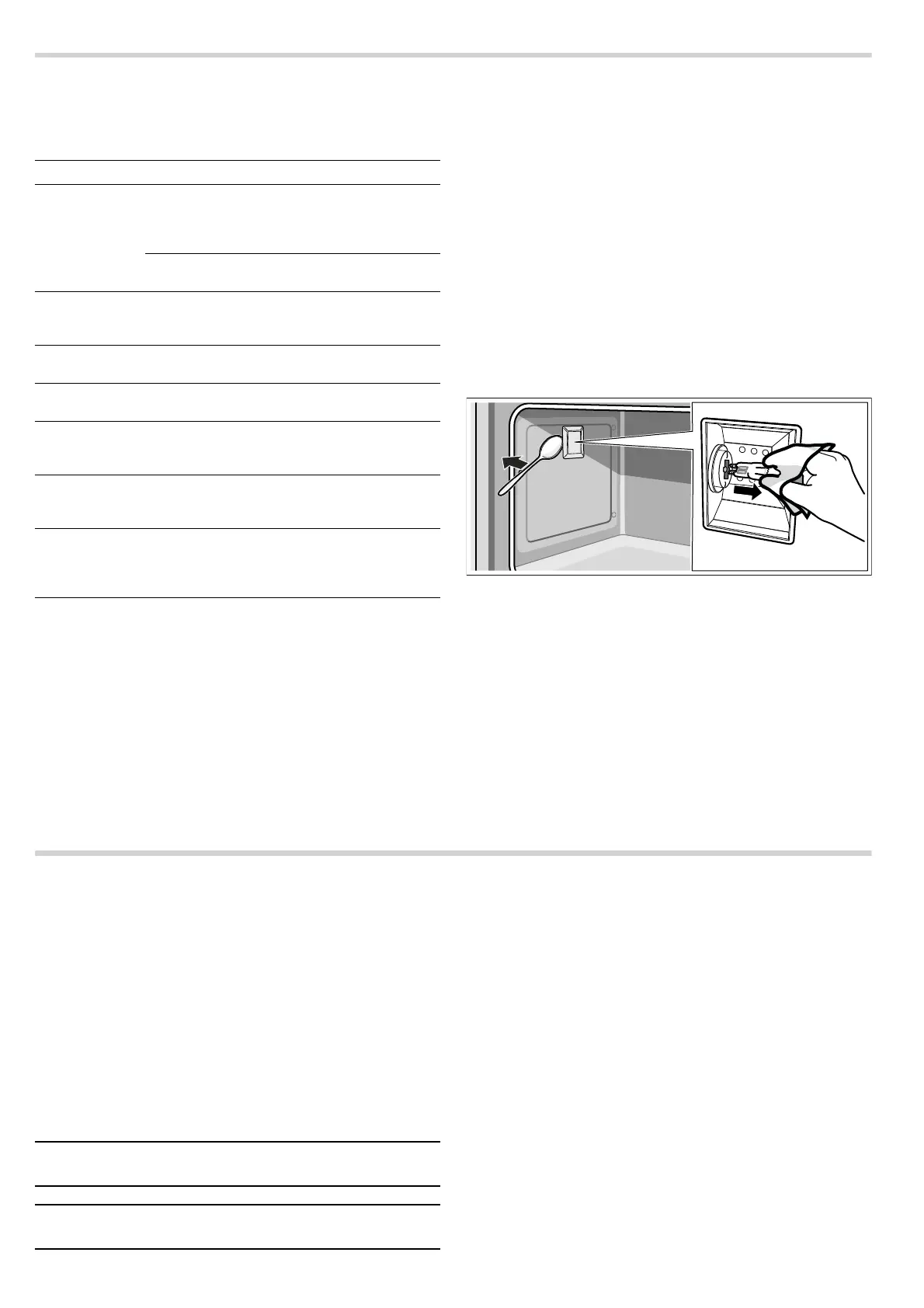
5. Remove the glass cover. To do this, open the glass cover at
the front with your hand. Should you experience difficulties
removing the glass cover, use a spoon to help.
6. Remove the oven light bulb.
7. Replace the oven light bulb with a bulb of the same type:
Voltage: 230 V;
Power: 40 W;
Fitting: G9;
Temperature resistance: 300 °C
8. Refit the glass cover for the oven light bulb.
9. Refit the hook-in racks.
10.Remove the tea towel.
11.Switch the circuit breaker back on.
12.Check that the oven lighting is working again.
After-sales service
Our after-sales service is there for you if your appliance needs
to be repaired. We will always find the right solution in order to
avoid unnecessary visits from a service technician.
E number and FD number
When calling us, please give the product number (E no.) and
the production number (FD no.) so that we can provide you with
the correct advice. To find the identification plate with the
numbers, open the oven door and look at the front of the
bottom of the cooking compartment. To save time, you can
make a note of the number of your appliance and the
telephone number of the after-sales service in the space below,
should it be required.
Please note that there will be a fee for a visit by a service
technician in the event of a malfunction, even during the
warranty period.
Please find the contact data of all countries in the enclosed
customer service list.
To book an engineer visit and product advice
Rely on the professionalism of the manufacturer. You can
therefore be sure that the repair is carried out by trained service
technicians who carry original spare parts for your appliances.
Problem Possible cause Notes/remedy
The appliance
does not work.
Circuit breaker
faulty.
Look in the fuse box and
check that the circuit
breaker for the cooker is in
working order.
Power cut Check whether the kitchen
light works.
The oven can-
not be switched
off.
The electronics
are faulty.
Switch off the circuit
breaker. Contact the after-
sales service.
The clock dis-
play flashes.
Power cut Reset the clock.
The oven does
not heat up.
Circuit breaker
faulty.
Check the circuit breaker
and replace if necessary.
The function
selector has not
been set.
Set the function selector.
The door glass
is broken.
Switch off the appliance.
Contact the after-sales ser-
vice.
Fruit juice or
albumen stains
on enamelled
surfaces.
Moist cake or
meat juices.
Harmless change in the
enamel, cannot be
removed.
E no. FD no.
After-sales service
O
GB 0344 8928989
Calls from a BT landline will be charged at up to
3 pence per minute. A call set-up fee of up to
6 pence may apply.
IE 01450 2655
0.03 € per minute at peak. Off peak 0.0088 € per
minute.


 To Next Page