Gig Zero Delay Tap & 10/100/1000BaseT Tap
9
Connecting to the Monitoring Device
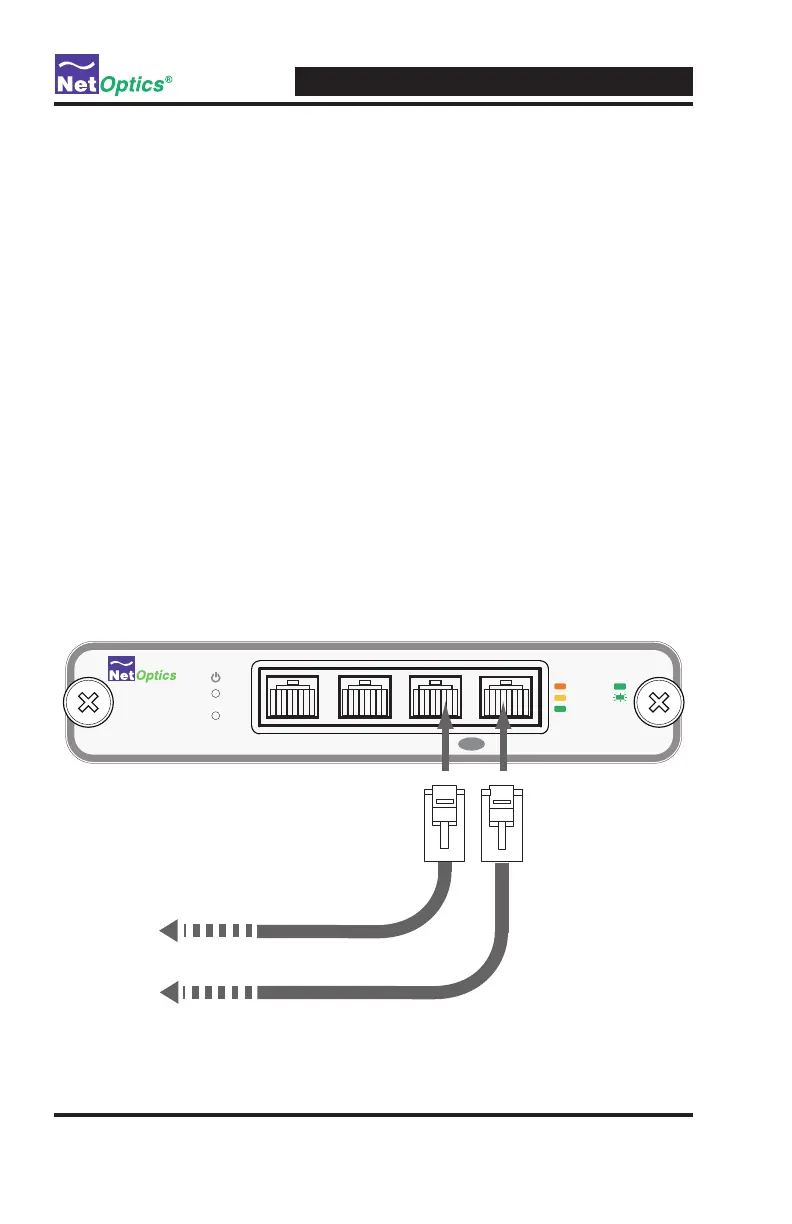
To connect the Tap to the Monitoring device:
1. Supply power to the Tap using the two redundant power supplies included
with the unit. Verify that the Power LED illuminates.
Note: _______________________________________________________________
The second power supply is available to support the ow of trafc to the
monitoring device in the event that the rst power supply becomes
unavailable.
______________________________________________________________________
2. Connect Monitor Port A to the appropriate port on the monitoring device
using a CAT5e straight-through cable. This cable sends the monitoring
device a copy of all of the trafc being received at Monitor Port A.
3. Connect Monitor Port B to the appropriate port on the monitoring device
using a CAT5e straight-through cable. This cable sends the monitoring
device a copy of all of the trafc being received at Monitor Port B.
Figure 8: Connecting to the Monitoring Device
®
www.netoptics.com
Monitor
Network
10
100
1000
LINK
ACT
1
2
Full Duplex TapFull Duplex Tap
A AB B
To monitor NIC
To monitor NIC



 To Next Page