Attention: Be sure to check the illustration arrow for the proper cable connector pull-tab orientation.
Note: To unplug a cable, gently pull the tab to release the locking mechanism.
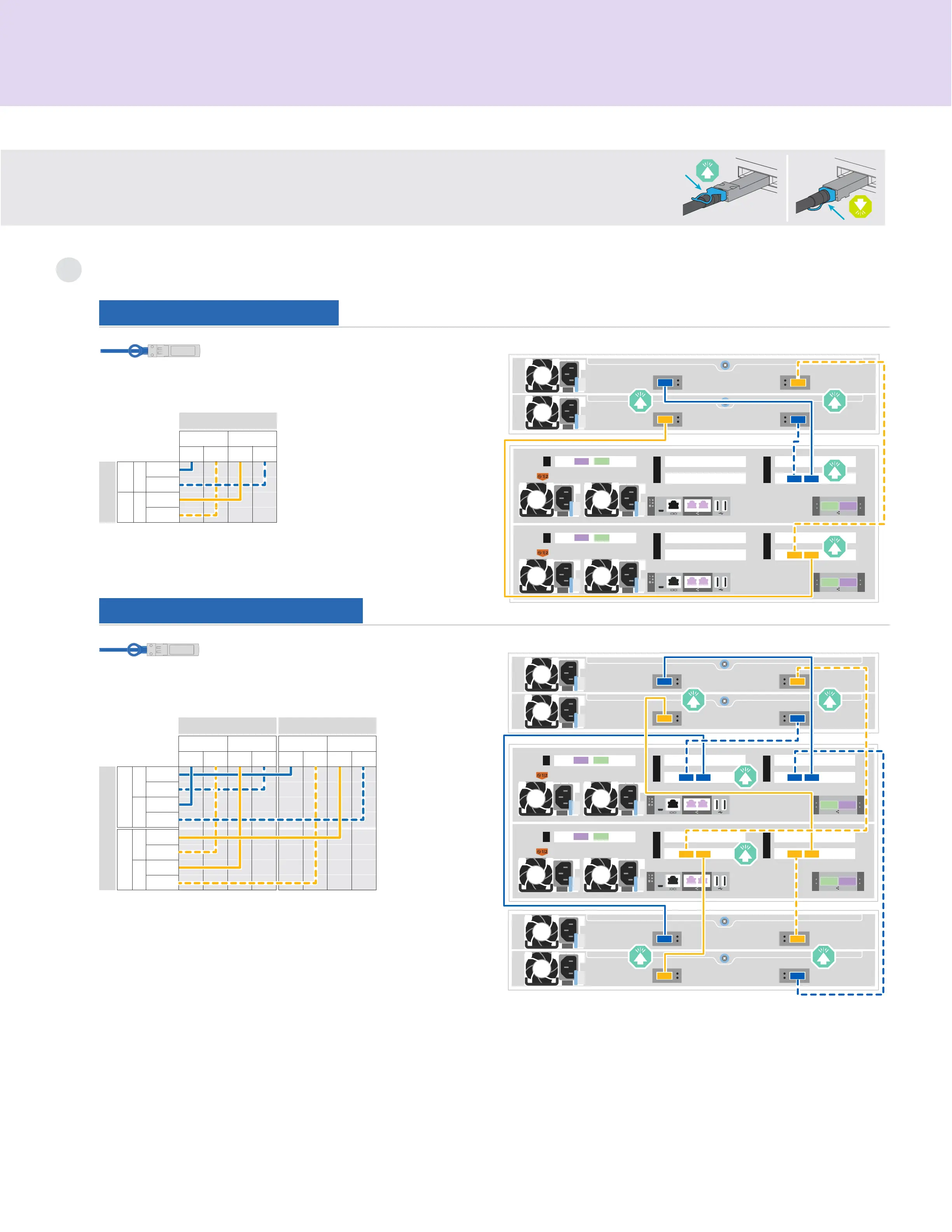
Cable controllers | Stage 2
Cable storage
3
Cable to one NS224 shelf
Cable to two NS224 shelves
e0a
NSM A
Shelf 1
e0b e0a
NSM B
e0b
A
Controller
B
Port 1
Port 2
Slot 5
Port 1
Port 2
Slot 5
Use the table below to connect your controllers
to the two NS224 shelves.
100 GbE for storage cables
1
4
5
2
3
1
4
5
2
3
NSM ANSM BNSM ANSM B Controller AController B
Shelf 1
Shelf 2
1212
1212
e0be0a
e0be0a
e0be0a
e0be0a
1
4
5
2
3
1
4
5
2
3
Shelf 1
NSM ANSM BController AController B
e0be0a
e0b
12
12
e0a
100 GbE for storage cables
Use the table below to connect your controllers
to the NS224 shelf.
e0a
NSM A
Shelf 1
e0b e0a
NSM B
e0b e0a
NSM A
Shelf 2
e0b e0a
NSM B
e0b
Controller
AB
Port 1
Port 2
Port 1
Port 2
Port 1
Port 2
Port 1
Port 2
Slot 3Slot 5Slot 3Slot 5











 To Next Page