View Your Content
15
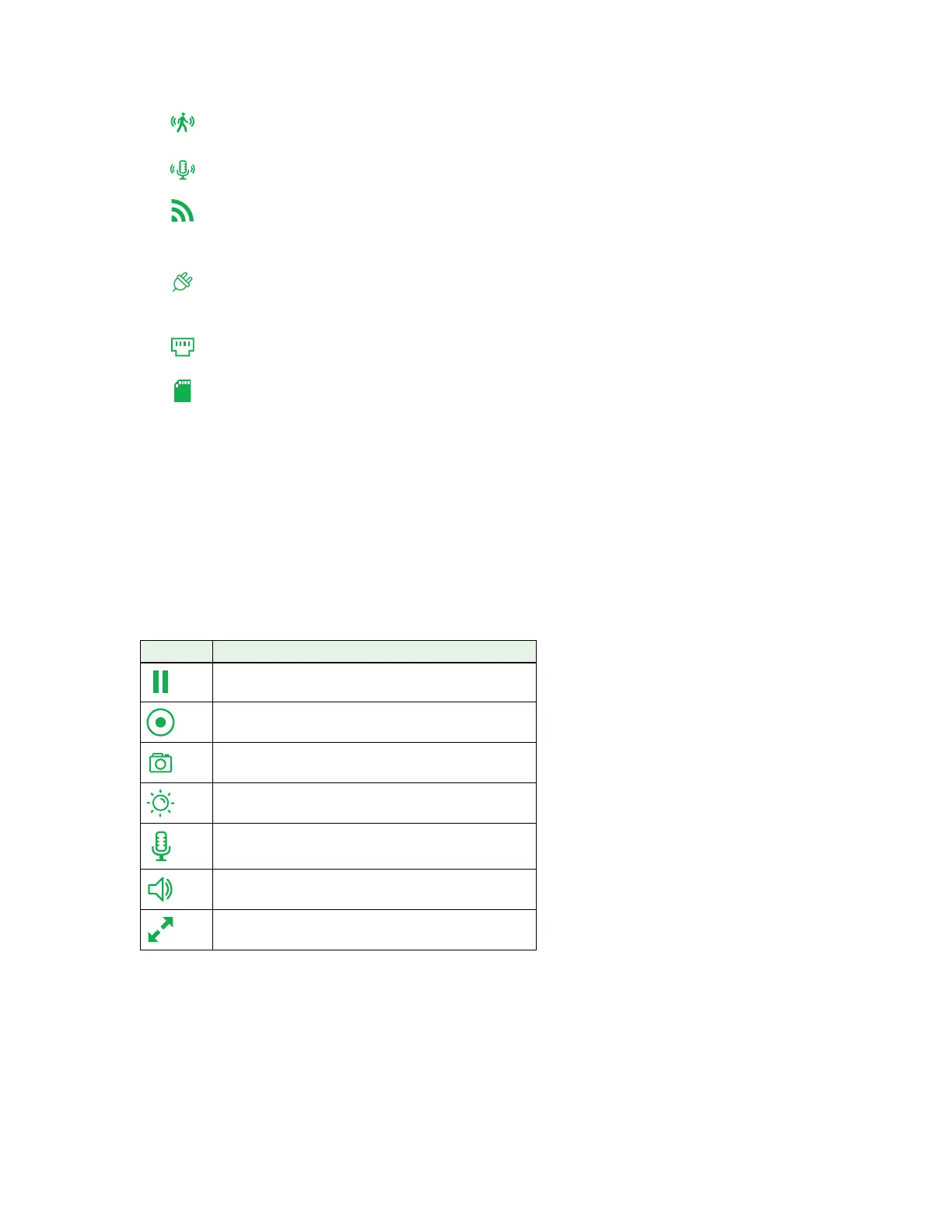
Motion. Motion detection is on for this camera.
Sound. Audio detection is on for this camera.
WiFi Signal. The camera is connected with WiFi. This indicates the WiFi
signal strength.
Arlo Q Plus Power. This camera is receiving power from an electrical outlet
and is not running o battery power.
Arlo Q Plus Ethernet. This camera connection uses Ethernet.
Arlo Q Plus SD card. An SD card is installed in this Arlo Q Plus camera.
2. To view and listen to a live feed, click or tap Live on the camera feed image.
A row of live feed icons displays below the live stream image for the camera.
3. To stop viewing and listening to the live feed, click or tap the Pause icon.
Live Feed Icons
The following table describes the icons on the menu that displays when you click
or tap Live on the image from the camera.
Icon Description
Pause.
Record video manually.
Snapshot.
Brightness.
Microphone. Start using Talk and Listen
Speaker. Mute the audio.
Full screen.

 To Next Page
 Loading...